
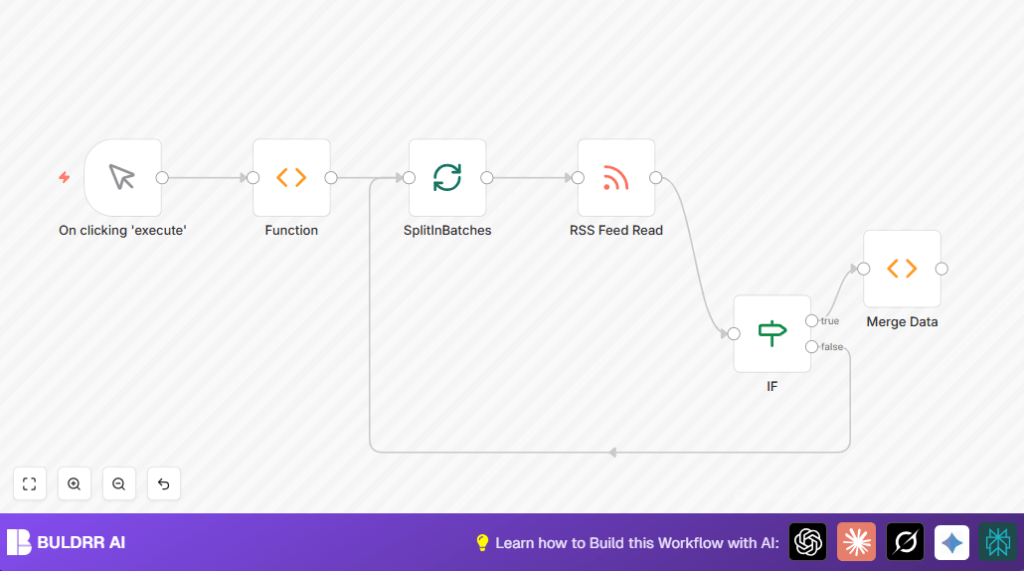

What This Automation Does
This workflow reads many RSS feeds one after another. It takes the list of feed URLs as input. Then it fetches the articles from each feed in small batches to avoid overload. Afterwards, it mixes all articles into one big list. The output is a single combined list of articles from all feeds. This helps save time and reduce mistakes from manual copying.
The workflow runs step by step, checking if all feeds are done and then stops. It works with public RSS feeds and does not need login or API keys. After running, the user gets all new articles together. This is useful for content newsletters or quick reviews.
This n8n workflow lets you aggregate 100+ RSS feeds into one structured output — no coding required.
Workflow Inputs, Process, and Output
Input
- List of RSS feed URLs: The user provides URLs of blog feeds to fetch.
Process Steps
- Split feeds: The list is split per feed to process one feed at a time.
- Fetch feed items: Each RSS feed is read and articles are extracted.
- Loop check: The workflow checks if any feeds remain unprocessed.
- Merge results: After all feeds are done, all articles are joined into one list.
Output
- Combined articles array: One list with all articles from every feed.
Who Should Use This Workflow
This workflow is for people who read many RSS feeds regularly. It helps anyone who wants to combine news or blog posts from various sites. Non-technical users can use this to save manual copying time. It fits roles like content curators, marketers, and newsletter creators.
No coding skills or API setup is needed. The workflow works with public RSS feeds and avoids complex steps. Users get a simpler way to keep all articles in one place.
Tools and Services Used
- n8n Automation Platform: To create and run the workflow.
- RSS Feed Read Node: To fetch articles from the RSS URLs.
- Function Node: To set feed URLs and merge the results.
- SplitInBatches Node: To process feeds one by one.
- IF Node: To check when all feeds are processed.
- Manual Trigger Node: To start workflow manually.
Beginner Step-by-Step: How to Use in n8n
Importing The Workflow
- Download the workflow file using the Download button on this page.
- Inside the n8n editor, click Import from File and select the downloaded file.
Configuring After Import
- Open the Function node that holds RSS URLs. Change or add your desired feed URLs using the same format:
return [
  { json: { url: 'https://medium.com/feed/n8n-io' } },
  { json: { url: 'https://dev.to/feed/n8n' } }
];
- Check if any additional credentials or API keys are needed (none required here since feeds are public).
- You can update other parameters like batch size in the SplitInBatches node if needed.
Testing and Activating
- Run the workflow by clicking the manual trigger button to test.
- Verify the output shows combined articles from all feeds.
- If all works well, activate the workflow for production use.
- Optionally, set a scheduled trigger to run automatically.
If self hosting n8n, refer to self-host n8n resources to manage deployments.
Common Problems and Fixes
Problem: RSS Feed Read node returns empty results
Cause: The feed URL might be wrong or offline.
Fix: Check URL in a browser or RSS reader to confirm it works. Use the expression syntax =<{{$json["url"]}}> exactly in the RSS Feed Read node.
Problem: The workflow loops forever or errors in merge function
Cause: The IF node condition or the merge function’s try-catch logic might be incorrect.
Fix: Make sure the IF node stops looping when no feeds remain. Check the Merge Data function node catches when no more items exist to process.
Customizations
- Add more feeds: Add URLs inside the Function node with feed links you want.
- Batch size: Increase or decrease the SplitInBatches batch size to process feeds faster or slower.
- Filter articles: Use IF nodes after RSS reads to filter posts by keyword or date.
Summary of Results
✓ The workflow reads many RSS feeds automatically.
✓ Feeds are processed one at a time with checks to complete the job.
✓ All articles combined into one simple list.
→ This saves time by removing manual copying.
→ It reduces mistakes and makes content curation easier.
