

What This Automation Does
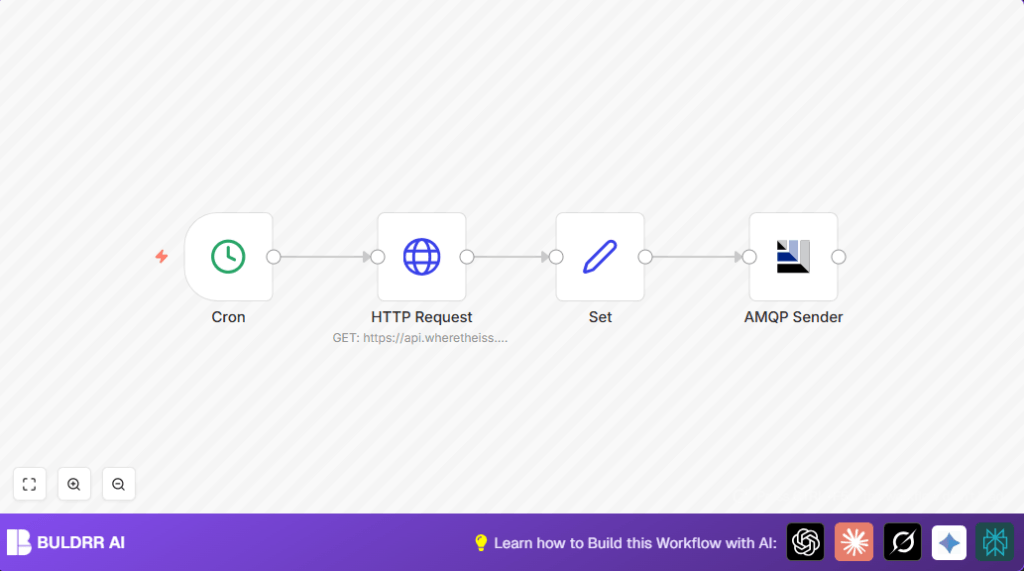
This workflow runs every minute and fetches the current ISS position from a public API.
It organizes the data and sends it to an ActiveMQ topic for other services to use.
The main problem solved is stopping manual checking and sending of ISS location updates, which can cause delays or errors.
The result is automatic updates posted regularly to the messaging system.
The workflow triggers on a one-minute schedule using a Cron node.
It calls the “Where The ISS At” API to get latitude, longitude, timestamp, and name.
A Set node then extracts just these important details.
Finally, an AMQP Sender node publishes the cleaned ISS data to an ActiveMQ topic.
This keeps subscribers informed without manual input.
The main benefit is time saved and fewer mistakes by automating repeated data fetching.
It also fits precise timing needs by working every minute.
Tools and Services Used
- n8n: For building the automation workflow.
- Where The ISS At API: Public API to fetch ISS current coordinates.
- ActiveMQ with AMQP: Message broker that receives ISS position updates.
- Internet connection: Required to access the ISS API and ActiveMQ.
Inputs, Processing, and Output
Inputs
- Trigger from Cron node every minute.
- Dynamic timestamp sent as query parameter to ISS API.
Processing
- HTTP Request node calls ISS API and gets a JSON array response.
- Set node extracts latitude, longitude, timestamp, and name from the first item.
- Data is cleaned to keep only relevant fields.
Output
- AMQP Sender node sends the data to the ActiveMQ topic named “iss-position”.
- Other services subscribed to this topic can receive and process updates.
Beginner Step-by-Step: How to Use This Workflow in Production
Import the Workflow
- Download the workflow file using the Download button on this page.
- Inside the n8n editor, use the “Import from File” option to upload the workflow.
Configure Credentials and Settings
- Add your ActiveMQ AMQP credentials in the AMQP Sender node.
- Check the ActiveMQ topic name is correct (“iss-position”).
- Verify the API URL and timestamp expression are correct in the HTTP Request node.
Test and Activate
- Run the workflow manually once to check it fetches and sends the ISS data.
- Fix any errors, especially with credentials or API response.
- When confirmed working, activate the workflow to run automatically every minute.
If you want to self-host the workflow, consider self-host n8n for stable operation.
Customizations and Enhancements
- Change the frequency in the Cron node to update less or more often.
- Add extra fields like altitude or velocity in the Set node using expressions like
= $node["HTTP Request"].json[0].altitude. - Insert a Function node to check if data is valid before sending.
- Use expressions in AMQP Sender node’s topic to send messages dynamically.
- Log sent messages into Google Sheets or databases for audit trails.
Troubleshooting
- AMQP connection refused: Wrong credentials or broker down. Check broker details and network.
- No messages in ActiveMQ: Check topic name spelling and subscription status.
- HTTP Request errors: API endpoint might be incorrect or timestamp expression wrong. Use
= Date.now();exactly.
Pre-Production Checklist
- Test the workflow triggers once per minute.
- Verify the API fetch returns latitude, longitude, and timestamp.
- Check the Set node outputs correct data.
- Confirm the AMQP Sender node publishes messages successfully.
- Activate and watch logs to catch early run issues.
Deployment Guide
- Activate the workflow inside n8n.
- Ensure internet and ActiveMQ broker are up.
- Monitor execution history regularly.
- Set optional alerts to catch workflow stoppages.
Summary
✓ Saves time by automating ISS position tracking.
✓ Sends data every minute to ActiveMQ for live usage.
✓ Eliminates manual fetching errors and delays.
✓ Easy to import and configure inside n8n.
→ Provides reliable, fresh ISS data for dashboards or alerts.
