

Automate Course Feedback Collection with n8n and Typeform

Save hours in managing course feedback by automating data collection from Typeform to Google Sheets with n8n. This workflow filters and organizes feedback based on usefulness scores, making it easy to analyze positive and negative responses.
typeformTrigger
if
googleSheets
+1
Workflow Identifier: 1373
NODES in Use: Typeform Trigger, IF, Google Sheets, Set
Automate course feedback with n8n and Typeform

Press CTRL+F5 if the workflow didn't load.

Learn how to Build this Workflow with AI:

What This Automation Does

This workflow runs automatically when a new form entry arrives from Typeform.
It picks up the feedback fields like usefulness rating and opinions from the form data.
Based on the usefulness score, it sorts feedback into positive or negative groups.
Positive feedback is saved to one Google Sheets tab, negative to another.
This helps save time and cuts errors from manual sorting and typing.


Inputs, Processing Steps, and Outputs

Inputs

  • Typeform form submission: Feedback data including usefulness score and opinion text.

Processing Steps

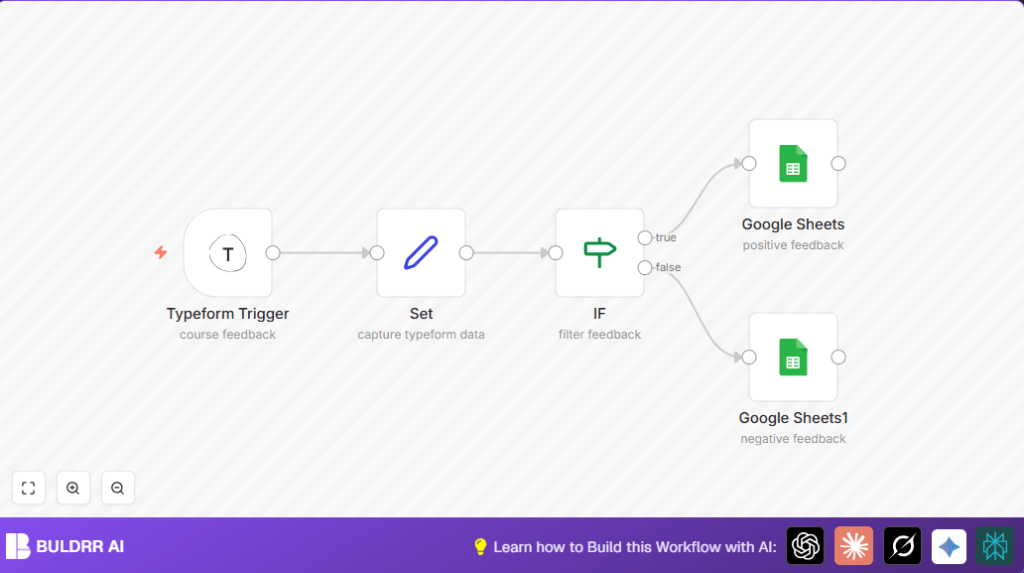
  • The Typeform Trigger node listens for new feedback.
  • The Set node extracts and labels key fields like usefulness and opinion.
  • The IF node checks if usefulness is 3 or higher to sort feedback.
  • Depending on the check, the workflow sends data to one of two Google Sheets nodes.

Outputs

  • New row appended to the positive feedback sheet for scores 3 and up.
  • New row appended to the negative feedback sheet for scores below 3.

Who Should Use This Workflow

Teachers or course creators who get feedback through Typeform forms.
Anyone tired of sorting feedback manually into spreadsheets.
Non-technical users who want to save hours on feedback management.


Tools & Services Used

  • Typeform API: Sends new form submission data via webhook.
  • Google Sheets API: Appends feedback rows into spreadsheet tabs.
  • n8n: Automates and links the trigger, data processing, and storage.

Beginner Step-by-Step: How to Use This Workflow in n8n Production

Import Workflow

  1. Click the Download button on this page to get the workflow file.
  2. Open your n8n editor.
  3. Use the Import from File option to add the workflow.

Setup Credentials and IDs

  1. Add your Typeform API credentials in the Typeform Trigger node.
  2. Update the Form ID to match your feedback form’s ID.
  3. Provide Google Sheets OAuth2 credentials in the Google Sheets nodes.
  4. Change the spreadsheet IDs and sheet names if your sheets differ.

Test and Activate

  1. Submit a test feedback entry in your Typeform.
  2. Check that feedback appears in the right Google Sheets tab.
  3. If all works, activate the workflow to run automatically.

This process gets the workflow working live fast without knowing internal node building.
If running on your own server, consider self-host n8n options for reliability.


Customization Ideas

  • Change the usefulness threshold in the IF node to reclassify feedback.
  • Add more fields in the Set node to capture extra form answers.
  • Attach email or Slack notifications after Google Sheets to get alerts on new negative feedback.
  • Adjust mappings for multi-language forms in the Set node.

Common Issues and Fixes

  • Typeform trigger not firing: Check if the Form ID in the Typeform Trigger node is exact.
  • Verify Typeform webhook settings allow sending data.
  • Google Sheets append fails: Reauthenticate the OAuth2 Google credentials.
  • When spreadsheet IDs or sheet tabs are wrong, update them correctly.

Before Using in Production

  • Confirm your Typeform webhook is active and using the right Form ID.
  • Run several test submissions to check logging works.
  • Verify positive and negative feedback logs correct data.
  • Backup existing Google Sheets content to avoid data loss.

Deployment Guide

After testing, simply enable the workflow by activating it in the editor.
Observe the workflow logs for errors during first days.
Keep an eye on Google API limits if feedback volume grows.


Summary

✓ Saves hours by sorting and logging feedback automatically
✓ Avoids mistakes from manual copying
✓ Separates positive and negative feedback clearly
✓ Easy to set up by importing in n8n and adding credentials
✓ Works well for small to medium feedback volumes
→ Results in faster course improvements based on clear student input


Automate course feedback with n8n and Typeform

Visit through Desktop to Interact with the Workflow.

Frequently Asked Questions

The Typeform trigger may not fire if the Form ID in the trigger node is incorrect or if the webhook is not properly set in the Typeform developer settings.
Errors happen if the Google OAuth2 credentials expired or the spreadsheet ID is wrong. Reauthenticate and check spreadsheet details to fix.
This workflow uses Typeform’s webhook and cannot directly receive Microsoft Forms data. A new workflow using Microsoft Forms API is needed.
Data transfers use OAuth2 and HTTPS for security. The n8n instance should be hosted securely, such as with reliable self-host n8n, to protect stored data.

Promoted by BULDRR AI

Related Workflows

Automate Twist Channel Creation and Messaging with n8n

This workflow automates creating and updating a channel in Twist and sending a personalized message to specific users. It eliminates manual setup errors and saves time managing Twist communications.
manualTrigger
twist
twist
Free

Automate Ideogram Image Generation with Google Sheets & Gmail

This workflow automates graphic design image generation via Ideogram AI, storing image data in Google Sheets and Google Drive, with email alerts via Gmail. It saves designers hours by automating image creation, remixing, review, and record-keeping.
googleSheets
httpRequest
chainLlm
+8
Free

Automate IT Support with Slack and OpenAI in n8n

Streamline IT support by automating Slack message handling using n8n and OpenAI. This workflow handles Slack DMs, filters bots, queries a Confluence knowledge base, and delivers AI-generated responses, improving support efficiency and response time.
RespondToWebhook
If
Slack
+5
Free

Automate Crypto Analysis with CoinMarketCap & n8n AI Agent

Discover how this unique n8n workflow leverages CoinMarketCap’s multi-agent AI to deliver precise, real-time cryptocurrency insights directly via Telegram. Manage crypto data analysis efficiently with automated multi-source API integration.
agent
lmChatOpenAi
toolWorkflow
+3
Free

Automate Gumroad to Beehiiv Subscriber Sync with n8n

Learn how to automatically add new Gumroad sales customers as Beehiiv newsletter subscribers using n8n automation. This workflow saves time by syncing sales data to Google Sheets CRM and notifying your Telegram channel instantly.
gumroadTrigger
googleSheets
httpRequest
+3
Free

Generate On-Brand Blog Articles Using n8n and OpenAI

This workflow automates the creation of on-brand blog articles by analyzing existing company content using n8n and OpenAI. It extracts article structures and brand voice to produce consistent draft articles, saving significant content creation time.
httpRequest
informationExtractor
wordpress
+9
Free
1:1 Free Strategy Session
Your competitors are already automating. Are you still paying for it manually?

Do you want to adopt AI Automation?

Every hour your team does repetitive work, you're burning real money.
While you wait, faster businesses are cutting costs and moving quicker.
AI and automations aren't the future anymore — they're the present.

Book a live 1-on-1 session where we show you exactly which of your daily tasks can be automated — and what it’s costing you not to.