
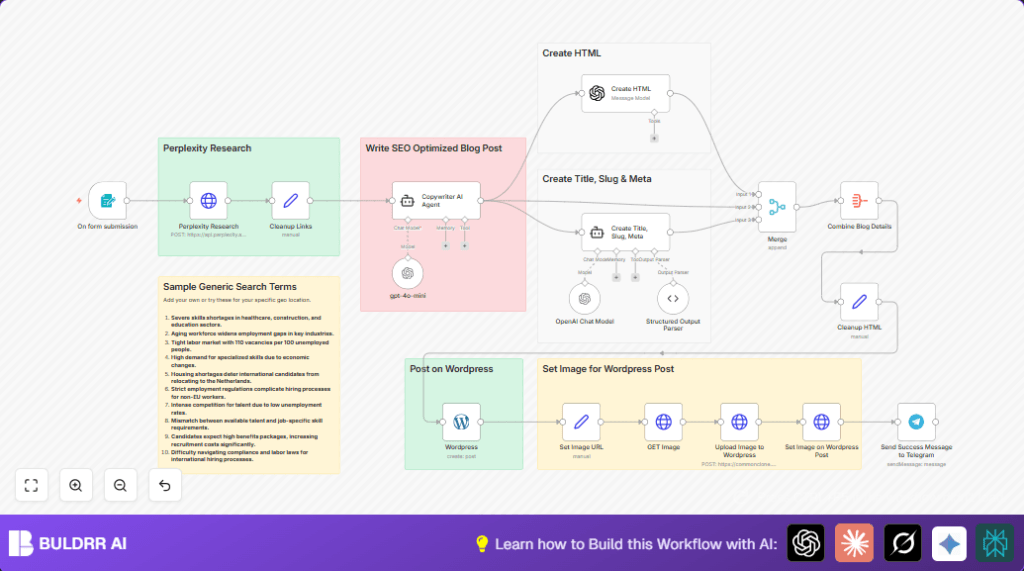

What This Workflow Does
This workflow creates a full blog post draft from a simple topic.
The main problem it solves is saving time on deep research and writing while keeping the post accurate and SEO-friendly.
It gets a research query, finds trustworthy info, writes a well-structured blog, then uploads it as a draft on WordPress with images.
This helps content creators publish more often without manual work.
Who Should Use This Workflow
People making blogs regularly that want to save time on research and writing.
This is for marketers, content creators, or small teams working with WordPress who need SEO-ready posts fast.
Tools and Services Used
- n8n: Automates the entire process inside workflows.
- Perplexity AI API: Fetches current research summaries with sources.
- OpenAI API (GPT-4o-mini): Writes the blog post and SEO metadata.
- WordPress API: Uploads drafts and images.
- Telegram Bot API: Sends notifications to the team.
How This Workflow Works (Input → Process → Output)
Inputs
User submits a research topic through a web form.
Processing Steps
- Get the research query from form input.
- Send query to Perplexity AI via HTTP POST request for trusted research results.
- Clean the research text, add human-readable source citations.
- Use OpenAI to write a long, SEO-optimized blog including the research.
- Create SEO metadata: blog title, slug, and meta description via OpenAI with structured output.
- Merge all content data into one payload.
- Post draft blog on WordPress via API.
- Upload an image and set it as the featured image for the blog post.
- Send Telegram notification about the new draft post.
Output
A SEO friendly blog post draft with metadata and image is created as a WordPress draft.
The user/team receives a Telegram alert.
Beginner Step-by-Step: How to Use This Workflow in n8n
Import the Workflow
- Download the workflow file using the Download button on this page.
- Open n8n editor and click on “Import from File.”
- Select the downloaded workflow file and import it.
Configure Credentials and IDs
- Open n8n Credentials tab.
- Add or update your WordPress API Key and URL.
- Add the OpenAI API Key.
- Add the Perplexity AI API Key.
- Set up Telegram Bot token and chat ID if you want notifications.
- If the workflow uses fixed image URLs or user IDs, update those with your own.
Test the Workflow
- Open the Webhook URL from the Webhook node (from form trigger).
- Submit a test blog topic using the form.
- Watch execution logs in n8n for errors.
Activate for Production Use
- If all tests pass, activate the workflow.
- Share webhook URL with your team for submitting blog queries.
- Monitor runs for any failing steps.
- Remember to keep API Keys up to date.
Try self-host n8n if planning to run this workflow steadily with control.
Customization Ideas
- Change the research source by editing the Perplexity HTTP Request payload.
- Add more images by fetching and uploading multiples, then attach them in WordPress.
- Make posts publish immediately by changing WordPress status to “publish.”
- Adjust SEO rules in the OpenAI agent prompt to fit other domains.
- Add Slack or email notifications along with Telegram using extra nodes.
Troubleshooting Common Issues
- 401 Unauthorized from WordPress API
Check API key correctness and reauthenticate in n8n. - Empty research responses from Perplexity AI
Verify JSON body matches API specs and API key is set. - Telegram notifications not arriving
Confirm that Telegram bot token and chat ID are correct. - Image upload fails or image not attached to post
Make sure HTTP headers for image upload include proper content disposition.
Pre-Production Checklist
- Test submitting sample queries to trigger the workflow.
- Confirm research data is received from Perplexity correctly.
- Check the OpenAI node outputs a full blog draft.
- Make sure WordPress draft post is created with metadata.
- Send a Telegram message test to validate notification.
- Backup WordPress before bulk content publishing.
Deployment Guide
After workflow import and configuration, activate it in n8n.
Share the webhook URL with team members who give blog topics.
Watch workflow executions on the n8n dashboard and fix errors fast.
Keep API keys fresh and update prompts to keep content useful.
Consider self-host n8n if needing more control or scaling.
Summary
✓ Save many hours by automating research, writing, and publishing.
✓ Get SEO friendly, credible blog drafts ready as WordPress drafts.
✓ Receive quick notifications so the team knows when posts are ready.
✓ Easy to use even for beginners by importing and configuring credentials.
