

1. What This Workflow Does
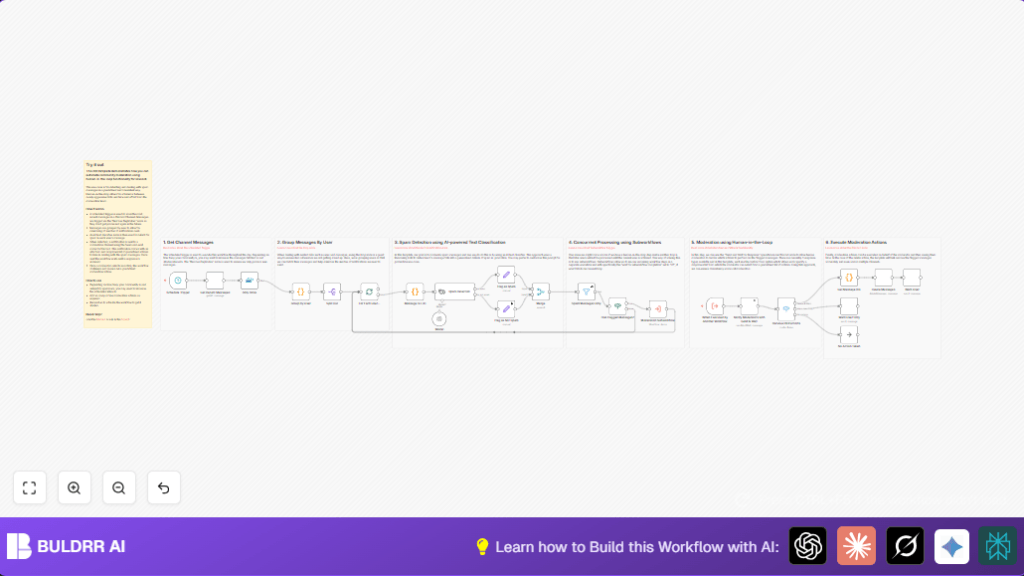
This workflow finds spam messages from a specific Discord channel and sends them to moderators for review.
It uses AI to check messages and lets moderators decide to delete, warn, or ignore.
This saves lots of time by catching spam fast and keeping the community clean.
2. Tools and Services Used
- n8n: Automates the workflow execution.
- Discord Bot API: Fetches messages, sends notifications, deletes messages, and sends user warnings.
- OpenAI API with Langchain Text Classifier: Uses AI to classify messages as spam or not.
For servers needing more uptime or control, use self-host n8n.
3. Workflow Inputs, Processing, and Outputs
Inputs
- Recent messages from a selected Discord channel fetched by the Discord Bot.
Processing Steps
- Remove any duplicate messages to avoid repeating work.
- Group messages by each user to reduce notifications spam.
- Run AI classification to decide if messages are spam or not.
- Flag messages marked as spam for moderator review.
- Send a notification to moderators with a form to choose actions.
- Based on moderator choice, either delete messages, warn users, or do nothing.
Outputs
- Spam messages deleted or users warned.
- Moderators get details and control over each flagged case.
4. Who Should Use This Workflow
Anyone managing a busy Discord server who wants to stop spam fast.
It helps community managers save hours daily and reduce errors in moderation.
Users who want simple AI help plus human control over decisions will find this useful.
5. Beginner Step-by-Step: Use Workflow in n8n Production
Step 1: Download and Import Workflow
- Click the Download button on this page to get the workflow file.
- Open n8n editor and choose Import from File.
- Select the downloaded file to add the workflow.
Step 2: Add Credentials and Update Settings
- Add Discord Bot API credentials in the Discord nodes.
- Insert OpenAI API key in the Langchain Text Classifier and LMChat nodes.
- Update
guildIdandchannelIdwith your Discord server and channel IDs.
Step 3: Review and Customize Code
- Check Code node script for grouping messages by user; no change needed unless custom logic is wanted.
- Review the moderator form messages and options in the Discord send and wait node.
Step 4: Test Run
- Trigger the workflow manually or wait for the schedule to run.
- Watch for errors and confirm messages are fetched and flagged as expected.
Step 5: Activate Workflow
- Turn on the workflow in n8n so it runs at scheduled times automatically.
- Monitor logs and results to adjust trigger intervals or AI settings if needed.
This is a quick way to get the workflow running without building from zero.
6. Important Code Snippet: Group Messages By User
This code organizes messages by who sent them. It helps process each user’s messages together and reduce repeated moderator notifications.
const groupByUser = {};

for (const item of $input.all()) {
  if (!groupByUser[item.json.author.id]) {
    groupByUser[item.json.author.id] = [];
  }
  groupByUser[item.json.author.id].push(item.json);
}

return { json : { groupByUser } };
Just paste this code in the Code node named “Group Messages By User”.
7. Customization Ideas
- Add more spam types like “phishing” or “bad words” in the AI classifier.
- Change schedule trigger speed to check messages more or less often.
- In moderator form, include extra actions like “mute user” or “temporary ban”.
- Edit warning messages sent to users for a friendlier tone.
- Increase duplicate detection settings if message volume is very high.
8. Troubleshooting Common Issues
- No messages found: Check Discord
guildIdandchannelId. Confirm bot can read messages. - AI errors: Verify OpenAI API key and Langchain Text Classifier settings match instructions.
- Moderator prompt missing: Ensure bot has proper permissions and “Send and Wait” is set up correctly.
9. Summary of Benefits and Outcome
✓ Save hours by automating spam detection and moderation.
✓ Catch spam messages faster with AI help.
✓ Keep community clean while letting moderators control actions.
✓ Use simple steps to set up and run this workflow in n8n.
