
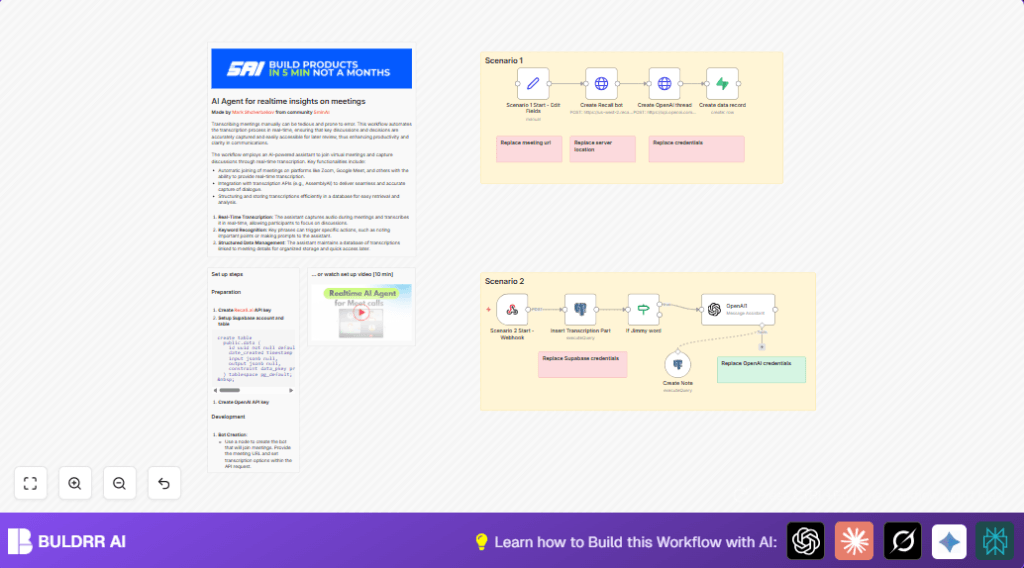

What This Workflow Does
This workflow joins your online meeting and listens live to what people say. It writes down the words automatically and saves them in a database. It also uses AI to make notes and highlights from the talk. This saves time spent typing meeting notes and stops missing important points.
The workflow works with tools like Recall.ai for transcription, OpenAI for note-making, and PostgreSQL to keep everything stored.
Who Should Use This Workflow
This is for anyone who does many team meetings or workshops online and needs help capturing what was said quickly.
It is useful if typing meeting notes takes too long or errors keep happening in your records.
Tools and Services Used
- Recall.ai API: Joins meetings and transcribes speech live.
- AssemblyAI API: Powers the voice-to-text transcription inside Recall.ai.
- OpenAI API: Creates summaries and notes from transcribed text.
- PostgreSQL Database (Supabase): Stores meeting data, transcripts, and AI notes.
- n8n Automation Platform: Manages the workflow steps, API calls, and data flow.
Inputs → Processing Steps → Outputs
Inputs
- A meeting URL from Google Meet, Zoom, or other supported platforms.
- API keys for Recall.ai, OpenAI, and PostgreSQL for making requests and storing data.
Processing Steps
- Use a Set node to add the meeting URL.
- Create a Recall.ai bot with an HTTP Request node so it joins the call and sends transcription chunks to an Webhook node.
- Start an OpenAI conversation thread to hold dialogue context with another HTTP Request node.
- Save meeting info with the OpenAI thread ID and bot ID in Supabase using a Supabase node.
- The Webhook node listens to the live transcript data sent from Recall.ai.
- Each new transcript piece is added in the PostgreSQL database by a Postgres node, keeping speaker and timestamp info.
- An If node checks if the word “Jimmy” appears in the latest transcript.
- If “Jimmy” is found, the OpenAI Langchain node generates a note using recent dialogue.
- Save AI-generated notes back into the database with a Postgres Tool node.
Outputs
- Real-time meeting transcript saved securely in a database.
- AI-generated notes and summaries linked to meeting data.
- Organized records with speaker, timestamp, and language details.
Beginner Step-by-Step: How to Use This Workflow in n8n
1. Import the Workflow
- Download the workflow file using the Download button on this page.
- Open n8n in the editor view.
- Click “Import from file” and select the workflow file you downloaded.
2. Add Required Credentials
- Enter your Recall.ai API Key in the credentials section.
- Fill in your OpenAI API Key for the node that calls the AI.
- Connect your PostgreSQL database or Supabase credentials.
3. Check and Update IDs and URLs
- In the Set node, verify or change the meeting URL you want the bot to join.
- Confirm the webhook URL in the Recall.ai bot creation HTTP Request node matches your n8n webhook address.
- Update any table names or fields if your database schema is different.
4. Test and Activate
- Run the workflow once manually with a meeting URL to see if transcription starts and data saves.
- Watch the execution logs for errors or missing data.
- When satisfied, activate the workflow to run automatically for live meetings.
If using self-host n8n, ensure your server can accept external webhook calls. Refer to self-host n8n for assistance.
Common Issues and Edge Cases
- Webhook misses transcription data: The webhook URL may be incorrect or not open to the internet.
- OpenAI thread fails: API key might be invalid or required headers missing.
- Database update errors: SQL syntax or JSON paths may not match the table structure.
- Meeting URL wrong: Bot will not join if the URL is invalid or the meeting is closed.
Ideas to Customize This Workflow
- Change the Set node meeting URL to support other platforms like Zoom or Microsoft Teams.
- Modify the timeout and silence settings in Recall.ai to suit meeting styles.
- Add keywords besides “Jimmy” in the If node to trigger AI notes on different topics.
- Adjust the AI prompt in the OpenAI Langchain node to change note tone or detail.
- Switch the database from PostgreSQL to another supported by n8n like MySQL or MongoDB.
Summary of Benefits and Outcome
✓ Save hours spent on typing meeting notes.
✓ Reduce errors because everything is captured live.
✓ Access clear meeting transcripts and AI-generated notes anytime.
✓ Organize meeting data by speaker and time for easy review.
