
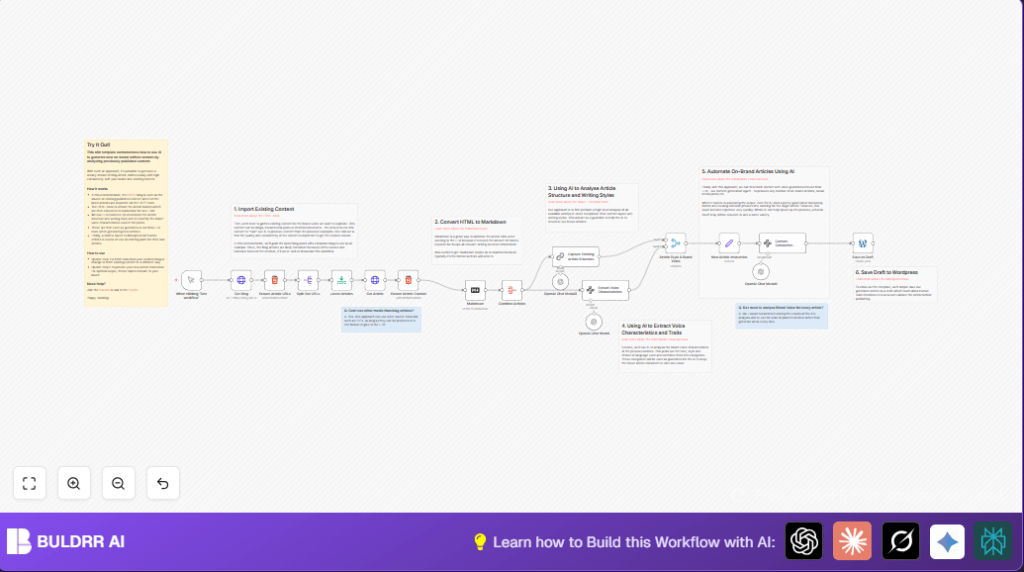

What This Workflow Does
This workflow gets the latest blog articles from a company blog website and reads their content.
It finds the writing style, layout, and tone used in those articles by using AI.
Then it uses that style information to write new blog article drafts that match the brand voice.
The new drafts are saved automatically in WordPress as unpublished posts.
Who Should Use This Workflow
Anyone who manages blog content and needs help keeping articles consistent in style and voice.
This is good for teams with little time who want to save hours on writing and editing blog posts.
Tools and Services Used
- n8n: To build and run the workflow automation.
- OpenAI API: For AI analysis and content generation.
- WordPress API: To save generated articles as drafts in the blog.
- HTTP Requests and HTML Extraction: To scrape blog pages and parse article content.
Workflow Inputs, Processing, and Outputs
Inputs
- URL of the company blog homepage to fetch latest articles.
- OpenAI API Key for communicating with AI models.
- WordPress credentials for saving draft posts.
Processing Steps
- Fetch the blog homepage HTML.
- Extract newest article URLs from the page.
- Get the full content HTML for each article.
- Extract main article body using CSS selectors.
- Convert article HTML to Markdown for AI processing efficiency.
- Combine all articles into one set for analysis.
- Use OpenAI to find common article structure and writing style.
- Use OpenAI again to identify brand voice characteristics.
- Merge style and voice results to create writing instructions.
- Send instructions plus topic prompt to AI to generate new draft content.
- Save resulting article as draft in WordPress site.
Outputs
- Draft blog post in WordPress matching brand style.
- Saved markdown content processed by AI.
- Structured style and voice guidelines for content generation.
Beginner Step-by-Step: How to Use This Workflow in n8n
Step 1: Import Workflow
- Download the workflow file by clicking the Download button on this page.
- Open the n8n editor where you want to use the workflow.
- Choose “Import from File” and select the downloaded workflow file.
Step 2: Add Credentials
- In the n8n editor, open _Credentials Manager_.
- Add your OpenAI API Key for all nodes using OpenAI models.
- Add your WordPress API credentials so the workflow can save drafts.
Step 3: Update Parameters
- In the HTTP Request node named “Get Blog”, update the URL to your company blog homepage.
- Change the Limit node “Latest Articles” if you want to adjust the number of articles analyzed.
- Edit the Set node “New Article Instruction” to change the topic or instructions for new content.
Step 4: Test the Workflow
- Click the manual trigger node Manual Trigger and then “Execute Node” to run the workflow once.
- Check the execution for errors and verify draft posts appear in WordPress.
Step 5: Activate for Production Use
- After successful testing, activate the workflow by enabling it in the n8n editor.
- Run on demand or schedule the workflow if your plan and setup allow.
- If preferred, consider self-host n8n for more control and security.
Customization Ideas
- Change the blog URL in the HTTP Request node to scrape different websites.
- Adjust the number of articles to analyze by editing the Limit node.
- Modify the instructions in the Set node “New Article Instruction” to write different article topics.
- Add a WordPress node after draft creation to publish posts automatically after review.
- Save brand voice data to a database for reuse without repeating AI analysis every time.
Failure and Edge Case Handling
If no article URLs show up, check the CSS selector in the HTML node “Extract Article URLs” for website changes.
If WordPress drafts fail to save, double-check wordPress API credentials and user permissions.
OpenAI errors may show if API limits are reached; verify API key quota and network connection.
Pre-Production Checklist
- Test the manual trigger fires correctly.
- Confirm that HTTP nodes fetch blog data properly.
- Verify HTML extraction CSS selectors work with current blog design.
- Ensure OpenAI nodes return good style and voice data.
- Try saving a draft to WordPress to confirm permissions and keys.
- Backup WordPress database before using in production.
Deployment Guide
After testing, enable the workflow in n8n for live use.
Run it manually when new blog drafts are needed or schedule if supported by your n8n plan.
Monitor workflow logs for errors and keep CSS selectors and API credentials updated regularly.
Summary of Results
✓ Saves time by automating blog draft writing.
✓ Keeps content consistent with brand style and voice.
✓ Reduces editing and rewriting effort for content teams.
→ Creates ready-to-edit draft articles in WordPress automatically.
→ Enables smooth content pipeline from style analysis to AI-generated drafts.
