
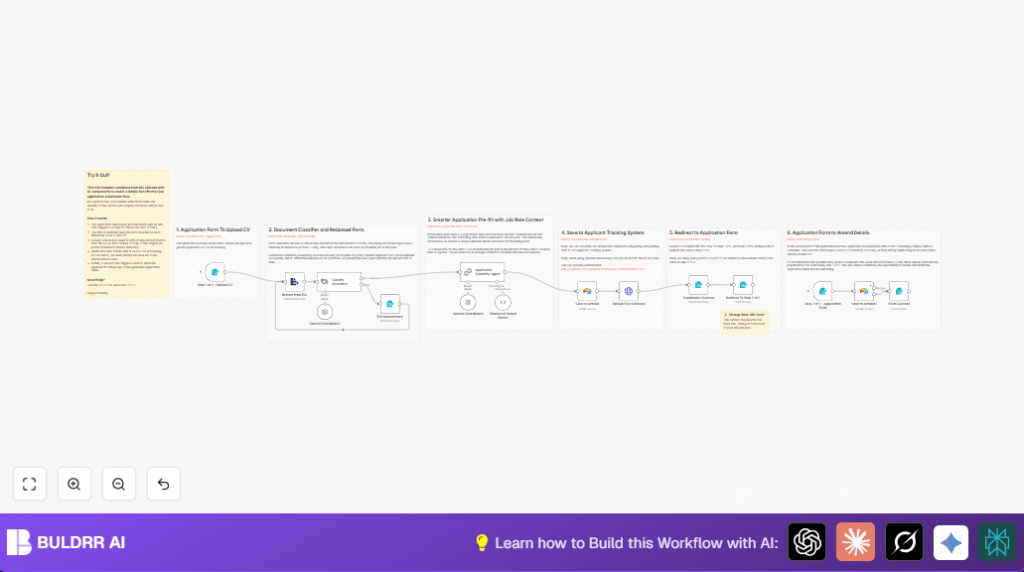

What this workflow does
This workflow helps automate job application processing inside n8n. It checks if an uploaded PDF is a real CV, extracts key info like name and skills, drafts a cover letter, and saves everything into Airtable. Then it lets applicants review and fix their details. This saves hours of manual work and cuts mistakes.
It works by using AI to classify and read PDFs, extracting tailored data for the job, then managing applicant data in Airtable with candidate-friendly forms. Invalid files get flagged early, prompting re-upload. The workflow speeds up recruiting and improves data accuracy.
Who should use this workflow
This automation fits HR teams at small to mid-size companies who get many PDF resumes weekly. It helps HR managers reduce manual sorting, save time, and avoid errors in data entry. Recruiters wanting to add AI-powered data extraction and improve applicant experience also benefit. Basic n8n and API key knowledge is enough to run it.
The workflow handles common PDF resumes that are not password-protected. It works best when paired with Airtable as an applicant tracking system but can be adjusted to others.
Tools and services used
- n8n Automation Platform: Runs the workflow and connects nodes.
- OpenAI API: Classifies documents and extracts candidate details using AI chat models.
- Airtable: Stores extracted candidate info and uploads CV files.
- Online Forms inside n8n: Collects CV upload and follow-up candidate confirmations.
Workflow inputs, processing steps, and outputs
Inputs
- PDF resume files uploaded by candidates through the first form.
- Applicant basic data from the first form (name, acknowledgement checkbox).
- Prefilled query parameters in the second form URL for data confirmation.
Processing steps
- Extract text from the uploaded PDF using an Extract from File node.
- Use AI classification via a Text Classifier node to check if file is a CV or not.
- If invalid, prompt user to re-upload file with a retry form node.
- If valid, run the AI-powered Application Suitability Agent chain that extracts candidate details and drafts a cover letter based on the job post description.
- Parse AI output into structured JSON to map to Airtable fields.
- Create a new record in Airtable with candidate data.
- Upload the original PDF file to the Airtable record via an HTTP Request node using Airtable API.
- Show a success form with an acknowledgement and redirect to a second form prefilled with extracted data.
- The candidate reviews and updates details in the second form.
- Update the Airtable record with final confirmed data.
Outputs
- Candidate data stored in Airtable with original CV attached.
- Automated coverage letter draft saved for HR reference and applicant use.
- Smooth candidate experience with validation and correction steps.
- Reduction in manual workload and fewer data entry errors.
Beginner step-by-step: How to use this workflow in n8n
1. Import the workflow
- Download the full workflow file using the Download button on this page.
- Open the n8n editor environment where you want to run the workflow.
- Use n8n’s “Import from File” option and select the downloaded workflow JSON.
2. Configure credentials and settings
- Add your OpenAI API Key credentials in n8n under Credentials.
- Add your Airtable Personal Access Token and base/table IDs to the relevant Airtable nodes.
- Update any email addresses, Slack channels, or URLs in form redirect nodes if needed.
3. Test and activate
- Run a manual test by submitting the first form with a sample PDF CV to verify extraction and storage.
- Check Airtable to confirm record creation with attached PDF and data mapping.
- If successful, activate the workflow inside n8n for live candidate processing.
Note
If self hosting n8n on your server, see self-host n8n for setup tips.
Edge cases and error handling
- If the uploaded PDF is password protected or corrupted, the Extract from File node will fail. Ask users to upload only unlocked PDFs.
- If the AI classifier marks the document as “other,” the workflow prompts the applicant to retry upload.
- Missing or incorrect binary property names in file extraction cause failures.
- Airtable file uploads require use of the HTTP Request node with Airtable API. Plain create record operations won’t attach files properly.
- Redirect URLs must be updated with the correct n8n hostname to avoid redirection errors.
Customization ideas
- Change the detailed job post text inside the Application Suitability Agent prompt to tailor which candidate details get extracted.
- Add more categories in the Text Classifier node for finer document type handling (cover letters, portfolios).
- Swap the Airtable node and HTTP requests with APIs for other ATS platforms like Greenhouse or Lever.
- Adjust the AI prompt for the cover letter to modify tone, style or length to match company branding.
- Add notification nodes (Slack, email) after successful submission to alert hiring teams.
Summary of key results
✓ Automates CV validation, data extraction, and storage from uploaded PDFs.
✓ Allows candidates to verify and fix data via prefilled second form.
✓ Cuts manual HR work from hours to minutes per application.
✓ Improves data accuracy and hiring speed.
→ Provides a more professional and smooth applicant experience.
→ Enables HR teams to focus on decisions, not admin.
