

What This Automation Does
This n8n workflow turns voice messages into smart, memory-aware AI chat replies.
It fixes the problem where AI forgets chat history.
The result is faster, natural voice conversations that remember past talks.
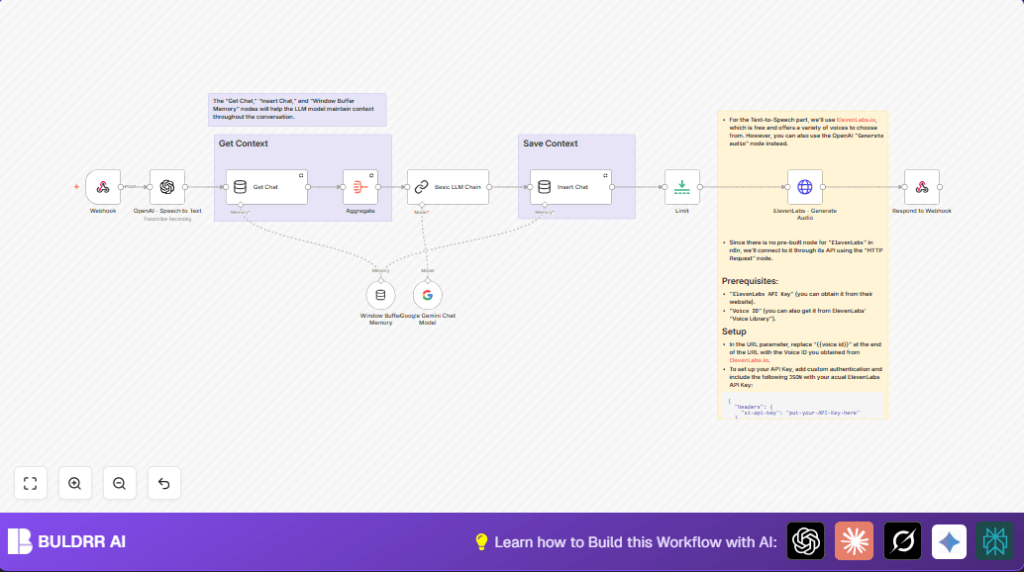
Here’s how it works: it listens to voice, writes down words, remembers chats, thinks with Google Gemini AI, then talks back using ElevenLabs voice.
Tools and Services Used
- Webhook: Gets voice messages.
- OpenAI Speech to Text model: Changes voice to text.
- Get Chat Memory Manager node: Fetches previous chats.
- Aggregate node: Collects chat history into one message.
- Google Gemini Chat Model: Gives AI replies with full chat context.
- Insert Chat Memory Manager node: Saves new chat messages.
- ElevenLabs HTTP Request node: Changes text replies back to speech.
- Respond to Webhook node: Sends voice replies out.
Inputs, Processing Steps, and Outputs
Inputs
- Voice audio files sent to the Webhook node.
Processing Steps
- Transcribe incoming voice to text using OpenAI Speech to Text node.
- Fetch previous conversation using Get Chat Memory Manager node.
- Aggregate past chat messages into a single context string with Aggregate node.
- Send current text and context to Google Gemini Chat Model node for AI reply.
- Store both user text and AI reply back into chat memory via Insert Chat Memory Manager node.
- Convert AI reply text into natural voice audio using ElevenLabs HTTP Request node.
- Return audio reply to client through Respond to Webhook node.
Outputs
- AI-generated voice audio reply sent back through the webhook.
Who Should Use This Workflow
This workflow suits people who want AI voice chat that remembers earlier talks.
It helps those tired of repeating voice messages or typing replies manually.
Users wanting a simple way to add voice AI with memory to apps will find this workflow useful.
Having API keys for OpenAI, Google Gemini, and ElevenLabs is needed.
Basic knowledge of n8n editor is helpful but not required.
Beginner Step-by-Step: How to Use This Workflow in n8n Production
Import Workflow
- Download the workflow JSON file using the Download button on this page.
- In the n8n editor, click “Import from File” and upload the downloaded file.
Configure Credentials and IDs
- Add your OpenAI API Key in the OpenAI Speech to Text node credentials.
- Set up Google Gemini API credentials in the Google Gemini Chat Model node.
- Insert ElevenLabs API Key and Voice ID in the ElevenLabs HTTP Request node headers and URL.
- Check webhook URL path and update if needed to fit your application’s endpoint.
- Update any session keys or environment variables if used in memory nodes.
Test the Workflow
- Use the webhook URL to send a sample voice message.
- Check that the AI returns a voice reply matching the message and remembers past chats.
Activate for Production
- Toggle the workflow status to “active” in n8n once testing looks good.
- Connect the webhook URL to your app or client to start receiving voice messages live.
- Monitor executions for errors or warnings in the n8n UI.
For extra control, consider self-host n8n on a server.
Customization Ideas
- Switch AI from Google Gemini to OpenAI Chat Completion node for a different chat style.
- Change session keys in Memory Manager nodes for handling multiple users separately.
- Replace ElevenLabs HTTP Request with OpenAI’s Generate Audio node for speech synthesis inside OpenAI ecosystem.
- Modify the webhook path in the Webhook node to fit different app endpoints.
Common Problems and Fixes
- No transcription from OpenAI?
Make sure the audio file name matches exactly “voice_message” from webhook to OpenAI node. - ElevenLabs API errors?
Check Voice ID and API Key in HTTP Request headers and URL carefully for typos. - AI answer not matching chat?
Verify correct session keys and proper aggregation of past chats before sending to AI.
Pre-Production Checklist
- Test webhook is accepting POST requests and reachable.
- Confirm OpenAI speech-to-text outputs correct transcription.
- Ensure memory manager nodes read and write conversation history properly.
- Validate Google Gemini AI responses are relevant and keep context.
- Test ElevenLabs HTTP request to produce usable audio replies.
- Run end-to-end voice chat test to verify smooth, correct audio feedback.
Deployment and Scaling
Once active, use the webhook URL inside your voice chat app.
Watch n8n executions for issues.
Protect API keys to avoid interruptions.
Adjust memory session keys to handle many users at once.
Try self-host n8n for better control if needed.
Summary
✓ Transcribes voice to text fast and reliable.
✓ Keeps memory for natural conversations.
✓ Generates smart replies with Google Gemini AI.
✓ Converts text replies back to voice using ElevenLabs.
→ Saves time by automating chat and audio workflows.
→ Gives real-time, human-like AI voice chat experience.
