

1. What this workflow does
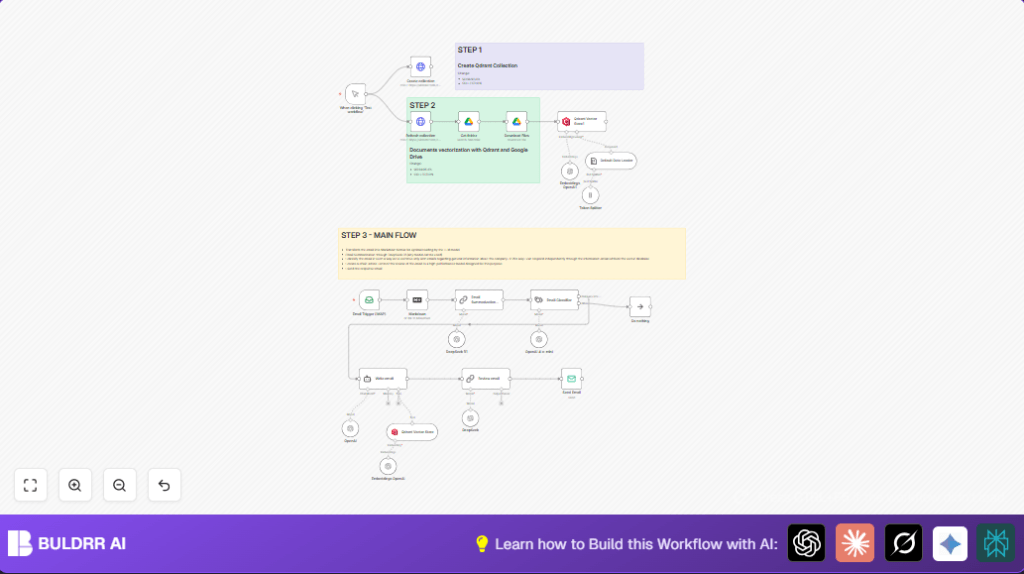
This workflow reads emails sent to a company info address automatically.
It cleans and summarizes the email text.
Then it checks if the message asks about company info.
If yes, it finds matching info from stored documents.
Finally, it writes and sends a short, clear email back without human help.
This saves time and gives faster answers to customers.
2. Who should use this workflow
This workflow is good for teams handling many customer emails.
People who want to speed up replies and reduce errors benefit.
It helps customer service or sales staff who deal with product and company questions.
It works well if company info is kept in Google Drive documents.
3. Tools and services used
- IMAP Email: Reads incoming emails.
- SMTP Email: Sends reply emails.
- OpenAI API: Creates summaries, classifies emails, and writes replies.
- Qdrant Vector Database: Stores company documents in a searchable way.
- Google Drive: Holds company documents for knowledge lookup.
- n8n automation platform: Runs all these actions in a workflow.
4. Beginner step-by-step: How to use this workflow in n8n
Step 1: Import the workflow
- Click the Download button on this page.
- Open the n8n editor.
- Use the Import from File option.
- Select the downloaded file.
Step 2: Add credentials
- In the workflow, find the Email Trigger (IMAP) node.
- Add the IMAP account credentials (email, password, server).
- Find the Send Email node.
- Add the SMTP credentials for sending emails.
- Add the OpenAI API key in nodes requiring AI services.
- Add Qdrant API access for vector searches.
Step 3: Update settings
- Change any email addresses if different.
- Check Google Drive folder IDs if documents differ.
- Adjust any other IDs or URLs as needed.
Step 4: Test and activate
- Send a test email to the monitored address.
- Watch workflow run in n8n’s executions panel.
- Check the reply email arrives promptly.
- Activate the workflow to run continuously for production.
If you want full control over data and credentials, consider self-host n8n.
5. Input → Processing → Output explained
Input
- New emails arriving at company info IMAP inbox.
Processing
- The email HTML converts to Markdown for clear text.
- AI summarizes the email, keeping it short.
- AI categorizes email type (e.g., company info request).
- If request is about company, vector search finds matching documents.
- AI writes a polite reply using summary and found info.
- Another AI step formats the reply in clean HTML.
Output
- Reply email sent through SMTP back to sender.
- All done automatically without manual work.
6. Edge cases and failures
- Emails not received: Check IMAP credentials and permissions.
- Zero results from Qdrant: Make sure collection exists and documents are uploaded.
- Reply emails sound generic: Update company documents and refresh vector data.
- Connection errors: Test all API keys and tokens.
7. Customization ideas
- Add more email classes in the classifier node to handle support or billing.
- Change AI model settings for faster or more detailed answers.
- Adjust reply length or formality in AI prompts.
- Include attachment processing with Google Drive upload nodes.
- Connect with CRM systems to log conversations.
8. Summary of benefits and outcomes
✓ Saves hours daily by automating email replies.
✓ Provides clear, concise answers to customers.
✓ Reduces human mistakes and delays.
✓ Keeps company info up to date in one place.
✓ Easy to import and run in n8n with minimal setup.
→ Frees staff from repetitive email work.
→ Improves customer satisfaction with quick responses.
→ Enables easy scaling for higher email volumes.
