

What this workflow does
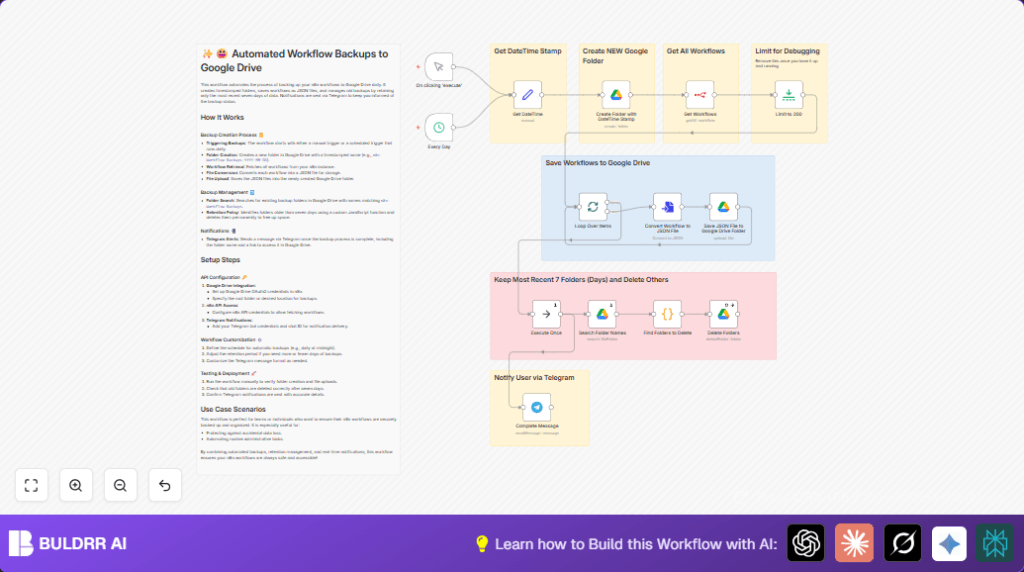
This workflow automatically backs up n8n workflows as JSON files in Google Drive with folders named by the current date and time.
It deletes backup folders older than seven days to save storage space.
Users get Telegram messages telling them when backups finish, with a link to the saved folder.
This removes manual backup work and stops accidental data loss.
Who should use this workflow
This is for anyone managing many n8n workflows who wants a simple way to save them every day.
It helps people who fear losing workflow data because of mistakes or errors.
Tools and services used
- n8n: For automation workflow creation and API access to get workflows.
- Google Drive: To create folders and save workflow JSON backup files.
- Telegram Bot API: To send notifications when backups complete.
Inputs, processing, and outputs
Inputs:
- Trigger events from the Manual Trigger or Schedule Trigger in n8n.
- Authentication credentials for Google Drive and Telegram.
- n8n API access to fetch up to 200 workflows.
Processing Steps:
- Create a new Google Drive folder with the current datetime as name.
- Request all n8n workflows from the API, limited to 200.
- Split workflows into batches to handle them one by one.
- Convert each workflow into a JSON file named after the workflow.
- Upload each JSON file to the created Google Drive folder.
- Search Google Drive for backup folders named with the n8n backup prefix.
- Use code to find folders older than seven days for deletion.
- Delete old folders permanently from Google Drive.
- Send a Telegram message with backup completion time and folder link.
Outputs:
- Google Drive folders containing workflow JSON backups named by datetime.
- Removed old backup folders to keep storage clean.
- Telegram notifications with backup status and folder link.
Beginner step-by-step: How to run this workflow in n8n
Import and configure the workflow
- Download the workflow file using the Download button on this page.
- Open n8n and click on “Import from File” in the editor.
- Select the downloaded file to load the workflow inside n8n.
Add required credentials
- Go to the Credentials section in n8n.
- Add Google Drive OAuth2 credentials for folder and file operations.
- Add n8n API credentials to allow workflow retrieval.
- Add Telegram Bot credentials and set Telegram chat ID in environment variables.
Update IDs and parameters
- If needed, update Google Drive folder paths or IDs to match your account.
- Make sure the Telegram chat ID is set correctly in environment variables.
Test and activate
- Run the workflow using the Manual Trigger node once to test properly.
- Check Google Drive for the newly created backup folder with JSON files inside.
- Check Telegram for the notification message.
- Turn on the workflow activation toggle to automate backups with the scheduled trigger.
For hosting or running this workflow on your own server, consider self-host n8n.
Customization and adjustments
- You can change how often backups run by editing the Schedule Trigger node timing.
- Adjust how many old backup folders to keep by changing the number in the Code node that selects folders to delete.
- Change folder names by editing the Google Drive Folder Creation node’s name field to add time or other text.
- Add more details to Telegram notifications like workflow count or backup size by changing the Telegram node’s message text.
- If manual backups only are preferred, disconnect or remove the Schedule Trigger node.
Possible problems and solutions
- Google Drive folder creation fails: OAuth2 credentials missing, expired, or wrong. Fix by updating credentials and re-authenticating.
- No workflows found in Get Workflows node: API credentials missing or incorrect. Fix by checking API keys and permissions.
- No Telegram message received: Bot token or chat ID missing or wrong. Fix by verifying Telegram credentials and environment variables.
Summary
✓ Save all n8n workflows daily as JSON files in easy-to-find Google Drive folders.
✓ Keep Google Drive clean by deleting backup folders older than 7 days automatically.
✓ Get Telegram alerts when backups finish, with instant folder links.
✓ Stop worrying about losing workflows due to mistakes or technical issues.
✓ Run backups automatically on a schedule or manually anytime you want.
