
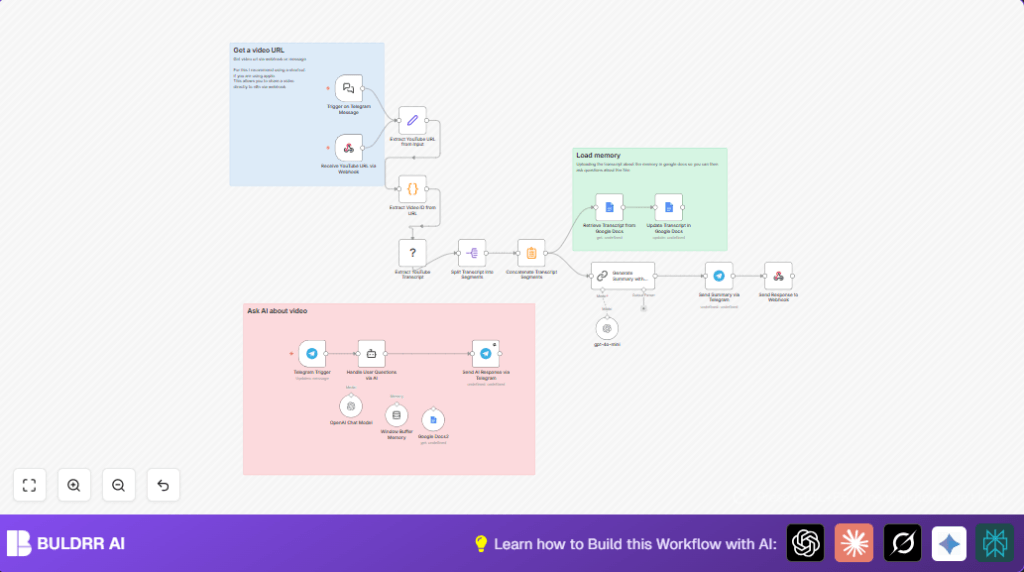

What This Automation Does
This workflow grabs a YouTube video URL sent through Telegram or a webhook.
It gets the video ID then fetches the full transcript automatically.
The transcript is split into small parts, then joined into one text.
After that, GPT-4o-mini creates a clear summary with key points.
The transcript is saved and updated in Google Docs for easy access.
Users can ask questions about the video in Telegram, and the AI answers using the saved transcript.
The final summary and answers are sent back to Telegram chat.
This saves time by stopping the need to watch videos many times or write notes by hand.
Who Should Use This Workflow
This workflow is good for people who handle many video links and need fast notes.
It suits teams that want to share knowledge quickly without extra effort.
Anyone who needs to understand video content better and wants questions answered fast in chat can use it.
Tools and Services Used
- Telegram Bot API: Receives user messages.
- YouTube Transcription Kasha node: Gets video transcripts automatically.
- OpenAI GPT-4o-mini: Creates summaries and answers questions based on transcript.
- Google Docs API: Stores and updates the transcript text for memory.
- n8n Platform: Automates the entire workflow.
Beginner Step-by-Step: How to Use This Workflow in n8n
Step 1: Import the Workflow
- Download the workflow using the Download button on this page.
- In the n8n editor, select “Import from File” and upload the downloaded workflow.
Step 2: Add Credentials and Configure
- Enter required API keys for OpenAI, Telegram, YouTube Transcription, and Google Docs.
- Update IDs and links such as Google Docs document ID and Telegram chat IDs if needed.
- Review any code or prompt sections; copy and paste the provided code or prompt if applicable.
Step 3: Test and Activate
- Send a test YouTube video link via the webhook or Telegram to check if the summary is returned.
- If everything works well, activate the workflow for production in n8n.
The workflow is now live and ready to automate.
For self hosting or more control, consider self-host n8n.
Workflow Inputs, Processing, and Outputs
Inputs
- YouTube video URL sent via Telegram message or webhook.
Processing Steps
- Extract video ID from the URL.
- Use YouTube Transcription Kasha node to get transcript text.
- Split full transcript into smaller text segments.
- Concatenate all segments into one joined transcript.
- Send transcript text to GPT-4o-mini for summarization.
- Save or update the transcript text in Google Docs.
- Listen to Telegram chat messages to accept user questions.
- Use GPT-4o-mini with reference to stored transcript to answer questions.
- Send summary or answers back through Telegram chat.
Outputs
- A summarized, clear text of the video content.
- Interactive Q&A responses to user questions on Telegram.
- Updated Google Docs storing the full transcript for future reference.
Edge Cases and Failures
Transcript Fails or Is Empty
This happens if video has no subtitles, or YouTube API hits limits.
To fix, verify video has captions enabled and check API credentials.
Telegram Messages Not Sent
This happens if Telegram bot token is wrong or bot is not in chat.
Check Telegram API key and add bot to the chat.
Summary Quality Is Poor
This happens if AI prompts are wrong or API quota is used up.
Improve prompts and check API usage.
Customization Ideas
- Switch OpenAI model to GPT-4 for richer summaries if allowed.
- Replace Google Docs nodes with Google Sheets for tabular transcript storage.
- Add Google Translate API before summarization to support other languages.
- Modify Telegram bot messages or add quick replies for better chat experience.
- Add caching to check if transcript already exists to avoid duplicate calls.
Summary of the Workflow
✓ Automatically turn YouTube video URLs into neat, readable summaries.
✓ Save full transcripts in Google Docs for lasting memory.
✓ Answer user questions in Telegram using AI based on the saved transcript.
✓ Reduce time spent manually watching and note-taking.
✓ Get clean, direct insights quickly in chat.
Step 3 Code Example (Extract Video ID)
The workflow uses this Python code to get the video ID from any YouTube URL.
import re

for item in _input.all():
    url = item.json.get('youtubeUrl','')
    video_id = re.search(r'(?:v=|\/)([0-9A-Za-z_-]{11})', url)
    item.json['videoId'] = video_id.group(1) if video_id else ''

return _input.all()
This code must be copied exactly into the Code node named “Extract Video ID from URL.”
Step 2 Expression for URL Extraction
In the Set node called “Extract YouTube URL from Input,” use this expression to get the URL:
{{$json.chatInput || $json.query.url}}This ensures URL is grabbed no matter how it comes in the JSON.
Prompt Example for GPT-4o-mini Summarization
The Langchain node uses a prompt asking GPT-4o-mini to write a clear summary with bullet points of key moments and instructions if any.
Summarize this YouTube transcript in simple words.
Give a short overview.
List key moments with bullet points.
Include any steps or instructions mentioned.
Make sure summary is easy to read.