
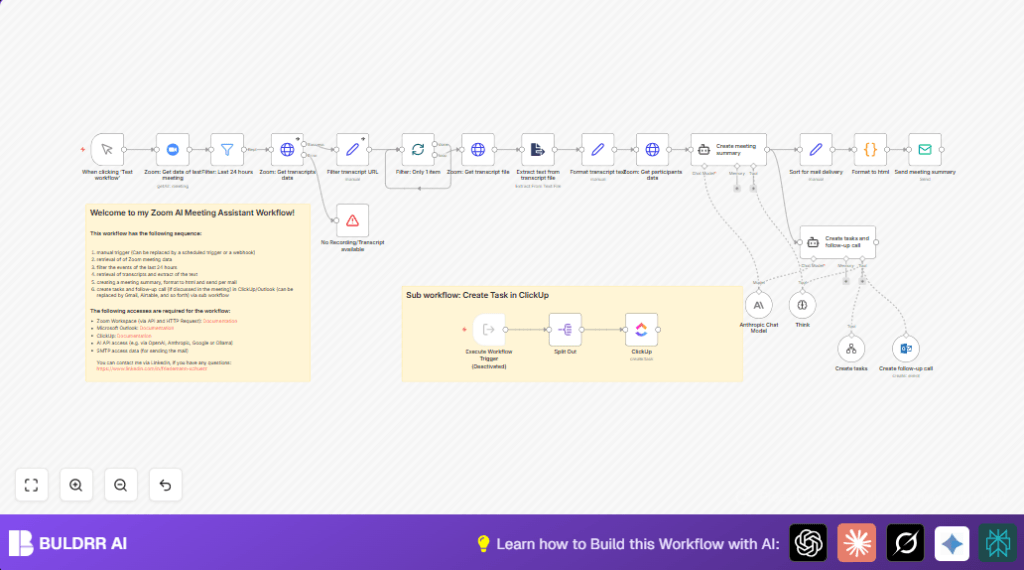

What this workflow does
This n8n workflow takes Zoom meetings from the last 24 hours and turns their recordings and transcripts into clear meeting summaries. It finds tasks from the talks and adds them to ClickUp. It can also schedule follow-up meetings in Microsoft Outlook if needed. Finally, it sends a summary email to meeting participants.
This stops you from spending hours copying notes, missing tasks, or forgetting follow-ups. It gives you neat summaries, tasks, and calendar events automatically.
Who should use this workflow
This workflow fits project managers, team leads, or anyone who runs many Zoom meetings and must track tasks and follow-ups well.
If spending hours after calls on writing notes, creating tasks, or scheduling meetings is common, this workflow saves time and stops human mistakes.
Tools and services used
- Zoom API: Gets meetings, recordings, transcripts, and participant info.
- Microsoft Outlook API: Creates calendar events for follow-up meetings.
- ClickUp API: Adds tasks found in meeting transcripts.
- SMTP Email: Sends meeting summary emails.
- Anthropic AI API (or similar): Reads transcripts and finds tasks and follow-ups.
- n8n: Automates the workflow steps.
Inputs, Processing steps, and Outputs
Inputs
- Scheduled Zoom meetings from the last 24 hours.
- Transcript URLs from Zoom recordings.
- Participant names and emails.
Processing steps
- Fetch meetings and filter for last 24 hours.
- Download transcript files and convert to plain text.
- Clean and format transcript text.
- Retrieve meeting participants details.
- Use AI to create meeting summary and extract action tasks.
- Send summary email via SMTP.
- Create tasks in ClickUp using the AI-extracted data.
- Schedule follow-up Outlook meetings if mentioned.
Outputs
- Clear and formatted meeting summary email sent to participants.
- Action items added as tasks in ClickUp.
- Follow-up meetings scheduled in Microsoft Outlook calendar.
Beginner step-by-step: How to build this in n8n
Step 1: Import the workflow
- Download the workflow file using the “Download” button on this page.
- Open the n8n editor already logged in.
- Click on “Import from File” and select the downloaded workflow.
Step 2: Set up credentials and IDs
- Add API Keys or OAuth2 credentials for Zoom, Microsoft Outlook, ClickUp, and SMTP email in n8n.
- Check if you need to update any meeting IDs, email addresses, folders, or task list IDs used in the nodes.
Step 3: Test the workflow
- Use the Manual Trigger node and click “Test workflow” to run steps.
- Verify that meeting data, summaries, emails, tasks, and meetings are created as expected.
Step 4: Activate for production
- Switch the trigger node to a Scheduled Trigger if you want it to run automatically, for example once daily.
- Turn on the workflow activation toggle at the top right to run on schedule.
- If hosting n8n yourself is preferred for security or compliance, consider self-host n8n.
Edge cases and failure points
If no transcript is found, the workflow stops and shows an error. This happens if Zoom cloud recording or transcription are off.
Wait some minutes after meetings end before running the workflow so data is available.
AI task creation may fail if required fields are missing in the AI output JSON. Always check AI prompts and test with fixed sample data.
Customizations to consider
- Change the manual trigger node to Scheduled Trigger for daily automatic runs.
- Modify the email recipient list to include multiple participants.
- Replace ClickUp with other task tools like Asana or Airtable if preferred.
- Switch AI from Anthropic to OpenAI or other models by updating the LangChain AI nodes.
- Edit the HTML code node styling to add company branding or change email look.
Summary of result
✓ Automated meeting summaries create clarity and save hours.
✓ Tasks are added to ClickUp without manual typing.
✓ Follow-up meetings schedule directly in Outlook calendar.
✓ Summary emails arrive fast to meeting participants.
