
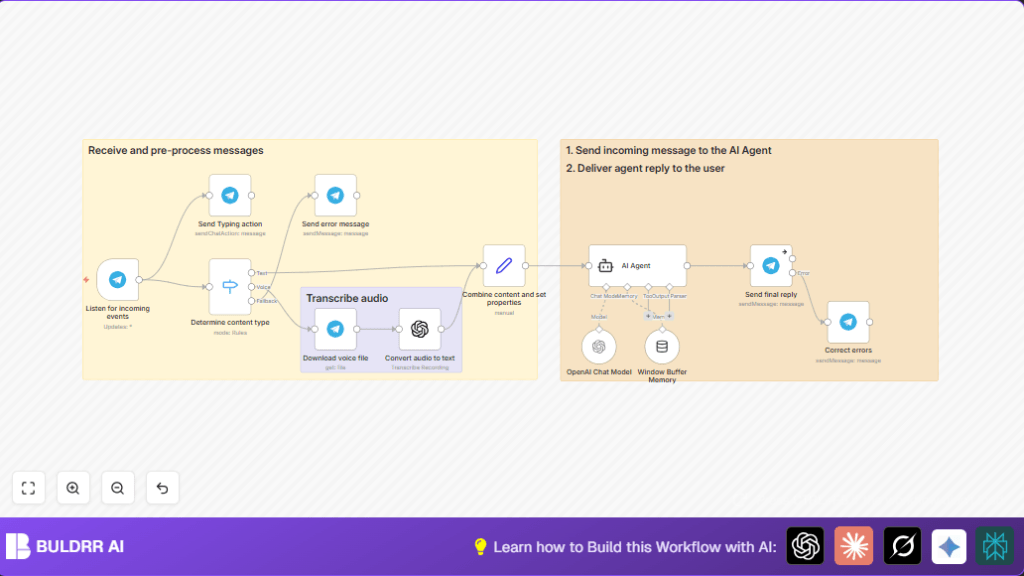

What This Automation Does ⚙️
This workflow listens for Telegram messages, both text and voice notes.
It separates voice messages from text messages.
Voice messages get downloaded and changed into text by OpenAI transcription.
All messages become one clear text input for the AI to understand.
The system remembers past chat with each user to keep context.
OpenAI GPT-4o creates smart answers with nice formatting for Telegram.
The bot then sends back replies in HTML style with politeness and user name.
While working, the bot shows typing to keep users waiting happily.
This saves a lot of time from reading and replying manually.
Who Should Use This Workflow
This helps people who manage busy Telegram channels or groups with many questions.
If answering messages wastes too much time, this AI bot helps to handle chats faster.
Users that want to keep their chat lively without missing voice notes will benefit.
Tools and Services Needed
- Telegram Bot API: Receives user messages from Telegram.
- OpenAI API: Transcribes voice to text and generates chat replies with GPT-4o.
- n8n Automation: Connects nodes to make the workflow work and handles API calls.
Inputs, Processing, and Outputs
Inputs
- New Telegram messages via webhook, including text and voice notes.
- Voice audio files linked inside Telegram messages.
Processing Steps
- Switch node decides if message is text or voice.
- Voice files get downloaded and transcribed using OpenAI Audio Transcription node.
- Set node merges text or transcription into one clear message.
- Window Buffer Memory stores last 10 user messages to keep chat context.
- OpenAI Chat Model GPT-4o generates a reply using the message and memory.
- AI Agent formats reply with HTML and system instructions.
- Telegram node sends typing action while processing.
- Telegram node sends back formatted answer to user.
Output
- Telegram reply with friendly AI-generated text in HTML format.
- Typing indicator during response creation.
Beginner Step-by-Step: How to Use This Workflow in n8n
Step 1: Download and Import
- Click the Download button on this page to get the workflow file.
- Open the n8n editor where you manage workflows.
- Click on the top menu and select Import from File.
- Choose the downloaded workflow file and import it.
Step 2: Configure Credentials and IDs
- Add your Telegram Bot API key in the Telegram nodes’ credentials sections.
- Enter your OpenAI API Key in all OpenAI-related nodes.
- Check the expressions for chat IDs and voice file IDs to match incoming Telegram message data.
- Update any email, channel, or folder references if present to match your setup.
Step 3: Test the Workflow
- Send a test text message or voice message to your Telegram bot.
- Watch the workflow run in n8n and check if it replies correctly.
- If errors appear, recheck credentials and expressions.
Step 4: Activate for Production Use
- Once the test passes, activate the workflow in n8n.
- Leave the workflow running to handle live Telegram messages.
- Consider using self-host n8n for better control and security if you expect many users.
Common Problems and How to Handle Them
- Invalid Telegram chat ID: Check that chat ID expressions use
message.chat.idcorrectly. - OpenAI request fails: Verify the API Key, and check rate limits or network issues.
- Voice messages fail to transcribe: Make sure the downloaded audio format matches OpenAI audio requirements and that file IDs are dynamic.
- Formatting errors in replies: Confirm HTML tags are used as instructed in the AI Agent node and special characters are escaped.
Customization Ideas
- Change GPT-4o settings like temperature to make answers more creative or precise.
- Expand memory size to remember more previous messages per user.
- Add handling for photos, documents, or other message types by adding new switch branches.
- Modify the AI Agent’s system message to change reply tone or add user-specific greetings.
- Add media replies like photos or voice notes after answers for richer chats.
Summary
✓ Saves hours daily by automating Telegram chat replies.
✓ Handles both text and voice messages with transcription.
✓ Keeps conversation context with user session memory.
✓ Sends friendly, formatted HTML replies with typing indicators.
✓ Easy to import, configure, and run in n8n with beginner-friendly steps.
