

What This Automation Does ⚙️
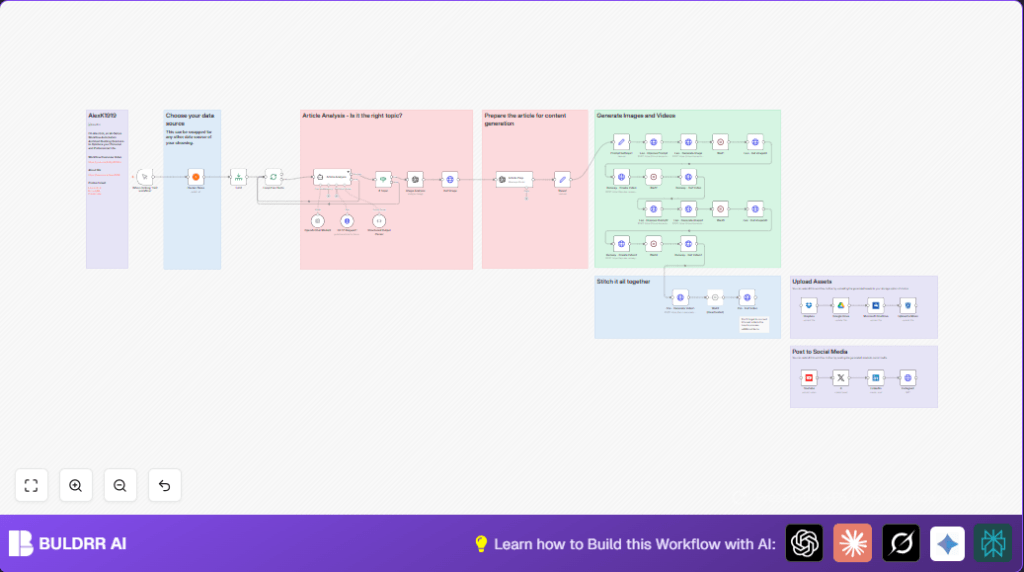
This workflow fetches new Hacker News articles and finds the ones about AI and automation. It then makes short summaries and pictures from those articles. After that, it creates videos with voice talking about the articles. Finally, it posts the videos to cloud storage and social media sites. This saves many hours of manual work and gives good videos on time.
The inputs start at Hacker News articles. Then the workflow uses OpenAI to read and decide which articles are about AI topics. It also creates short, clear summaries. Leonardo.ai makes pictures from those summaries. Using RunwayML and Creatomate, videos are made with the images and voice readings. The finished videos are put on YouTube, Twitter/X, Instagram, LinkedIn, and cloud storage like Google Drive.
Who Should Use This Workflow
This is for content creators who want to make AI and automation videos fast. It fits people who want to spend less time reading and editing. If you want to share AI news easily every day, this helps a lot.
It also helps those who want fewer mistakes in summaries and faster posting of content. This way, they can keep their audience engaged without wasting time.
Tools and Services Used
- n8n: Runs the automation workflow.
- Hacker News API: Gets the latest news articles.
- OpenAI GPT-4 API: Analyzes articles, creates summaries, and makes voiceover text.
- Leonardo.ai: Generates images from AI prompts.
- RunwayML API: Creates videos from generated images.
- Creatomate API: Stitches videos and adds voiceovers and subtitles.
- Cloud Storage: Minio, Dropbox, Google Drive, OneDrive to save video files.
- Social Media APIs: YouTube, Twitter/X, Instagram, LinkedIn for posting videos.
Workflow Steps: Inputs, Processing, Outputs
Inputs
The workflow starts by getting recent Hacker News articles automatically. It pulls up to 50 articles per run.
Processing Steps
- Fetch latest articles from Hacker News.
- Limit the max article count to 50 for control.
- Split the articles to handle each one separately.
- Use HTTP requests to get full article content.
- Send article content to OpenAI GPT-4 to decide if it is about AI or automation.
- Ask OpenAI to write a 250-word summary and image prompts.
- Confirm structure and filter only related articles.
- Analyze images to check they fit the topic.
- Create newsletter style title, blurbs, and creative image prompts in OpenAI.
- Send prompts to Leonardo.ai to generate images.
- Wait for image processing and then get image URLs.
- Submit images to RunwayML to make video clips with motion.
- Wait for video processing and get video URLs.
- Create a second video using improved prompts repeatedly.
- Use Creatomate to combine videos, images, subtitles, and voiceover audio into a final video.
- Import voice overs using OpenAI text-to-speech for clear narration.
- Wait for final video rendering and confirm readiness.
- Upload videos to cloud storage services.
- Post videos automatically on YouTube, Twitter/X, Instagram, and LinkedIn.
Output
The output is polished, summarized AI news videos ready for social sharing. Videos save time, have clear voice, images, and subtitles, and are stored safely on cloud accounts.
Beginner Step-by-Step: How to Use the Workflow in n8n
1. Import the Workflow
- Download the workflow file using the Download button on this page.
- Open your n8n editor.
- Go to top menu and select Import from File, then choose the downloaded workflow file.
2. Configure Credentials and IDs
- Add API Keys for OpenAI, Leonardo.ai, RunwayML, Creatomate, and cloud storage.
- Update any folder IDs, channel IDs, or emails needed for social media and storage nodes.
3. Test the Workflow
- Run the workflow manually using the Manual Trigger.
- Check each node’s output in n8n editor for errors or missing data.
4. Activate for Production
- After testing, activate the workflow in n8n.
- Add a Cron Trigger if you want it to run automatically at set times.
- Use external monitoring nodes or tools to get alerts on failure or success.
If you use self-host n8n, find setup help here: self-host n8n.
Customization Ideas
- Change Hacker News node to any RSS or news API you like.
- Adjust summary length in OpenAI prompts to fit your social media style.
- Alter Leonardo.ai image style presets to match your brand.
- Try different RunwayML models for unique video effects.
- Add new social media platforms like TikTok or Facebook by adding API nodes.
Possible Issues and Fixes
- If OpenAI GPT-4 gives incomplete or no summaries, check prompt clarity and API rate limits.
- If Leonardo.ai images fail, confirm API key is valid and prompts follow required format.
- If RunwayML video creation hangs, check service status and model IDs.
- If social media posting fails, verify credentials and update channel or account info.
Inputs and Outputs Summary
- Input: Hacker News articles JSON feed (up to 50 per run).
- Output: AI summarized, voiced videos posted on cloud and social media platforms.
Summary
✓ Saves many hours daily by automating AI news video creation.
✓ Produces clear, error-free article summaries and AI-generated images.
✓ Uploads and posts videos automatically to multiple social media and cloud platforms.
→ Workflow processes up to 50 Hacker News articles per run.
→ Easily customizable for different sources, styles, and social sites.
