
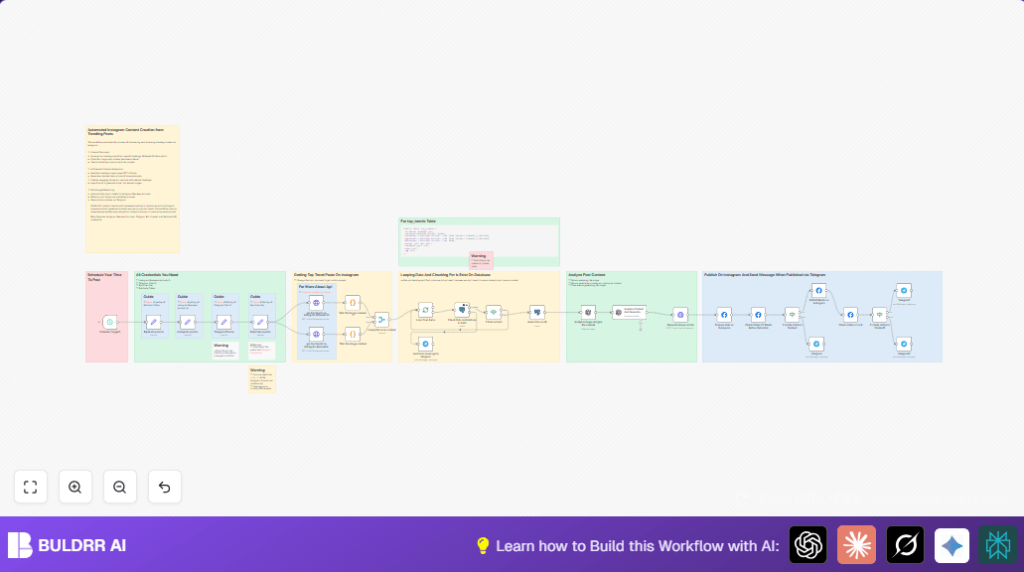

What This Workflow Does ⚙️
This workflow runs twice a day to find popular Instagram posts under hashtags like #blender3d and #isometric.
It picks images only, not videos, and skips repeated content using a database check.
Then AI explains what the image shows and writes a catchy caption.
It also makes a similar but new image in a 3D toy style using AI.
Finally, it posts the new image and caption to an Instagram Business Account automatically.
The workflow sends messages by Telegram for status or errors.
Tools and Services Used
- n8n: Automates the workflow with scheduling and API calls.
- Instagram Business Account: Receives the final posts via Facebook Graph API.
- Telegram Bot API: Sends progress and error updates.
- OpenAI GPT-4 Vision API: Analyzes images and generates captions.
- Replicate API with Flux AI: Creates new AI images based on prompts.
- RapidAPI Instagram Scraper: Gets trending Instagram posts by hashtag.
- PostgreSQL Database: Stores posts info to prevent duplicates.
How the Workflow Works (Input → Process → Output)
Input:
- Scheduled trigger at 1:05 PM and 7:05 PM Istanbul Time.
- Hashtags to search:
#blender3dand#isometric. - API keys and IDs for Instagram, Telegram, OpenAI, Replicate, RapidAPI, and PostgreSQL.
Processing Steps:
- Scrape top posts on Instagram by each hashtag.
- Filter out videos, keep only image posts.
- Merge results from both hashtags into one list.
- Loop through each post to check if it exists in the PostgreSQL database.
- Add new posts to the database if not found, marking them as unposted.
- Analyze each new image with OpenAI GPT-4 Vision to describe it.
- Generate Instagram caption using OpenAI with relevant hashtags.
- Use Replicate API (Flux AI) to make a unique 3D isometric style image based on the description.
- Upload the AI-generated image and caption to Instagram Business Account as unpublished media.
- Check upload status until it shows as “FINISHED”.
- Publish the media on Instagram when ready.
- Send Telegram notifications for progress, success, or errors.
Output:
- New, unique Instagram posts with AI-generated images and captions.
- Real-time Telegram updates about posting status.
Who Should Use This Workflow
This workflow is good for digital artists, content creators, and social media managers.
If you spend hours each week hunting for trendy Instagram content and want to save time, this helps.
It works well if you have an Instagram Business Account and want fresh, eye-catching posts without repeating old ones.
It also suits users familiar with connecting APIs and databases but prefer an easy way to post automatically.
Beginner Step-by-Step: How to Activate This Workflow in n8n
Step 1: Import the Workflow
- Download the workflow file from this page.
- Open your n8n editor.
- Use the Import from File feature to upload the workflow.
Step 2: Add Your Credentials
- Locate Instagram params node and enter your Instagram Business Account ID.
- Fill Telegram Params with your Telegram Bot API chat ID.
- Update Rapid Api params with your RapidAPI key for Instagram Scraper.
- Add your OpenAI API key in the relevant nodes for image analysis and captioning.
- Put your Replicate API token in the Replicate params node.
- Check your PostgreSQL database connection and table setup (table named
top_trends).
Step 3: Customize IDs or Details if Needed
- Change hashtags queried in the get top trends on instagram #blender3d and get top trends on instagram #isometric nodes if desired.
- Check any other IDs or tokens in Set nodes and update.
Step 4: Test the Workflow
- Run the workflow once manually inside n8n.
- Verify if steps pass without errors.
- Check Telegram for any status messages.
Step 5: Turn the Workflow On
- Activate the workflow by toggling it to “active” in the editor.
- It will now run automatically at scheduled times.
If using self-host n8n, see self-host n8n to optimize server performance.
Customization Ideas
- Change hashtags in the two Instagram Scraper nodes to suit a different niche.
- Edit the prompt in Analyze Content And Generate Instagram Caption node to adjust caption tone or tags.
- Modify the JSON body of Generate image on flux to try different image styles or resolutions.
- Adjust scheduled times in Schedule Trigger if a different posting window works better.
- Add extra columns to PostgreSQL table
top_trendsfor tracking likes or original post link.
Common Problems and Solutions
- Instagram Scraper API no data: Key expired or quota used up. Renew RapidAPI subscription.
- OpenAI failures: Wrong API key or usage limits hit. Check OpenAI account and key status.
- Instagram post not finishing upload: Permissions or network issues. Check Facebook Graph API access and retry.
- Telegram messages missing: Bot not started by messaging or wrong chat ID. Send /start and verify chat ID.
Pre-Production Checklist ✅
- Confirm Instagram Business Account ID and Facebook Graph API keys are valid.
- Verify Telegram Bot is active, sent /start and chat ID correct.
- Check RapidAPI Instagram Scraper subscription and keys.
- Test OpenAI and Replicate API keys with sample requests.
- Ensure PostgreSQL table
top_trendsexists with proper schema. - Run the workflow manually to confirm no errors before scheduling.
Summary
→ Finds trending Instagram images twice a day under chosen hashtags.
→ Checks database to avoid reposting duplicate content.
→ Uses AI to analyze images and write good captions.
→ Creates new AI-generated 3D style images for posts.
→ Automatically uploads and publishes to Instagram Business Account.
→ Sends Telegram messages to keep updated about progress.
→ Saves over 8 hours weekly by removing manual searching and posting.
