

What This Workflow Does
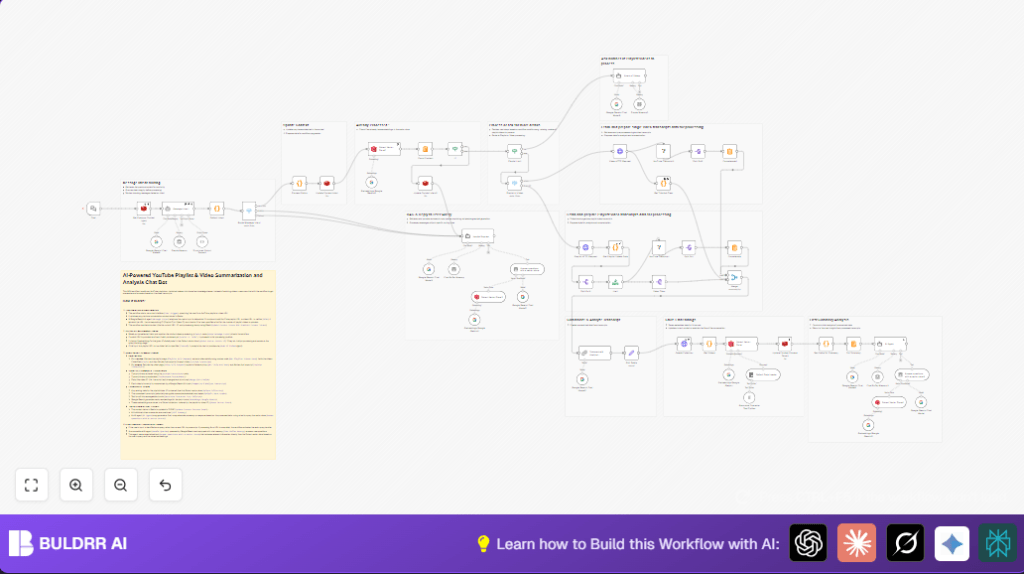
This workflow helps users turn YouTube playlists or single video URLs into easy-to-understand summaries and searchable data. It automates getting video transcripts, creating short summaries using Google Gemini AI, and saving those summaries in a searchable database. Users can then ask questions about the videos and get answers based on the preprocessed content.
The main problem it solves is saving time for people who would otherwise watch many hours of videos and take manual notes. It lets users quickly find key insights without watching everything fully.
The result is an interactive knowledge base from YouTube videos. Users get fast answers and technical summaries, helping them focus on insights instead of video playback.
Who Should Use This Workflow
This is for anyone who studies or researches industry topics using YouTube content. It is useful for analysts, students, or curious professionals who want faster video analysis.
You should use this if you often deal with long YouTube playlists or single videos and want better summaries plus easy search by asking questions instead of watching manually.
Tools and Services Used
- n8n: Automates the entire workflow triggered by chat input.
- Google Palm API (Google Gemini): Processes transcripts to create detailed summaries and detect user intent.
- YouTube Transcript nodes: Extract transcripts from YouTube videos.
- Qdrant vector store: Saves embeddings of transcripts for fast, semantic search.
- Redis: Stores chat session context and conversation history.
- HTTP Request nodes: Fetch YouTube video and playlist metadata.
Inputs, Processing Steps, and Outputs
Inputs
User sends a YouTube playlist URL or single video URL via chat webhook.
Processing Steps
- User input is checked for previous session context in Redis.
- Google Gemini AI detects the message intent and extracts URLs and parameters.
- Workflow routes input depending on intent: process new data or answer queries.
- If processing, it checks if data already exists in Qdrant to avoid duplication.
- User is asked for playlist video limits if none provided.
- Playlist or video metadata are retrieved via HTTP requests.
- Video transcripts are pulled using YouTube Transcript nodes.
- Transcripts are cleaned, combined, and structured with metadata.
- Google Gemini AI summarizes each transcript into technical bullet-point style markdown.
- Embeddings are prepared and old Qdrant collections deleted to update data.
- Embeddings are stored chunk-wise in Qdrant vector store.
- A final combined summary is generated by AI for entire playlist or video set.
- Context status in Redis is updated to DONE.
- User queries are answered by an AI agent using Qdrant semantic search and stored chat memory.
Outputs
Detailed summaries for each video and an overall playlist summary.
A vector store with searchable embeddings for semantic queries.
Interactive chat answers to user questions about video content.
Beginner Step-by-Step: How to Use This Workflow in n8n
1. Import the Workflow
- Download the workflow file using the Download button on this page.
- Go inside the n8n editor and choose “Import from File” to load the workflow.
2. Configure Credentials and Settings
- Add your Google Palm API (Google Gemini) credentials to the workflow nodes that require it.
- Set up your Qdrant access details (API keys or connection info) in the vector store nodes.
- Enter your Redis account credentials for session management.
- If needed, update any video or playlist IDs, folder names, or channels if the workflow uses fixed values.
- Review the prompt text or code snippets in Message Intent or Summarize & Analyze Transcript nodes and adjust if you want different summary styles.
3. Test the Workflow
- Trigger the workflow by sending a YouTube playlist or video URL via the chat webhook endpoint exposed by the Webhook node.
- Monitor the logs to ensure transcript fetching, summarization, and embedding storage run without errors.
4. Activate for Production
- Turn on the workflow using the toggle switch in n8n.
- Optionally, monitor chat request loads and logs from the n8n dashboard.
- Consider using self-host n8n if higher control or reliability is needed.
Edge Cases and Common Failures
- YouTube Captcha or Consent Page: Sometimes YouTube blocks bots with captchas. This stops transcript fetch. Using proxies or slowing requests can help.
- Parsing Errors: YouTube’s page format changes can break metadata extraction code nodes. The playlist/video fetching logic may need updates when YouTube updates the site.
- Missing Transcripts: Many videos have no subtitles or blocked captions. This workflows skips or fails on these. Checking transcript availability first is advised.
- Redis or Qdrant Issues: If session context or vector store queries fail due to credentials or network issues, the workflow may behave unexpectedly.
Customization Ideas
- Adjust summary length or detail by changing the prompt inside the Summarize & Analyze Transcript AI node.
- Change how the user is asked for playlist limits by editing the prompt in Numb of Videos agent node.
- Add support for YouTube Shorts or channel URLs by updating URL validation in Message Intent node.
- Replace Google Gemini with other AI models like OpenAI’s GPT-4 by swapping API keys and model references.
- Embed extra metadata fields such as video publish dates, tags, or view counts where available.
Summary of Workflow Benefits
✓ Saves many hours by automating YouTube video transcription and summarization.
✓ Creates a searchable knowledge base with vector embeddings for fast answers.
✓ Produces structured, easy-to-read AI-generated summaries of transcripts.
✓ Supports conversational queries with memory to keep context.
✓ Handles both playlists and individual videos for flexible use cases.
