

1. What This Workflow Does
This workflow gives weekly stock analysis by looking at price charts and recent market news together.
It helps solve the problem of spending many hours every week checking stocks manually.
You get a clear Hebrew report by email with advice on whether to buy, sell, or hold a NASDAQ-listed stock.
The reports combine technical data like RSI, EMA, Bollinger Bands, MACD, and Fibonacci retracements with sentiment from financial news.
The workflow runs inside n8n. You input a stock ticker and an email, then it does fetching, analyzing, and reporting automatically.
2. Who Should Use This Workflow
This is for independent investors who want to save time and reduce errors in studying NASDAQ stocks.
It’s good for beginners and intermediate users who want simple weekly analysis in Hebrew.
People who find manual research slow or confusing can benefit from this automated approach.
3. Tools and Services Used
- n8n: Workflow automation platform running the processes.
- OpenAI API (GPT-4o): For AI language generation and visual chart analysis.
- Chart-img API: Generates candlestick stock charts as images.
- Twelve Data API: Supplies historical prices and technical indicators.
- Alpha Vantage API: Fetches recent financial news and sentiment data.
- SMTP Server: Sends the final formatted email to the user.
4. Beginner Step-By-Step: How to Use This Workflow in n8n
Step 1: Download and Import Workflow
- Use the Download button on this page to get the workflow file.
- Open your n8n editor (cloud or self-host n8n).
- Click “Import from File” and select the downloaded workflow file.
Step 2: Add API Keys and Credentials
- Edit the Set Variables node to enter your OpenAI, Chart-img, Twelve Data, and Alpha Vantage API Keys.
- Enter your SMTP credentials inside the Send Stock Analysis Email node.
Step 3: Update User Inputs if Needed
- Confirm the Webhook node or Form Trigger node accepts the stock ticker and user email.
- Make sure ticker symbols used are valid NASDAQ tickers.
Step 4: Test the Workflow
- Run the workflow manually by entering a sample ticker and email via the form.
- Check the execution logs and confirm you receive a well-formatted Hebrew email report.
Step 5: Activate for Production Use
- Turn on the scheduling node (if present) or make the webhook/form trigger active for regular runs.
- Monitor executions regularly for errors or API key expirations.
5. Workflow Inputs, Processing, and Outputs
Inputs
- User inputs a NASDAQ stock ticker symbol and an email address via the Form Trigger node.
- API keys for OpenAI GPT-4o, Chart-img, Twelve Data, Alpha Vantage, and SMTP credentials.
Processing Steps
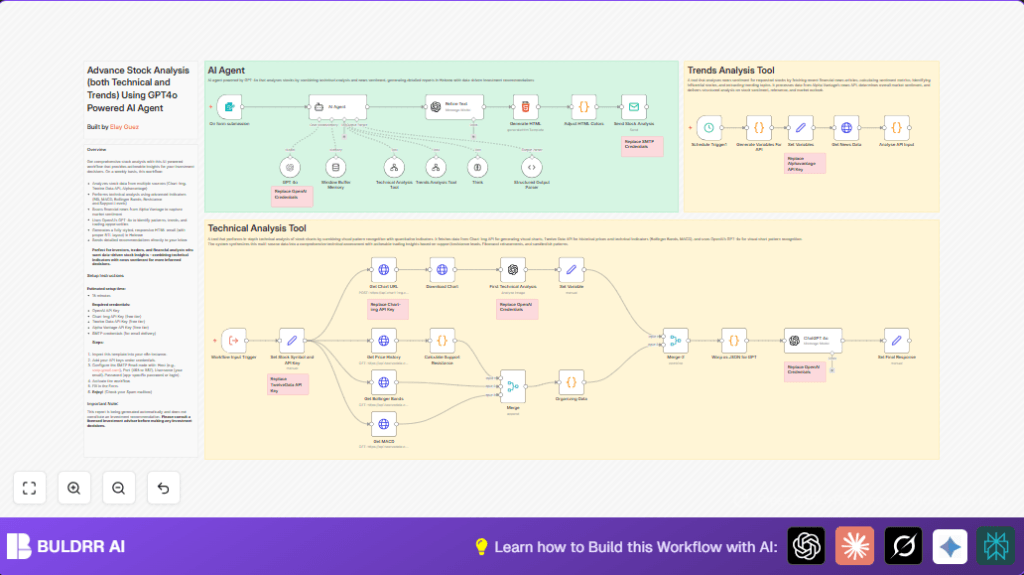
- Calculate recent dates for fetching market news.
- Call Alpha Vantage NEWS_SENTIMENT API to get recent news articles and sentiment scores.
- Process and rank news articles, extract sentiment and trending topics.
- Request weekly candlestick chart image with technical indicators from Chart-img.
- Download and convert the chart image to base64 for AI visual analysis.
- Use GPT-4o AI model to analyze the visual chart and get technical signals.
- Fetch price history and other technical indicators like Bollinger Bands and MACD from Twelve Data API.
- Calculate support/resistance and Fibonacci retracement levels using price data.
- Merge all technical indicators and news sentiment data.
- Send combined data to an AI agent that creates a detailed Hebrew stock analysis report and recommendation.
- Refine the Hebrew text for clarity and professional tone using another GPT-4o call.
- Generate a responsive, right-to-left HTML email report with color-coded sentiment and charts.
- Send the ready email via SMTP to the user email provided.
Outputs
- Well-structured, easy-to-understand weekly Hebrew email report.
- Includes technical insights, important news articles, market sentiment, and buy/hold/sell recommendation.
6. Handling Edge Cases and Failures
- If invalid or unknown ticker symbols are submitted, expect errors in API results.
- API Key errors often come from wrong or expired keys; update in n8n Credentials.
- Chart-img or image download failures cause AI analysis to fail; check that image responses are correct format (base64 or image URL).
- SMTP mistakes cause email sending to fail; verify server, ports, passwords carefully.
- Insufficient historical price points (less than 30) can cause support and resistance calculation errors.
7. Ideas for Customization
- Change chart time scale by editing the Get Chart URL node’s interval parameter.
- Adjust AI sentiment label mapping inside the AI Agent node for different languages.
- Modify Generate HTML node to add branding, logos, or competitor comparison sections.
- Add more technical indicators from different APIs or tune existing ones for varied insights.
- Tweak buy/sell recommendation rules inside the AI prompt for custom risk preferences.
8. Summary of Benefits and Results
✓ Saves 5 to 6 hours of manual stock research every week.
✓ Combines chart data with timely news sentiment in one report.
✓ Delivers clear Hebrew reports easy to understand even if you are new to investing.
✓ Improves decisions by removing human errors and bias.
→ Enables workflow activation in n8n with simple API key insertion and schedule setup.
→ Provides fully formatted, color-coded email ready for reading on any device.
