
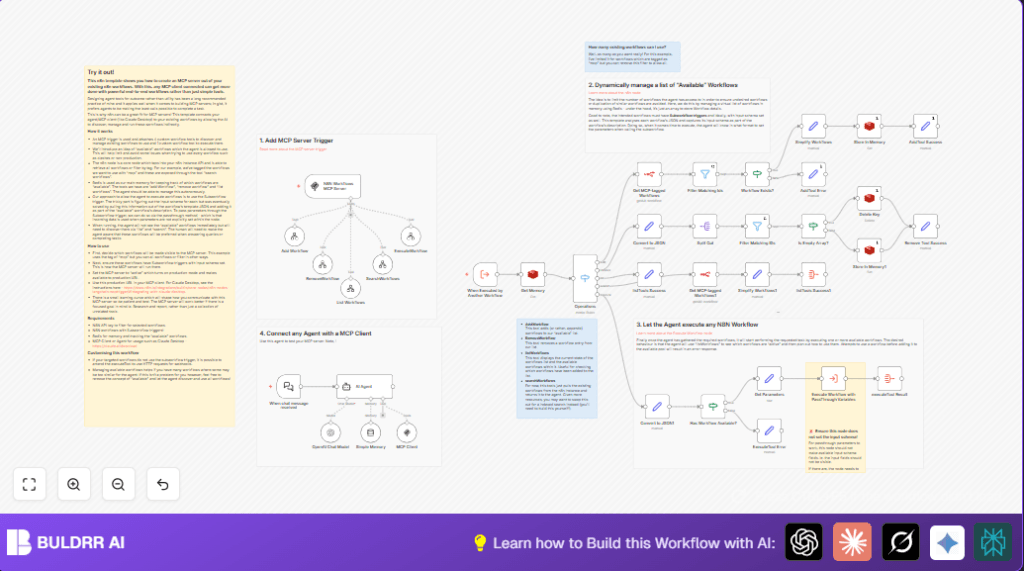

What This Workflow Does
This workflow lets an AI or other tools manage which n8n workflows to run without manual help.
It finds workflows tagged “mcp” inside n8n, keeps a list of active ones in Redis memory, and controls when to add or remove them.
The workflow also reads each subworkflow’s inputs so the AI knows what information to give when running it.
When asked, it runs selected approved workflows with input passed in from the user.
This stops mistakes like running wrong or outdated workflows and saves time by automating control of workflow execution.
Who Should Use This Workflow
Anyone managing many n8n workflows who wants to let an AI safely find, control, and run specific workflows.
This is ideal for automation teams needing less manual tracking of workflows and fewer errors from wrong runs.
Users with AI clients like Claude Desktop can connect to this workflow to request workflow lists or run them dynamically.
Tools and Services Used
- n8n account with API access: To query and execute workflows.
- Redis server: Stores the list of available workflows in memory.
- Workflows tagged “mcp”: Only workflows with this tag are managed.
- Execute Workflow Trigger node: Enables subworkflow input detection.
- AI Agent or MCP client: Such as Claude Desktop to interact with the MCP server.
- OpenAI API key (optional): Used for AI language model features inside n8n.
Beginner Step-by-Step: How to Use This Workflow in n8n
Download and Import
- Download the workflow file using the Download button on this page.
- Inside the n8n editor, click “Import from File” and upload the downloaded workflow.
Configure Credentials and IDs
- Add your n8n API Key or credentials to the n8n node that fetches workflows.
- Set up Redis credentials in the Redis node to enable memory storage.
- If needed, update any workflow IDs, email addresses, or channel names used in the nodes.
- Optionally, add your OpenAI API Key in the AI nodes to use language models.
Test and Activate
- Run the workflow once manually to confirm connections and permissions work.
- Activate the Webhook node (MCP Trigger) to get your webhook URL.
- Copy the webhook URL and provide it to your AI agent or MCP client for communication.
- Activate the whole workflow in n8n for production use.
For full control and better performance, you can consider self-host n8n to run this workflow.
Inputs, Processing, and Outputs
Inputs
- Commands sent by AI agent via the Webhook node, such as add, remove, list, search, or execute workflows.
- n8n API data filtered to workflows tagged “mcp”.
- Redis stored array holding current active workflows.
Processing Steps
- Filter workflows in n8n by tag “mcp”.
- Extract workflow input schemas from subworkflow triggers.
- Store and update workflows list in Redis under the key “mcp_n8n_tools”.
- Switch and Filter nodes route commands for adding, removing, listing, or executing workflows.
- Execute selected workflows dynamically using the Execute Workflow node without fixed input schema, allowing parameter passthrough.
Outputs
- Updated Redis list of workflows allowed for execution.
- Responses sent back to the AI agent about available workflows and execution results.
- On-demand running workflows with AI-given parameters.
Common Issues and How to Fix Them
- Missing workflow in Redis: The AI tries to run a workflow not added. Fix by using “AddWorkflow” command first.
- Redis connection failure: Check and update Redis server URL and credentials in n8n settings.
- Incorrect input parameters: Confirm each subworkflow has an Execute Workflow trigger node with proper input schema.
- Miscalled webhook URL: Activate the Webhook node and copy the correct URL for the AI agent.
Customization Ideas
- Change the workflow tag from “mcp” to a custom tag for different workflow groups.
- Edit the Redis key “mcp_n8n_tools” if you want to separate memory pools.
- Allow workflows without Execute Workflow triggers by using HTTP webhook calls instead.
- Modify AI system messages in the AI Agent node to guide how it handles commands.
- Improve input schema extraction by adding validation or documentation fields.
Results and Benefits
✓ Control over which workflows AI can use.
✓ Faster and safer workflow execution managed by AI agents.
✓ Automatically updated list of active workflows in memory.
✓ Reduced manual work and errors from running wrong workflows.
→ AI clients like Claude Desktop can talk directly to n8n workflows.
→ Scalable setup using Redis allows many workflows and parallel runs.
Additional Notes
Make sure all workflows tagged “mcp” are tested and have proper subworkflow triggers with input schemas.
Keep API keys, Redis access, and webhook URLs secure to protect workflow data.
Monitor logs after activation to catch issues quickly.
