
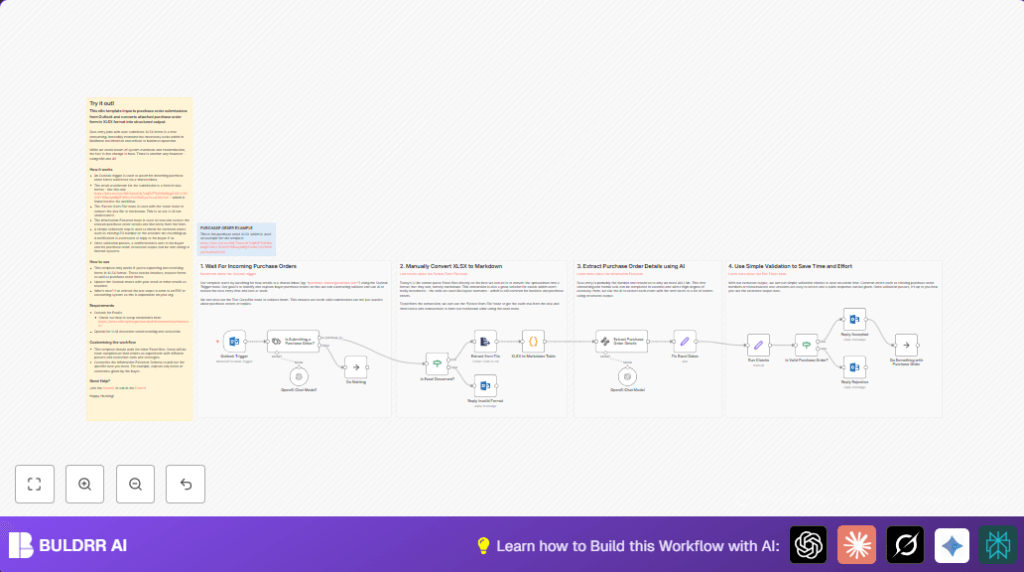

What this workflow does
This workflow reads purchase order emails in Outlook with XLSX attachments. It extracts order details using AI and checks for errors automatically. Then it sends a reply to the sender saying if the order is accepted or needs fixing.
This stops manual copying of data from Excel files. It saves hours and reduces mistakes.
Who should use this workflow
This is for anyone managing purchase orders sent by email as Excel sheets. It is good for teams using shared Outlook inboxes and needing accurate, fast processing.
Users without full system changes or vendor cooperation can still automate part of order handling.
Tools and services used
- Microsoft Outlook: Receives purchase order emails in shared inbox.
- n8n platform: Runs automation workflow to watch inbox and process files.
- OpenAI API: Extracts structured purchase order information from Excel data via AI.
- n8n nodes: Microsoft Outlook Trigger, If node, Extract From File node, AI Information Extractor node, Code and Set nodes.
- Optional: self-host n8n for private hosting needs.
Inputs, processing, and outputs
Inputs
Emails arriving in the shared Outlook inbox.
Only emails with XLSX attachments and purchase order intent proceed.
Processing steps
- Email trigger watches inbox hourly.
- AI text classification filters to detect purchase order emails.
- If attachment MIME type is not XLSX, send rejection email.
- Extract raw row data from XLSX file.
- Convert Excel rows into markdown table for AI parsing.
- Use AI Information Extractor node with strict JSON schema to get PO details: number, date, vendor info, items, totals.
- Fix Excel serial date to proper date object.
- Validate extracted data: check PO number exists, PO date not future, has items, and math totals match.
- If valid, send acceptance reply email; otherwise, send detailed rejection email pointing out errors.
Outputs
Automated confirmation or rejection emails sent back to the original sender.
Structured purchase order data ready for further use.
Beginner step-by-step: How to build this in n8n
Import the workflow
- Inside n8n editor, click Import from File and select this workflow file you downloaded.
- The workflow will appear in your editor ready to configure.
Set up credentials and settings
- Add Microsoft Outlook account credentials with access to your shared purchase orders inbox.
- Add OpenAI API key in the Information Extractor node settings.
- Update emails, folder IDs, or channels in nodes if your environment differs.
Test and activate
- Send a test purchase order email with an XLSX attachment to the shared inbox.
- Run the workflow manually or wait for trigger and watch the execution to confirm data extraction and emails work.
- Once satisfied, enable the workflow by toggling it active for automatic runs.
Remember to revisit and customize email replies and validation rules as needed.
For private hosting, consider self-host n8n.
Handling errors and edge cases
Emails without XLSX attachments will be rejected automatically by the If node check.
Incorrect Excel formats may cause extraction errors. Check the markdown conversion and JSON schema match exactly your PO templates.
If AI extraction misses fields, review the AI Information Extractor prompt and schema carefully.
Workflow may reject orders where totals don’t add up – fix vendor inputs in those cases.
Customization ideas
- Add more purchase order fields to the JSON schema for special vendor data.
- Change validation in the Set node to suit company rules, like stricter dates or required minimum quantities.
- Edit auto-reply emails to include PO numbers and personalized messages.
- Add ERP or database integration nodes after validation to automate order entry.
Summary of results
✓ Saves 8 or more hours weekly by automating manual data entry across emails and Excel files.
✓ Reduces mistakes like missing PO numbers and wrong totals.
✓ Speeds up procurement by sending quick accept or reject emails.
✓ Gives structured purchase order data ready for other systems.
✓ Easy to adapt and customize inside n8n with minimal code.
