
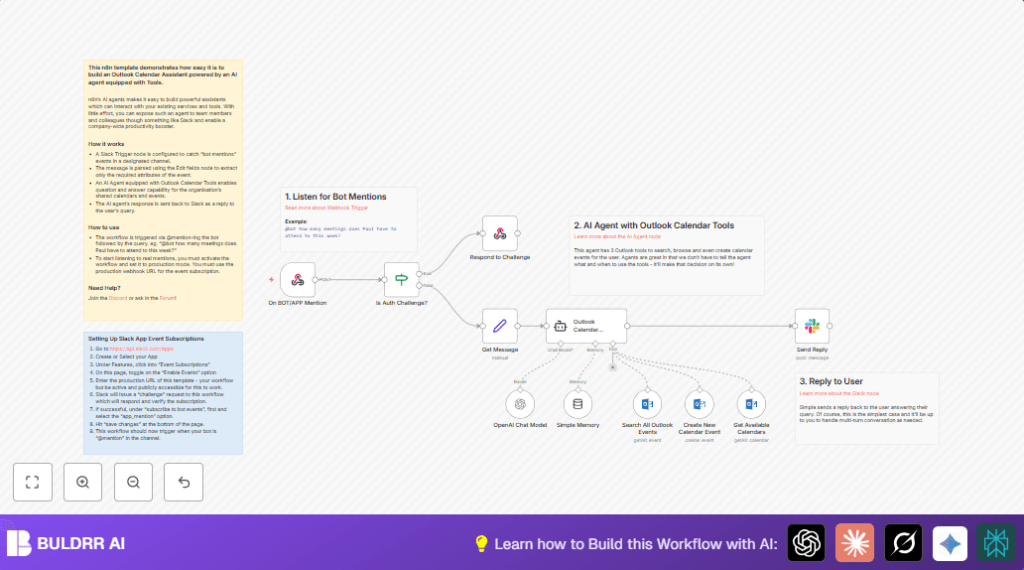

What This Automation Does
This workflow listens for messages in Slack where the bot is mentioned.
It reads the question about calendars or events.
Then it uses AI to understand what the user wants.
It asks Microsoft Outlook to find, add, or list calendar info.
The answer is sent back fast into the Slack thread.
This saves time and stops manual searching in Outlook.
It gives quick, clear replies in Slack without needing a person to look it up.
How This Workflow Works (Inputs → Process → Output)
Inputs from Slack
- Slack Event: When the bot is tagged in a message.
Processing Steps
- The Webhook node gets the Slack message.
- An If node checks if Slack sends a special “challenge” request for verification.
- A Set node extracts details: message text, user, time, channel.
- The Simple Memory node saves the chat context using user and timestamp.
- The OpenAI Chat Model node reads the question to understand intent.
- Microsoft Outlook Tool nodes run one of these based on understanding:
- Search calendar events
- Create new calendar event
- List available calendars
- The AI agent picks which Outlook tool fits best.
Output to Slack
- The Slack node posts an answer in the same Slack thread.
Beginner Step-by-step: How to Use This Workflow in Production in n8n
Step 1: Import Workflow
- Download the workflow file using the Download button on this page.
- Open n8n editor and choose Import from File to load the workflow.
Step 2: Add Credentials
- Go to each node that needs credentials.
- Enter your OpenAI API key.
- Enter Microsoft Outlook OAuth2 credentials.
- Enter Slack bot API credentials.
Step 3: Update Configurations if Needed
- Check and update any IDs like Slack channel IDs, Outlook calendar IDs, or emails.
- Make sure the Slack app event subscription URL matches your Webhook node URL.
- Check the AI prompt in the Outlook Calendar Assistant node. It should have this expression:
text: = {{$json.message.substr($json.message.indexOf('>')+1, 9999).trim()}}
options.systemMessage: = "You are a helpful calendar assistant who can help users with calendar and event enquiries. Today's date and time is {{$now.toISO()}}."
Step 4: Test the Workflow
- In n8n editor, activate the workflow in ‘active’ mode.
- Mention the bot in Slack with example questions about calendars.
- Look for replies in the Slack threads.
Step 5: Activate for Production
- Make sure the webhook URL is public and reachable.
- Set the Slack app’s Event Subscription URL to the webhook URL.
- Enable the workflow as production in n8n.
- Monitor the workflow logs for errors.
For users running a self-host n8n setup, ensure your server is publicly reachable and secured.
Tools and Services Used
- Slack Bot API: Receives user messages with bot mentions.
- OpenAI Chat Model: Understands natural language calendar questions.
- Microsoft Outlook API: Accesses and manages calendar data.
- n8n Nodes: Webhook, If, Set, Simple Memory, Slack, OpenAI, Microsoft Outlook Tool nodes.
Customizations
- Add more Microsoft Outlook tools to update or delete events.
- Use only user ID in Simple Memory node to keep memory across messages.
- Change Slack reply format with emojis or markdown.
- Filter calendar events by date dynamically using AI.
- Include reminders or attendees in event creation.
Troubleshooting
Slack challenge verification fails: The verify response must be exact from Slack’s challenge query.
Outlook API auth errors: Refresh Microsoft Outlook OAuth2 credentials and check permissions.
AI answers wrong or incomplete: Adjust Simple Memory node session keys and improve system messages.
Summary
✓ Saves hours by automating calendar questions inside Slack.
✓ Uses AI to understand natural language and pick Outlook actions.
✓ Replies instantly in Slack threads to improve team communication.
✓ Requires minimal setup after import and credential addition.
✓ Offers easy ways to customize and scale.
