

What This Automation Does
This workflow helps users find details about ServiceNow incidents quickly from Slack without opening many tabs or copying information.
It takes an incident ID from a Slack slash command, then looks up the incident in ServiceNow automatically, and sends the details back to Slack fast.
This stops wasting time on manual lookups, cuts errors, and gives the team answers right away.
The workflow talks to Slack and ServiceNow using API calls triggered by a webhook.
How the Workflow Works (Input → Process → Output)
Inputs
- Slack slash command input: Incident ID typed by a user in Slack.
- Webhook payload: Slack sends data to n8n when the slash command runs.
Processing Steps
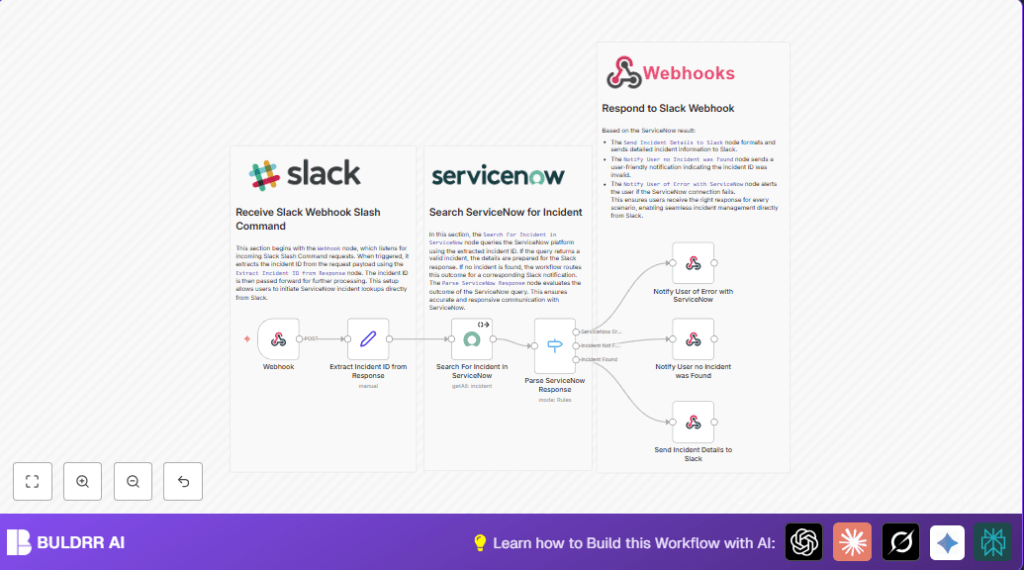
- Webhook node receives POST request from Slack with incident ID.
- Set node extracts the incident ID from the webhook JSON payload.
- ServiceNow node queries the ServiceNow API for incident details using the incident ID.
- Switch node checks if the incident was found, not found, or if an error happened.
Output
- Sends a formatted message back to Slack with incident details if found.
- Sends a notification to Slack if the incident wasn’t found or if an error occurred.
Beginner Step-by-Step: How to Use This Workflow in n8n Production
Import Workflow
- Download the workflow file using the Download button on the page.
- In the n8n editor, click “Import from File” and select the downloaded file.
Configure Credentials
- Set up your ServiceNow Basic Authentication credentials inside n8n credentials manager.
- Attach these credentials to the ServiceNow node.
Update Variables If Needed
- Edit the Slack slash command URL in Slack app settings to the webhook URL generated by the Webhook node.
- Update incident ID or other fields if your ServiceNow instance uses different naming conventions.
Test & Activate
- Run a test by typing the slash command and incident ID in Slack.
- Check n8n executions for errors and confirm Slack receives correct messages.
- Activate the workflow by turning on the Active toggle in n8n.
For hosting or running n8n on your own system, you can explore helpful options with self-host n8n.
Tools and Services Used
- Slack API: Receives slash command and sends webhook data.
- ServiceNow API: Provides incident data via REST calls.
- n8n Automation Platform: Hosts the workflow, connects Slack and ServiceNow.
Common Edge Cases and Failures
- If Slack webhook URL is wrong, webhook won’t receive data.
- If incident ID doesn’t match, ServiceNow returns no results.
- If the ServiceNow query syntax is off, the fetch will fail or error.
- If Slack message JSON is malformed, the response may be blank or show errors.
Careful testing of Slack URLs, ServiceNow queries, and JSON formatting is key to avoid these.
Customization Ideas
- Change the
sysparm_queryin the ServiceNow node to search other fields likecaller_id. - Add more fields like assignment group or resolution notes in the Slack message JSON output.
- Rename the Slack slash command to suit team needs.
- Add a Function node to log errors externally for audits.
- Use environment variables in n8n to keep credentials secure.
Summary
✓ Stops time lost doing manual incident searches.
✓ Gives fast, exact ServiceNow incident info inside Slack.
✓ Reduces mistakes from copying and pasting.
→ Users see results instantly with clear messages.
→ Saves hours weekly for busy IT teams.
→ Workflow easy to import, configure, test, and run.
