

What This Workflow Does
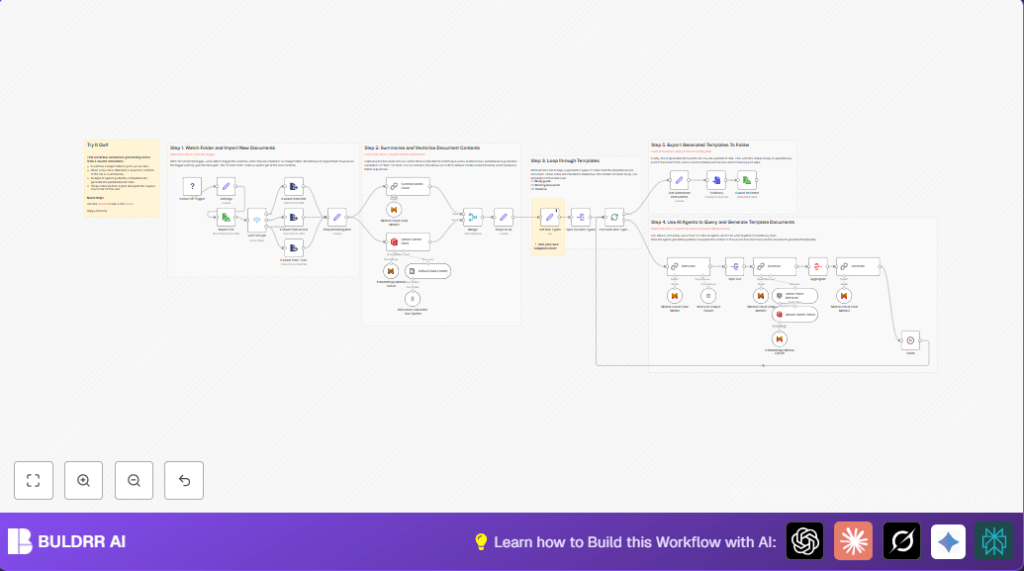
This workflow watches a specific local folder for new PDF, DOCX, or text files.
It reads these documents, extracts their text, and makes summaries.
Then it saves important info into a vector database for smart searching.
Finally, it creates three kinds of notes automatically: Study Guide, Timeline, and Briefing Doc.
These notes are saved back to the computer in clear markdown files.
This helps users avoid making notes by hand and get consistent results fast.
Who Should Use This Workflow
This workflow is for researchers, students, or anyone with many study documents.
If spending hours making summaries and notes manually is a problem, this workflow saves time.
Users who want clear, organized notes from PDFs and DOCX files benefit here.
Tools and Services Used
- n8n: The automation platform to build and run the workflow.
- Local File Trigger node: Watches a folder for new files.
- Extract From File nodes: Reads text from PDF, DOCX, or text files.
- Mistral Cloud API: Used for text summarization and chat AI models.
- Qdrant Vector Store: Stores vectors for fast semantic search.
These tools work together in the automation process.
Beginner Step-by-Step: Using This Workflow in n8n Production
Step 1: Download and Import Workflow
- Download the workflow file using the Download button on this page.
- Open the n8n editor.
- Import the workflow by choosing Import from File option.
Step 2: Configure Credentials
- Add required API Keys for Mistral Cloud and Qdrant in the n8n credentials section.
- Check the Local File Trigger path setting to point to the folder where documents will be added.
Step 3: Adjust Workflow Settings if Needed
- Update any IDs, folder names, or collection names in the nodes as needed.
- Copy and paste prompt templates if the workflow provides any custom prompts.
Step 4: Test the Workflow
- Add a sample PDF or DOCX file to the monitored folder.
- Watch the execution in n8n to confirm the workflow runs correctly and creates notes.
Step 5: Activate for Production
- Enable the workflow by turning it on inside n8n.
- Make sure polling is enabled in the Local File Trigger.
- Monitor the output folder for new markdown note files.
For users running on their own server, consider self-host n8n to allow local folder access.
Inputs, Processing, and Outputs
Inputs
- New PDF, DOCX, or text files placed inside a specific local folder.
- API keys for Mistral Cloud and Qdrant.
Processing Steps
- Workflow triggers on file addition.
- Reads the full file content.
- Detects file type to choose correct extraction method.
- Extracts clean text from the document.
- Summarizes the text into short key points.
- Creates vector embeddings and uploads them to Qdrant.
- Loops through three templates: Study Guide, Timeline, and Briefing Doc.
- Uses AI chat models to generate questions and detailed answers.
- Combines AI answers into formatted markdown notes.
Outputs
- Markdown note files saved back to a chosen local folder with clear filenames.
- Documents stored in vector database for future retrieval.
Customization Ideas
- Add new document templates by editing the JSON in the Get Doc Types node.
- Change how long summaries are by adjusting chunk size in Summarization Chain node.
- Switch Qdrant with another vector database supported by n8n.
- Change file events watched by Local File Trigger for modify or delete actions.
- Replace Mistral Cloud API nodes with other LLM providers like OpenAI.
Common Issues and Fixes
- If workflow does not start when a file is added, check that polling is enabled in Local File Trigger.
- If extracted text is blank or garbled, verify correct extraction operation is set: pdf, ods, or text.
- If AI output is vague or off-topic, improve prompt clarity and confirm correct summary data is passed.
Pre-Production Checklist
- Test adding files to watched folder triggers the workflow.
- Check extracted text in workflow executions.
- Verify API keys for Mistral Cloud and Qdrant work.
- Run AI steps and inspect generated questions and answers.
- Backup the Qdrant collection to avoid data loss before large runs.
Deployment Guide
Turn on the workflow inside n8n to run automatically.
Make sure the system supports folder polling and file access.
Watch logs to spot extraction or AI errors.
You will find note files in the export folder when ready.
Summary
→ This workflow automates reading PDFs or DOCX and makes notes.
→ It saves time by doing text extraction, summarization, and AI Q&A.
→ Outputs clear markdown notes for study or briefing.
→ Works locally with Mistral Cloud AI and Qdrant vector storage.
✓ Saves hours in manual note-taking.
✓ Produces consistent and clear study documents.
✓ Easy to adjust with new templates or models.
