
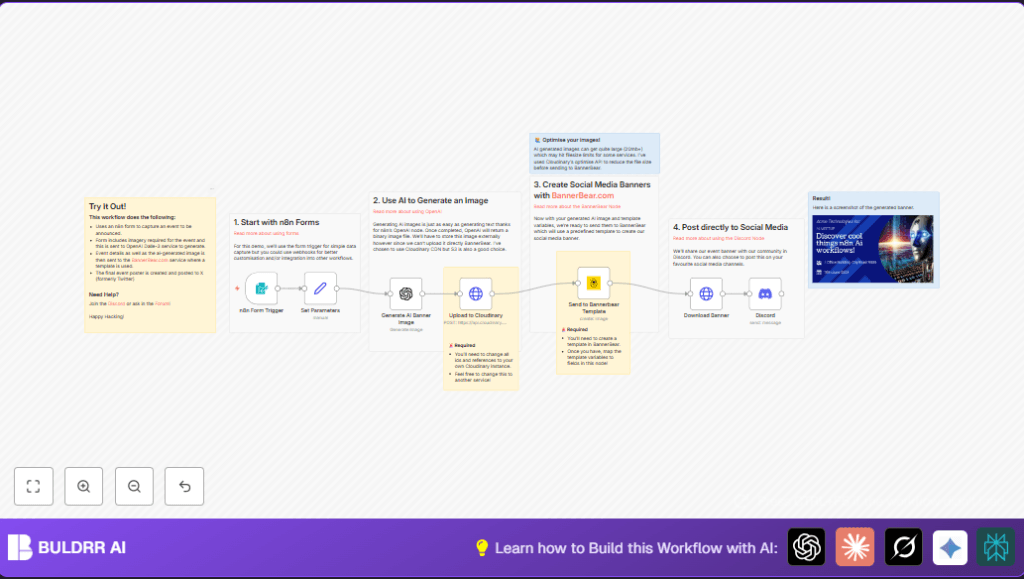

What This Workflow Does
This workflow creates event banners automatically from simple event information.
It solves the problem of slow, manual banner making and sharing on social media.
Users get a ready banner posted directly to Discord quickly, saving hours of work.
The inputs are event details and an image prompt.
Then, AI generates images, the images upload to Cloudinary, BannerBear makes banners, and Discord posts them.
Who Should Use This Workflow
Community managers or event organizers who spend too much time making event banners can use it.
It helps anyone who needs quick, professional event images and automatic social posts.
Good for people new to automation who want to work faster with less error.
Tools and Services Used
- n8n: For building and running the workflow.
- BannerBear: Creates banner images from templates.
- OpenAI DALL·E 3: Generates event images from text prompts.
- Cloudinary: Uploads and hosts images fast.
- Discord Bot API: Posts the final banners to a Discord server.
- Generic HTTP Request: Handles image upload to Cloudinary.
Inputs, Processing Steps, and Outputs
Inputs
- Event title, location, date.
- Image description prompt for AI image generation.
- Template choice from a dropdown.
Processing Steps
- Form Trigger captures event info from a web form.
- Set node maps form data to workflow variables.
- OpenAI node generates image from prompt using DALL·E 3.
- HTTP Request uploads AI image to Cloudinary with proper auth.
- BannerBear creates banner image with event text and Cloudinary URL.
- HTTP Request downloads BannerBear banner file.
- Discord node posts the final banner and event details to a Discord channel.
Output
A professional event banner image is automatically published to the Discord community server.
Beginner Step-by-Step: How to Use This Workflow in n8n
Step 1: Import the Workflow
- Download the workflow file using the Download button on this page.
- Open the n8n editor (Assume you are already there).
- Click on the top-right menu, choose “Import from File,” and upload the downloaded workflow file.
Step 2: Configure Credentials
- Add or update all required credentials like OpenAI API Key, BannerBear API Key, Cloudinary API details, and Discord Bot token.
- Make sure the generic HTTP Request node has correct Cloudinary upload settings.
Step 3: Update Identifiers
- Replace BannerBear template IDs if you want custom templates.
- Set the Discord channel ID where the banner should be posted.
- Update any webhook URLs, emails, or folder IDs if the workflow uses any.
Step 4: Test the Workflow
- Submit a test event through the webhook URL (you can copy it from the Webhook node).
- Check if the workflow runs without error and posts the event banner in Discord.
Step 5: Activate the Workflow
- Once testing succeeds, activate the workflow to run automatically on future form submissions.
- Monitor executions in n8n to catch any errors early.
- For reliable uptime, consider self-host n8n.
Common Issues and Fixes
- Cloudinary Upload Fails: Check API key is correct and the HTTP node sends binary image data in the ‘file’ field.
- BannerBear Timeout: Verify template variable names exactly match BannerBear setup; increase retry limit if network is slow.
- Discord Post Fails: Confirm bot has permission to send messages and upload files in the target channel.
- Form Data Incomplete: Make sure all required form fields are filled before submitting.
Customization Ideas
- Change BannerBear templates to fit different event types by updating template IDs in the Set node.
- Switch image hosting from Cloudinary to AWS S3 by changing the HTTP request node’s API URLs and authentication.
- Add social media posting steps after Discord, like Twitter or Facebook nodes.
- Enhance the AI image prompt field to include event themes, colors, or style keywords for better images.
- Add more template choices for different event types by expanding mapping logic in the Set node.
Pre-Production Checklist
- Confirm the form webhook accepts test submissions correctly.
- Check OpenAI API key allows image generation with DALL·E 3.
- Verify Cloudinary upload preset and API credentials are valid.
- Make sure BannerBear template IDs and variable names match your templates.
- Ensure Discord bot permissions and channel ID are set properly.
- Run a full test from form submit to Discord posting with real data.
- Backup current BannerBear templates and Cloudinary presets before making changes.
Deployment Guide
Activate the workflow after confirming it works as expected.
Use the executions tab inside the n8n editor to watch for errors or success.
For stable operation, running on your own n8n server is a good idea; see self-host n8n.
Consider setting alert nodes or external monitoring for failures.
Summary and Results
✓ Saves hours weekly by automating event banner creation and posting.
✓ Reduces errors from manual banner making.
✓ Posts professional event banners instantly to Discord communities.
→ Users gain time to focus on event planning over graphics work.
→ Workflow connects AI image generation, cloud hosting, template rendering, and social posting.
