
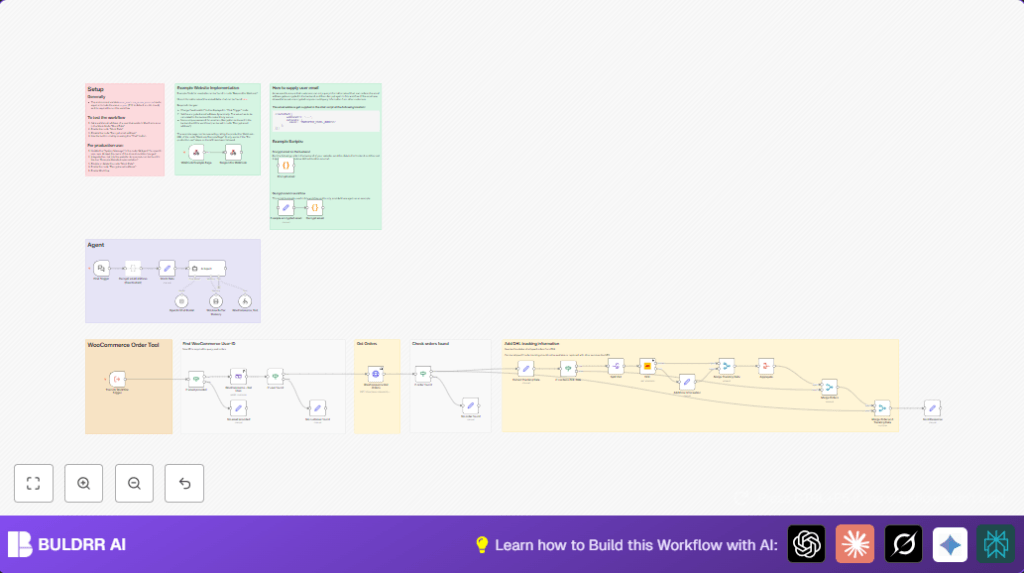

What This Workflow Does
This workflow helps customer support teams get order details and shipment status fast and safe.
It stops them from checking things by hand in WooCommerce or tracking sites.
The process uses encrypted emails from chat users to find their orders and shows current DHL shipment updates quick.
It keeps customer data private and returns clear info in the chat.
Who Should Use This Workflow
This workflow is good for online stores that sell with WooCommerce.
It works best if support agents spend time answering common order questions.
It helps reduce mistakes and speeds up replies to customers.
Tools and Services Needed
- WooCommerce API account: Lets you read customer and order info.
- DHL API account: For checking live shipment statuses.
- n8n Workflow Automation account: Cloud or self-host n8n works.
- OpenAI API key: Powers the AI chat agent in the workflow.
- Basic JavaScript skills: To understand encryption and decryption code nodes.
- Ability to add chat widget: On your website so encrypted emails can be sent safely.
Beginner Step-by-Step: How to Use This Workflow in n8n
Step 1: Download and Import Workflow
- Download this workflow file using the Download button on this page.
- Go inside your n8n editor.
- Use “Import from File” to add the workflow into n8n.
Step 2: Add Credentials
- In n8n, enter your WooCommerce API credentials into the WooCommerce nodes.
- Enter your DHL API keys for the DHL nodes.
- Add your OpenAI API key in the AI Agent nodes.
Step 3: Update Identifiers and URLs
- Change any IDs like customer IDs or API parameters if needed.
- Update any emails, channels, or file paths based on your setup.
- In the chat widget served by the Respond to Webhook node, set the webhook URL and encryption password correctly.
Step 4: Test the Workflow
- Send a test message from your chat widget or directly to the webhook with an encrypted email.
- Check if the workflow returns order and shipment data correctly.
Step 5: Activate for Production
- Enable all nodes.
- Turn on the workflow in n8n to listen for live chat requests.
Workflow Inputs, Processing, and Outputs
Inputs
- Encrypted customer email sent via chat interface to the Chat Trigger webhook.
Processing Steps
- The email is decrypted securely inside the Decrypt email address code node.
- The workflow checks if the email is provided. If missing, returns an error.
- Fetch customer data from WooCommerce using the decrypted email with WooCommerce customer getAll node.
- If no customer found, return a message.
- Fetch all orders for the customer via WooCommerce REST API in the WooCommerce Get Orders HTTP Request node.
- Check if orders exist, else report no orders.
- For each order, extract DHL shipment tracking metadata.
- If tracking data exists, split each item to query DHL API for live status.
- Handle cases where tracking info is missing with user-friendly messages.
- Merge the order data with DHL shipment statuses.
- Send consolidated order and shipment status back to chat user.
- The AI Agent node uses OpenAI to create natural, clear responses with context memory.
Outputs
- A detailed and accurate response in the chat showing orders and current shipment status or helpful error messages.
Handling Common Edge Cases or Failures
- If email encryption or decryption fails, the workflow returns “No customer with that email address could be found.” This usually means the password used does not match.
- If a customer exists but has no orders, a “No order could be found.” message is returned.
- If DHL API calls fail, verify tracking number format and DHL API permissions.
Customization Ideas
- Change the store name and support policies inside the AI Agent node’s systemMessage field.
- Add support for other carriers like UPS or FedEx by replacing or adding shipping API nodes.
- Update encryption passwords in code nodes to match your security keys.
- Edit the chat widget HTML in the Respond to Webhook node to match your website style.
Summary of Results
✓ Saves support agents hours by automating order and shipment lookups.
✓ Keeps customer data private via encrypted emails.
✓ Gives customers fast, accurate order and shipping info in the chat.
✓ Minimizes human errors and stops privacy issues.
✓ Easy to customize for different stores and carriers.
