
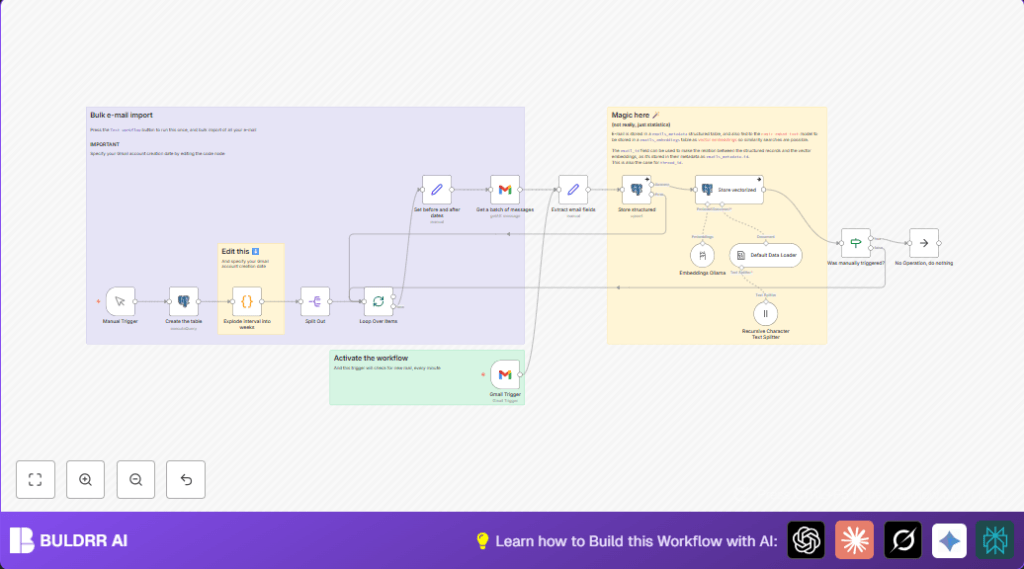

What This Workflow Does
This workflow listens for new Gmail emails every minute.
It takes full email details like text, sender, receivers, date, subject, and attachments.
Then, it turns the email text into vector numbers using the Ollama embedding model.
It saves the email info and vectors into a PostgreSQL database with PGVector support.
You get a structured and searchable email database that helps find similar emails fast.
This helps save many hours manually sorting emails and avoids missing important info.
The setup also lets you import old emails in weekly batches easily.
Who Should Use This Workflow
If you get many Gmail emails and want to analyze or search them quickly, this is useful.
It fits teams and analysts who spend too much time organizing emails by hand.
The workflow works well for anyone wanting to build an AI-ready email search system.
You do not need deep coding skills but need basic n8n familiarity.
Tools and Services Used
- Gmail API: Fetches emails with metadata and attachments.
- Ollama API: Creates vector embeddings from email texts using the
nomic-embed-text:latestmodel. - PostgreSQL Database: Stores email metadata in
emails_metadataand vector embeddings inemails_embeddingstables. - PGVector Extension: Enables vector storage and similarity search in PostgreSQL.
- n8n Automation Platform: Runs all nodes and logic connecting Gmail, embeddings, and database.
Beginner Step-by-Step: How to Use This Workflow in n8n
Step 1: Import Workflow
- Download the workflow file using the Download button on this page.
- Open the n8n editor where automation is created.
- Use the Import from File option to add the workflow to n8n.
Step 2: Configure Credentials and Settings
- Add your Gmail API credentials in the Gmail Trigger and Gmail nodes.
- Set PostgreSQL credentials in the nodes that connect to the database.
- Enter your Ollama API details in the Embeddings Ollama node.
- Update any IDs, email addresses, table names, or dates if needed for your account.
Step 3: Test the Workflow
- Run the workflow manually once to check connections and see if the database tables get created.
- Verify that emails import to the database and embeddings generate correctly.
Step 4: Activate for Production
- Turn on the Gmail Trigger node to start automatic processing every minute.
- Watch executions in the n8n dashboard and check database contents for data.
- Adjust batch sizes or polling intervals if needed to avoid hitting API limits.
For users self hosting n8n, you can visit self-host n8n for setup resources.
How the Workflow Works: Input → Process → Output
Input
- New Gmail emails arriving in the INBOX label checked every minute.
- Optionally, initial bulk import from historical email data by week intervals.
Processing Steps
- Extracts full email metadata: sender, receivers, subject, date, text, attachments.
- Generates semantic vector embeddings from the email text via Ollama API.
- Upserts email metadata into
emails_metadataPostgreSQL table. - Inserts vector embeddings linked by
email_idintoemails_embeddingstable using PGVector. - Loops through batches when importing history, handling API rate limits carefully.
Output
- A structured PostgreSQL database of emails indexed with vector embeddings.
- Ready for fast similarity search and AI-driven analysis.
- Less manual work organizing emails and fewer missed insights.
Edge Cases and Possible Failures
- Gmail API may fail if the credentials expired or lack permissions.
- Duplicate email ID conflicts can happen if email source sends repeated messages.
- Embedding generation might fail with wrong model name or Ollama API downtime.
- Database insert errors if PGVector extension is missing or table schema differs.
- API limits require tuning batch sizes or polling frequency.
Customization Ideas
- Change embedding model by editing Embeddings Ollama node’s
modelparameter. - Adjust the starting date in the weekly batch code node to import more or less email history.
- Enable or disable attachment processing in Gmail Trigger and metadata extraction.
- Tune batch sizes in SplitInBatches to balance speed and API limits.
- Expand the PostgreSQL tables to add more email fields like flags or labels.
Summary
✓ Saves many manual hours by automating Gmail email import and indexing.
✓ Builds a searchable, vectorized email database with metadata and embeddings.
✓ Supports live email processing and batch historical import.
✓ Enables fast email similarity search for better analysis.
✓ Easy to configure and run inside n8n with simple steps.
