
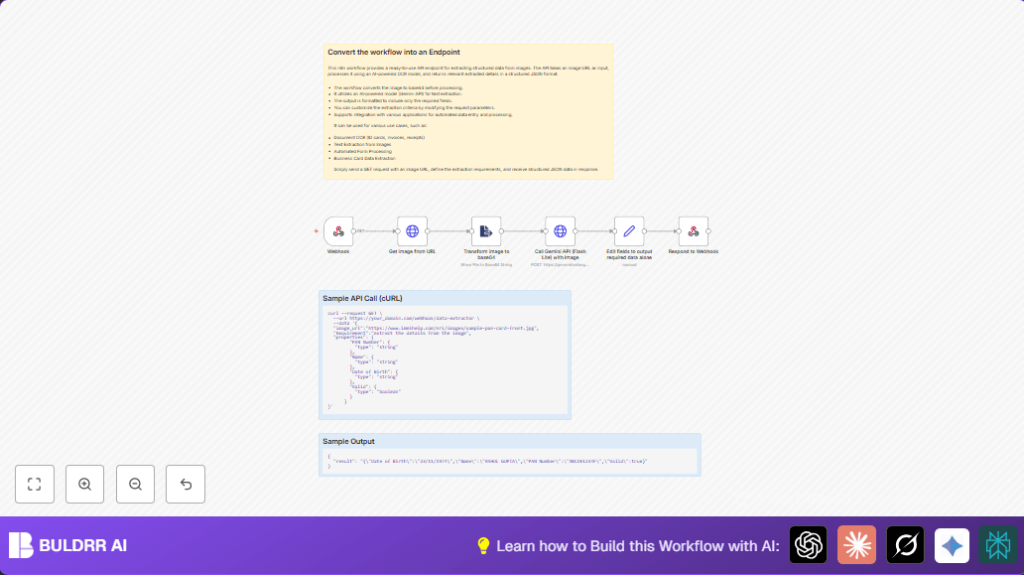

What This Automation Does
This workflow takes in a request with an image URL and what data to extract.
Then it fetches the image and changes it to a base64 string for AI to read.
It sends this data to Google Gemini AI to find the needed info.
Finally, it cleans up the AI result and sends back just the useful data in JSON format.
This saves many hours and mistakes from manual data entry on images.
Inputs, Processing Steps, and Output
Inputs
- Webhook Request: contains the image URL and extraction fields needed.
- Credentials: Google Gemini API key to call AI.
Processing Steps
- Webhook Trigger: receives the request with image URL and data requirements.
- HTTP Request Node: downloads the image binary from the URL.
- Extract From File Node: converts the image binary to a base64 encoded string.
- Call Gemini API Node: sends base64 image plus extraction instructions to Gemini AI.
- Set Node: parses the AI response and extracts just the requested JSON fields.
- Respond to Webhook Node: returns the clean extracted data to the original caller.
Output
The final result is a JSON response with structured fields like names, IDs, or dates extracted from the image.
Who Should Use This Workflow
This workflow is made for people or teams who must read info from images often.
It is good if manual entry wastes time and causes errors.
Anyone using scanned IDs, invoices, or forms images would benefit.
It works especially well if some programming help to set webhooks and API keys exists.
Tools and Services Used
- n8n: automation platform where workflow runs.
- Google Gemini API: AI model used to extract text data from images.
- HTTP Webhook: allows external requests with input data.
- HTTP Request Node: fetches images from URL.
- Extract From File Node: converts images to base64 for AI.
- Set Node: cleans AI response to show only needed fields.
- Respond to Webhook Node: sends JSON data back to user.
Beginner Step-by-Step: How to Use This Workflow in n8n
Download and Import Workflow
- Click the Download button on this page to get the workflow file.
- Open n8n editor and choose “Import from File” from the menu.
- Select the downloaded workflow file to load it in editor.
Setup Credentials and Settings
- Add Google Gemini API credentials under n8n’s credential manager.
- Check the Webhook node path and confirm it fits your URL scheme.
- Update any IDs, emails, or fields in nodes if needed, especially in the Gemini API JSON body.
- Ensure the JSON inside the Call Gemini API uses correct expressions for the fields to extract, this can be copied from the workflow.
Test the Workflow
- Send a test HTTP POST request to the webhook URL with a JSON body including
image_urlandRequirementfields. - Check the workflow’s execution in n8n to confirm data flows through each node without errors.
Activate for Production Use
- Turn on the workflow by toggling it active in n8n.
- Provide the webhook URL to any system or user who needs to send images for extraction.
- Monitor execution logs for errors and adjust parameters like extraction fields or token limits as needed.
If running self-host n8n, consider referring to self-host n8n information for hosting security and accessibility.
Customization Ideas
- Change fields for extraction by modifying the
propertiesobject in the webhook JSON. - Switch the Gemini AI model URL to others like “gemini-2.0-chat” to adjust AI behavior.
- Adjust
maxOutputTokensto allow longer or shorter AI responses depending on image complexity. - Modify
mimeTypeto handle image formats other than JPEG, like PNG.
Troubleshooting Common Issues
- Failed to fetch image or invalid URL: Check if the image URL is correct and public. Test by opening URL in browser.
- Gemini API JSON schema errors: Verify that the
propertiesin the webhook JSON matches JSON schema rules. - Base64 encoding errors: Confirm the image download is successful and Extract From File node uses ASCII encoding.
Pre-Production Checklist
- Make sure the webhook URL is reachable publicly.
- Test different kinds of document images.
- Validate the Google Gemini API credentials and quota.
- Confirm
propertiesin test requests match expected schemas. - Backup the workflow before enabling it in production.
Deployment Guide
Activate the workflow by enabling the active toggle in n8n.
Give the webhook URL to systems or users who will send image extraction requests.
Watch n8n’s execution dashboard for any errors or delays.
Change AI model or token limits as needed based on how often and how large the inputs are.
No extra setup needed if using n8n cloud or a properly configured self-host n8n instance.
Summary
✓ Saves hours of manual data entry by auto extracting text from images.
✓ Eliminates many common human errors in data transcription.
✓ Provides flexible API for automated document processing.
➔ Outputs clean JSON structured data ready to use.
➔ Can be customized to extract different fields and support various image types.
