

1. What This Workflow Does
This n8n workflow helps you do deep research automatically from one question.
It turns your research query into specific searches, collects web results, finds key facts, and writes a clear report.
It saves you many hours by doing what usually takes 20+ hours manually.
The outcome is a neat research report that covers your topic well and shows sources.
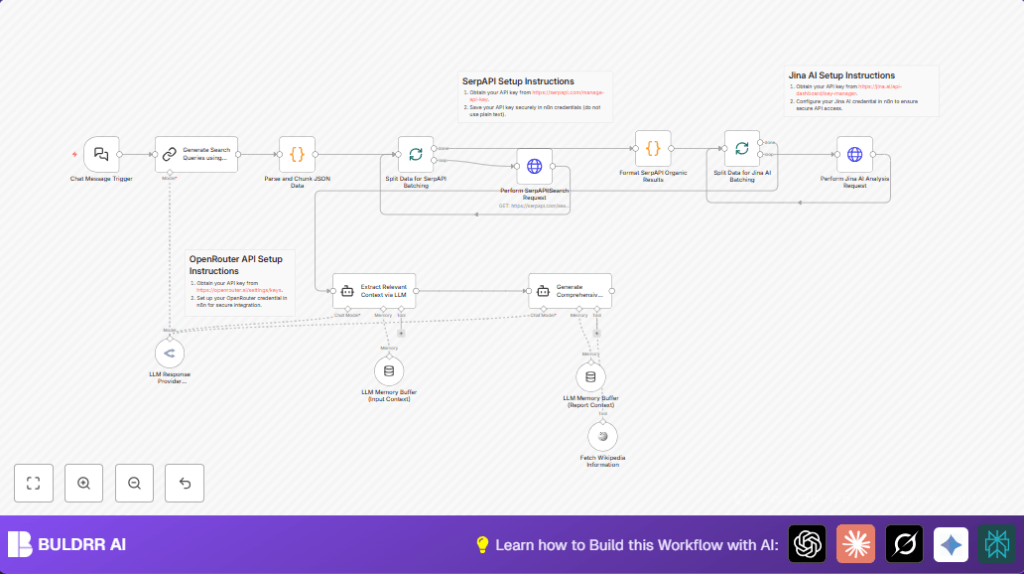
The workflow works like this: from your question, it makes 4 smart search queries with AI.
Then it uses SerpAPI to get Google search results for each query.
It cleans and cuts the results into pieces.
Next, it sends webpage contents to Jina AI for extracting important facts.
It adds info from Wikipedia for more detail.
Finally, it writes a full report with key points and source links in Markdown format.
This replaces many manual steps and makes faster, better research easy.
2. Who Should Use This Workflow
This workflow is for anyone who needs fast, deep info on a topic without spending full days searching.
It is great for market researchers, students, writers, or analysts who want clear, detailed reports quickly.
No deep tech skills needed since the automation handles web queries and data parsing for you.
It works with just a simple question from you.
3. Tools and Services Used
- OpenRouter API: runs the large language model to create search queries and summaries.
- SerpAPI: fetches Google search results for the generated queries.
- Jina AI: analyzes webpage contents to find relevant facts.
- Wikipedia tool: adds more trustworthy info for richer reports.
- n8n nodes: like Chat Message Trigger, code nodes, HTTP Request nodes, and LangChain nodes to connect all pieces.
4. Beginner Step-by-Step: How to Use This Workflow in n8n
Download and Import
- Download the workflow file using the Download button on this page.
- Open your n8n editor and choose “Import from File” to add the workflow.
Configure Credentials and Settings
- Add your OpenRouter API Key in the appropriate credential node.
- Add your SerpAPI API Key where the HTTP Request node for search is set.
- Add your Jina AI API Key to the content analysis HTTP Request node.
- If needed, update IDs, emails, or folder paths used in the workflow to match your environment.
- Check the prompts or URLs in code nodes and edit if your setup requires different parameters or formats.
Test and Activate
- Send a test query through the Chat Message Trigger or manually run the workflow to check outputs.
- Review the results, fix any errors like invalid keys or missing data.
- Activate the workflow for production use once tests pass.
Tip: Make sure the webhook for the Chat Message Trigger is accessible to start workflow automatically.
5. Inputs, Processing Steps, and Outputs
Inputs
- User research question typed or sent to the chat interface.
Processing Steps
- LLM creates 4 smart search queries from the user question.
- Search queries are split into batches for API calls.
- SerpAPI fetches Google organic results for each query.
- Results are cleaned and simplified to important fields (title, URL, source).
- Chunks of data are processed by Jina AI to extract relevant facts.
- Optional Wikipedia data is fetched to fill gaps.
- LLM agent extracts focused context pieces from all data.
- Final comprehensive report is generated in Markdown with findings and references.
Outputs
- Well-structured Markdown research report with key insights and source links.
6. Edge Cases and Failure Handling
If JSON parsing errors happen, it means the LLM output isn’t proper JSON.
Try cleaning the prompt or check the output formatting.
SerpAPI requests failing with authorization or quota errors mean your API key is wrong or limit exceeded.
Verify keys and monitor usage on SerpAPI dashboard.
Empty or unauthorized Jina AI data usually points to wrong API headers or bad URLs.
Check the HTTP Request node setup carefully.
7. Customization Ideas
- Change how many search queries the LLM creates by editing the prompt in the search query node.
- Switch SerpAPI for Bing or DuckDuckGo by changing the HTTP Request node URL and params.
- Add sections like “Recommendations” in the final report’s prompt to get more detailed summaries.
- Tweak how data is split into chunks by changing the chunk size in the code node to balance speed and cost.
- Use a different LLM model in the OpenRouter node to try faster or cheaper options.
8. Deployment Notes
After setting up, keep your API keys up to date to avoid downtime.
Make sure the webhook URL for the Chat Message Trigger is public and working.
If you want better control or reliability, consider self-host n8n.
This can help run the workflow on your server or VPS.
Monitor workflow runs often to catch errors early and keep data safe.
Back up workflow settings before big changes.
9. Summary of Benefits
✓ Saves 15+ hours weekly on deep research by automating web search and synthesis.
✓ Produces clear, well-structured Markdown reports with sources for easy sharing.
✓ Handles complex tasks like query splitting, multi-source analysis, and fact extraction without user input.
✓ Works with minimal user query input, ideal for non-tech users.
✓ Helps keep reports accurate and consistent by reducing human error.
