
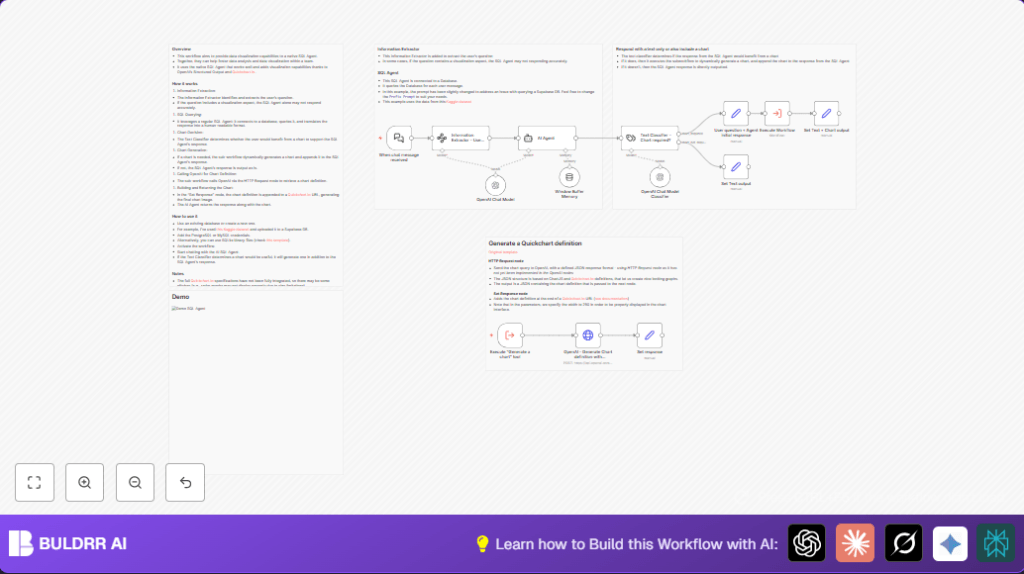

What This Automation Does
This workflow takes a user’s normal question about coffee sales data and turns that into a database query and an answer fast.
It solves the problem of writing SQL queries and making charts by hand, which takes a lot of time and can have mistakes.
The user gets a clear answer text, and if helpful, a chart image to understand sales trends quickly.
How This Workflow Works
Inputs
The main input is a chat message where the user types a question in normal language.
Processing Steps
- Extract user question: The workflow cleans the chat input to get the exact question for SQL query.
- Generate SQL query: An AI Agent uses the question to create a safe PostgreSQL SELECT query and runs it.
- Classify output type: Another AI model checks if results should show a chart or just text.
- If chart required: A sub-workflow calls OpenAI to create a Chart.js definition JSON based on the SQL results.
- Create chart image: The chart JSON is put into a Quickchart.io URL to make a chart image link.
- Combine and send response: The final reply merges the text answer with the chart graphic if needed.
Output
The output is a message with answered text and an optional chart image URL.
Who Should Use This Workflow
Anyone who needs to get data answers from SQL databases but does not want to write SQL manually can use it.
This is good for beginners or data people who want quick charts and answers from their data.
Tools and Services Used
- n8n automation platform: Runs the workflow and connects the nodes.
- PostgreSQL database: Contains the coffee sales data and runs SQL queries.
- OpenAI GPT API: Generates SQL queries, classifies whether a chart is needed, and creates Chart.js JSON.
- Quickchart.io: Turns Chart.js JSON into a chart image URL.
Beginner Step-by-Step: Using This Workflow in n8n Production
Download and Import
- Click the Download button on this page to get the workflow file.
- Open your n8n editor.
- Use the Import from File option to upload the downloaded workflow.
Configure Credentials
- Add your PostgreSQL database credentials in the AI Agent node settings.
- Enter your OpenAI API Key in the OpenAI Chat Model and classification nodes.
- If using different databases or channels, update the respective node parameters, like table names.
Update IDs and Prompts
- Check any IDs for sub-workflows and ensure they match with imported workflows.
- Make sure input prompts or query prefix strings are as you want them; copy and paste code snippets if provided.
Test the Workflow
- Send a test chat message to your webhook URL to confirm the workflow triggers.
- Review output in execution logs to see the answer text and chart if shown.
Activate for Production
- Switch the workflow from inactive to active in n8n.
- Share the webhook URL with users who will send data questions.
- Monitor workflow runs in n8n to catch any errors and fix them.
If using self-host n8n, check self-host n8n for hosting help.
Inputs and Outputs
- Input: Chat message text with user question about coffee sales data.
- Output: Text answer describing sales insights.
- Optional Output: Chart image URL illustrating results if useful.
Handling Errors and Special Cases
- SQL syntax errors: Check the AI Agent prompt and database permissions to fix query problems.
- Chart does not render: Validate Chart.js JSON and simplify if Quickchart errors happen.
- No workflow output: Confirm webhook settings and node connections are correct.
Customization Ideas
- Change SQL prompt in AI Agent to support other databases like MySQL.
- Adjust Quickchart URL to make bigger or smaller charts.
- Add new classification options to decide between charts and tables.
- Update OpenAI nodes to new GPT versions as they come out.
Summary
✓ Get fast data answers and charts from natural language questions.
✓ Avoid manual SQL writing and chart creation.
→ Save time and reduce mistakes in reporting.
→ Use simple chat questions to unlock data insights instantly.
