
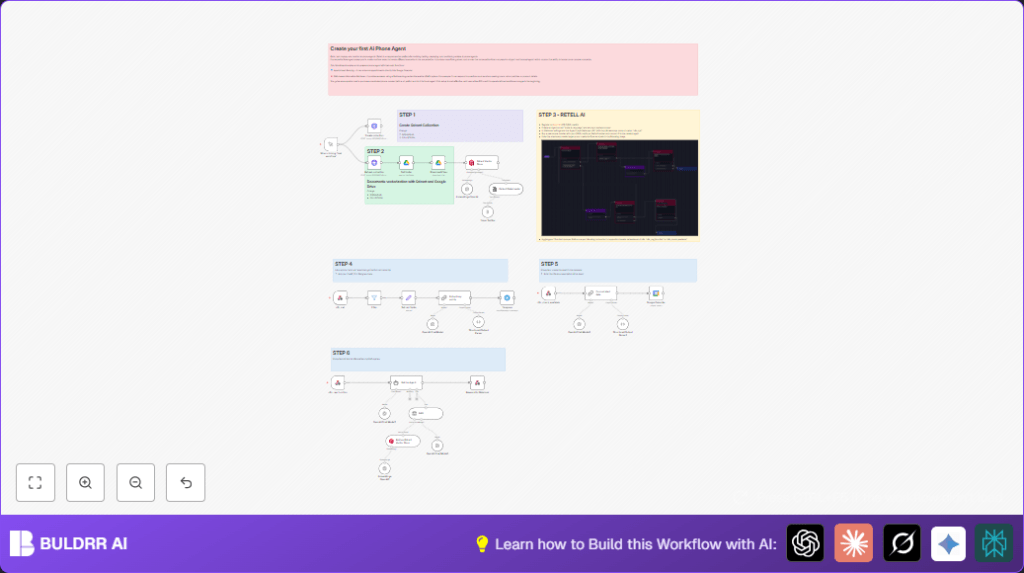

What This Workflow Does
This workflow automates phone call handling using AI. It captures full call transcripts from RetellAI, extracts important customer details, schedules appointments in Google Calendar, and answers customer questions using company knowledge stored in a Qdrant vector database. Notifications with call summaries go to Telegram. This saves time and prevents lost sales caused by manual errors and delays.
Who Should Use This Workflow
Retail store owners or small teams dealing with many customer phone inquiries would benefit. It helps those who lose leads due to slow or error-prone manual call notes. Users wanting to reduce phone handling time and improve booking accuracy will find it useful.
Tools and Services Used
- RetellAI: Captures phone calls and sends call events.
- n8n: Orchestrates the automation workflow.
- OpenAI GPT-4o-mini: Summarizes call transcripts and extracts structured data.
- Qdrant Vector Search: Stores company documents as vectors and enables knowledge retrieval.
- Google Drive & Google Calendar: Stores documents and manages appointment bookings.
- Telegram Bot API: Sends call summary notifications.
- Twilio (optional): Connects phone numbers to RetellAI agents.
Inputs, Processing Steps, and Outputs
Inputs
- Phone call events from RetellAI including transcripts and call metadata.
- Company documents stored in a Google Drive folder.
Processing Steps
- Filter call events to only process ended calls.
- Extract transcript and call data.
- Use OpenAI model to summarize and extract customer info such as name, email, phone, and appointment date.
- Vectorize company documents using OpenAI embeddings and upload to Qdrant.
- Perform Retrieval-Augmented Generation (RAG) queries on Qdrant to answer customer questions.
- Create appointment events in Google Calendar from extracted date.
- Send summarized call info and customer details to a Telegram chat.
Outputs
- Scheduled Google Calendar appointments.
- Telegram messages with call summaries.
- AI-generated answers referencing company knowledge accessible during calls.
Beginner Step-by-Step: How to Use This Workflow in n8n
Step 1: Import Workflow
- Download the workflow file using the Download button on this page.
- Inside the n8n editor, select “Import from File” and upload the downloaded workflow.
Step 2: Setup Credentials and Config
- Add RetellAI, OpenAI, Qdrant, Google Drive, Google Calendar, and Telegram API credentials in n8n credentials manager.
- Update folder IDs for Google Drive documents, Telegram chat ID, and any email or channel fields inside the nodes.
- Ensure webhook URLs in RetellAI agent settings match the Webhook node URLs in n8n.
Step 3: Test Workflow
- Trigger an example call event from RetellAI or send a sample webhook payload to the Webhook node to confirm data flows properly.
- Check that OpenAI summarization works and Telegram notifies the chat.
Step 4: Activate Workflow
- Once verified, enable workflow execution in n8n to run automatically on new calls.
- Optionally connect Twilio phone number to RetellAI for live call routing.
You can use the self-host n8n options if you want a private server setup.
Inputs and Outputs in Detail
Inputs
- Call data from RetellAI webhook including transcript, caller info, call timing, and recording URLs.
- Company knowledge documents from Google Drive folder.
Outputs
- Clean, summarized customer info in JSON format.
- Google Calendar events for appointments.
- Telegram messages with call summaries.
- Contextual answers to customer questions using vector search results.
Handling Errors and Edge Cases
- If the webhook does not trigger, check the URL in RetellAI and verify filter nodes allow “call_ended” or “call_analyzed” events.
- If OpenAI response fails JSON parsing, match the AI prompt output with the expected schema exactly.
- Google Calendar events fail if date format is wrong or OAuth credentials are missing.
- Telegram messages will not send if the chat ID or bot token is invalid or missing admin rights.
- Check each node’s error messages inside n8n execution logs for hints.
Customization Ideas
- Switch OpenAI model in OpenAI Chat Model nodes to save cost or improve results.
- Edit the prompt text in the summarization node to fit company style.
- Add more documents to the Google Drive folder to enrich the Qdrant knowledge base.
- Modify Google Calendar event details to include extra info like customer phone.
- Change notification node from Telegram to Slack or email if preferred.
Summary
✓ Automates phone call transcription and follow-up tasks.
✓ Extracts key customer info and schedules appointments.
✓ Answers customer questions using up-to-date company docs.
✓ Sends instant team notifications over Telegram.
→ Saves many hours of manual work each week.
→ Improves customer service quality and speed.
