

Deep Research Automation with n8n and OpenAI for In-Depth Reports

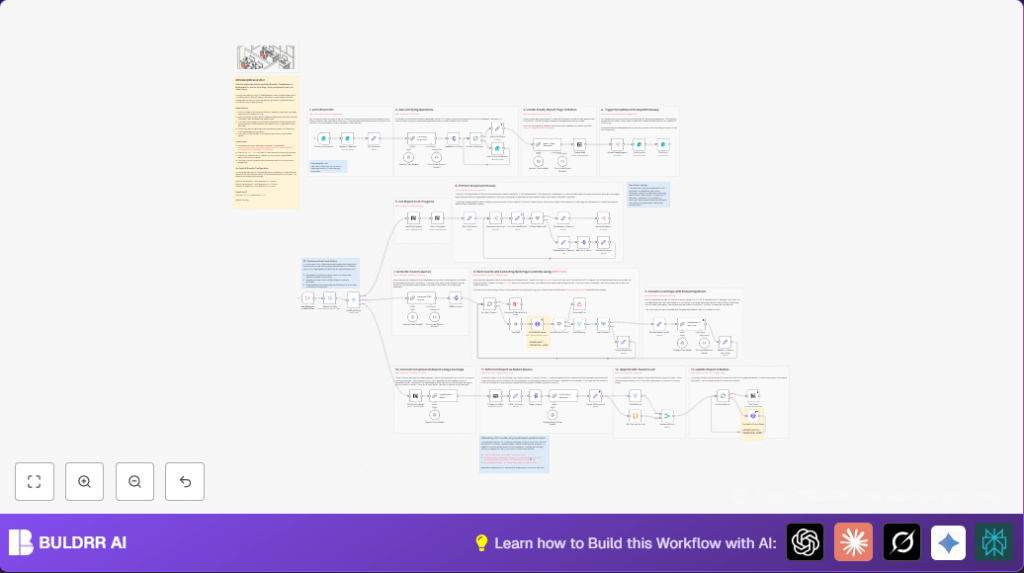
This workflow automates complex, multi-step deep research using n8n, OpenAI, and Apify, transforming user queries into comprehensive reports stored in Notion. It tackles the challenge of lengthy manual research, saving hours by recursively gathering and summarizing web data.
formTrigger
set
lmChatOpenAi
+16
Workflow Identifier: 1139
NODES in Use: formTrigger, set, lmChatOpenAi, chainLlm, outputParserStructured, form, splitOut, splitInBatches, executeWorkflowTrigger, executeWorkflow, noOp, if, filter, aggregate, stopAndError, notion, httpRequest, code, markdown

Press CTRL+F5 if the workflow didn't load.

Learn how to Build this Workflow with AI:

Visit through Desktop for Best experience

Opening Problem Statement

Meet Sarah, a market analyst at a fast-growing tech firm. Every week, she faces the tedious task of researching emerging technologies and trends. Sarah spends hours scouring countless web pages, searching for credible sources, extracting relevant data, and then trying to summarize her findings in a coherent report. The process is not only time-consuming but prone to oversight and inconsistent depth. On average, Sarah spends 8-10 hours per research topic, sometimes missing critical information due to the overwhelming volume of data. What if there was an automated way to conduct deep, multi-layered research and produce detailed reports quickly, alleviating the bottleneck Sarah faces?

What This Automation Does

This n8n workflow, DeepResearcher, is designed to automate the entire deep research process, transforming raw user input into a detailed, organized research report that is automatically saved in a Notion database. When triggered by a user’s query through a form, the workflow performs a recursive web search and scraping process enhanced by AI-generated queries to dig deeper into the topic. Specifically, it:

  • Receives a research prompt and parameters for depth and breadth of inquiry via an interactive n8n form.
  • Generates clarifying questions to refine the research direction.
  • Executes iterative cycles of generating search queries, scraping web content through Apify, and extracting key learnings from the collected data using OpenAI’s advanced language models.
  • Aggregates all learnings across several iterations to build a comprehensive data foundation.
  • Generates a detailed research report in markdown format using AI reasoning models.
  • Converts the markdown report into Notion API blocks and uploads the structured report into a Notion page, complete with source links.
  • Completes the automation asynchronously so the user can close the form and wait for the research without needing to stay connected.

For Sarah, this means cutting down research time from nearly a full day to minutes, with consistent, high-quality outputs every time.

Prerequisites ⚙️

  • n8n Account: An active n8n workflow automation platform account to deploy and manage the workflow.
  • OpenAI Account: Access to OpenAI’s API with permission to use the o3-mini model for generating queries, clarifying questions, and producing research reports.
  • Apify API Account: Subscription to Apify for web scraping and SERP scraping services leveraging their act for retrieving and extracting relevant web content.
  • Notion Account: A Notion workspace and a designated database to store research reports, structured to accept pages with title, description, status, and request ID properties.
  • Publicly Accessible Endpoint: The workflow’s form URL must be published and accessible to users for submitting research prompts.
  • Optional – Self-hosting n8n: You may self-host n8n for full control and enhanced security. See options at Hostinger Self-hosting Guide.

Step-by-Step Guide

1. Capture User Research Request with n8n Form

Navigate to the Research Request form trigger node. Configure the form to ask the user a research prompt and allow them to select the depth and breadth parameters using range sliders. These sliders define how many subqueries and sources the research will cover, balancing thoroughness with performance and cost. The form also includes a mandatory acknowledgment checkbox about increased cost/time for higher depth and breadth selections. Submitting this form triggers the workflow.

2. Initialize Variables and Request ID Saving

The Set Variables node captures inputs from the form and assigns internal variables such as the unique request_id (based on execution ID), the research prompt, and parsed depth and breadth values. This prepares the data context for subsequent processing.

3. Generate Clarifying Questions with OpenAI Chat Model

The Clarifying Questions node uses OpenAI’s o3-mini model to produce up to three follow-up questions that refine and clarify the user’s initial research query. This reduces ambiguity and improves the quality of deeper research.

4. Collect Answers via n8n Form for Clarification

Using the Ask Clarity Questions form node, users answer the AI-generated clarifying questions. This step loops dynamically, enabling iterative refinement if necessary.

5. Prepare Initial Query for Recursive Research

The Get Initial Query node aggregates the original research prompt and the user’s clarifying answers. This combined query sets the foundation for the recursive deep research process.

6. Recursive DeepResearch Subworkflow Triggers

This automation uses subworkflow triggers (DeepResearch Subworkflow node) to run recursive cycles. Based on the depth and breadth specified, the workflow generates subqueries, collects data from web searches via Apify’s RAG Web Browser act, and extracts learnings through OpenAI reasoning models. The depth controls iterations of these recursive research subcycles, and breadth controls the number of unique queries explored per iteration.

7. Generating SERP Queries with LangChain LLM Node

The Generate SERP Queries chain LLM node creates concise keyword-based search queries for this research, influenced by previous learnings and structured with strict instructions to avoid redundant queries.

8. Scraping Web Pages Using Apify

The RAG Web Browser HTTP Request node calls Apify’s web scraping act to fetch search result data excluding non-informative domains (e.g., TikTok, YouTube).

9. Split and Validate Scraped Content

Using Valid Results and Has Content? nodes, the workflow filters and processes only successful, content-rich search results.

10. Extract Learnings from Content with OpenAI Reasoning Model

The DeepResearch Learnings LLM node consumes scraped content markdown and generates concise, dense learnings capturing facts, entities, metrics, and critical insights for each query.

11. Iterate or Stop Based on Depth Threshold

The Accumulate Results and Is Depth Reached? nodes check if the recursion depth limit has been reached. If not, the workflow prepares new queries and continues recursively until the preset research depth is fulfilled.

12. Combine Learnings and Generate Final Report

Once the deepest level is reached, the full set of learned data is provided to the DeepResearch Report LLM node, which composes a detailed, markdown-formatted research report incorporating all gathered insights.

13. Create Placeholder Notion Page and Update Status

The Create Row node creates a new entry in a Notion database with the research project title and initializes the status as “Not started.” Shortly after, the Set In-Progress node updates the status to “In progress” once research begins.

14. Convert Markdown Report to Notion Blocks

The workflow converts the markdown report to HTML using the Convert to HTML node, then splits this HTML semantically (HTML to Array) into meaningful chunks like headings, tables, and lists.

15. Convert HTML Chunks to Notion API Block Objects with AI

The Notion Block Generator LangChain LLM node transforms each HTML segment into Notion API block JSON objects formatted for headings, paragraphs, lists, and tables, maintaining content fidelity.

16. Upload Notion Blocks to Report Page

The Upload to Notion Page HTTP Request node appends these blocks sequentially to the originally created Notion page through repeated API calls, ensuring the page is built incrementally.

17. Append Source URLs as Bulleted Lists in Notion

The URL Sources to Lists Code node generates a bulleted list block of all source URLs referenced during the research and appends this section to the Notion report.

18. Mark the Notion Report as Done

Lastly, the Set Done Notion node updates the database page’s status to “Done” and sets the last updated timestamp, signaling completion of the automated research task.

Customizations ✏️

  • Adjusting Depth and Breadth Parameters: In the Research Request form node, change the slider maximum values or default setting to control recursion intensity and data volume, balancing research detail vs cost and run time.
  • Switching AI Models: Modify each LangChain LLM nodes (OpenAI Chat Model nodes) to use different OpenAI models or embedding different services like Google Gemini Chat Model for report generation or query expansion to leverage alternative AI capabilities.
  • Swap Web Scraper Service: Replace the RAG Web Browser HTTP Request node with other web scraping services or APIs that better fit your geographic or language requirements.
  • Change Notion Integration: Customize the Create Row and Notion update nodes to work with different Notion databases or page properties, or switch to other document management tools for storing final reports.
  • Modify Report Formatting: Edit the prompt text in the DeepResearch Report LLM node to change report length, style, or focus to better suit your audience’s needs.

Troubleshooting 🔧

Problem: “Apify Auth Error! Check your API token is valid…”
Cause: Invalid or misconfigured Apify API token or incorrect header format.
Solution: Navigate to the RAG Web Browser node credentials and ensure your Apify API key is correctly entered with the prefix “Bearer “. Retest to restore scraping access.

Problem: “No content found” or empty results from scraping steps.
Cause: Search query restrictions or network issues causing no valid crawled content.
Solution: Check the query format in the Generate SERP Queries node and ensure filters do not overrestrict (e.g., excluded domains). Also, verify your Apify act’s quota and logs.

Problem: “Error converting markdown to Notion blocks” or incomplete report upload.
Cause: Malformed markdown or API rate limits causing failures.
Solution: Review the Notion Block Generator node and Upload to Notion Page node logs; consider adding retry logic or splitting large content chunks smaller.

Pre-Production Checklist ✅

  • Verify your OpenAI API key has access to the o3-mini and related language models.
  • Ensure Apify API credentials are correctly set and test web crawling functionality.
  • Confirm configured Notion database exists and contains required properties: Title, Description, Request ID, and Status.
  • Test the form publicly to confirm it collects user input and triggers the workflow.
  • Simulate a research request with small depth/breadth parameters to monitor each step’s output.
  • Backup your Notion data before large-scale testing to prevent data loss.

Deployment Guide

Once your workflow is configured and tested, activate it by enabling it in the n8n editor. Share the public form URL with your team or users. Monitor the workflow executions and Notion database entries to ensure smooth operation. Use n8n’s built-in execution logs for debugging. For higher volume demand, consider scaling your n8n instance resources accordingly.

FAQs

Q: Can I use another AI model instead of OpenAI’s o3-mini?
A: Yes, you can substitute the AI model nodes with other accessible models like GPT-4 or Google Gemini, but adjust prompts for compatibility.

Q: Does this workflow consume a lot of API credits?
A: The recursive nature and depth/breadth selections increase API calls, so monitor your usage to manage costs effectively.

Q: Is my research data secure?
A: Data is handled within your n8n instance and passed to trusted APIs. Ensure your API tokens are secure.

Conclusion

By following this comprehensive DeepResearcher workflow, you have automated the once arduous, error-prone research process into a smooth, recursive data gathering and reporting machine. This saves analysts like Sarah many hours per task and provides consistent, enriched insights. This automation illustrates the power of combining n8n’s workflow capabilities, OpenAI’s language models, Apify’s web scraping, and Notion’s organizational features for practical AI enhancements.

Next steps could include adapting this workflow to other languages, integrating with corporate knowledge bases, or developing real-time research update notifications. Keep experimenting and happy automating!

Promoted by BULDRR AI

Related Workflows

Automate Viral UGC Video Creation Using n8n + Degaus (Beginner-Friendly Guide)

Learn how to automate viral UGC video creation using n8n, AI prompts, and Degaus. This beginner-friendly guide shows how to import, configure, and run the workflow without technical complexity.
Form Trigger
Google Sheets
Gmail
+37
Free

AI SEO Blog Writer Automation in n8n

A complete beginner guide to building an AI-powered SEO blog writer automation using n8n.
AI Agent
Google Sheets
httpRequest
+5
Free

Automate CrowdStrike Alerts with VirusTotal, Jira & Slack

This workflow automates processing of CrowdStrike detections by enriching threat data via VirusTotal, creating Jira tickets for incident tracking, and notifying teams on Slack for quick response. Save hours daily by transforming complex threat data into actionable alerts effortlessly.
scheduleTrigger
httpRequest
jira
+5
Free

Automate Telegram Invoices to Notion with AI Summaries & Reports

Save hours on financial tracking by automating invoice extraction from Telegram photos to Notion using Google Gemini AI. This workflow extracts data, records transactions, and generates detailed spending reports with charts sent on schedule via Telegram.
lmChatGoogleGemini
telegramTrigger
notion
+9
Free

Automate Email Replies with n8n and AI-Powered Summarization

Save hours managing your inbox with this n8n workflow that uses IMAP email triggers, AI summarization, and vector search to draft concise replies requiring minimal review. Automate business email processing efficiently with AI guidance and Gmail integration.
emailReadImap
vectorStoreQdrant
emailSend
+12
Free

Automate Email Campaigns Using n8n with Gmail & Google Sheets

This n8n workflow automates personalized email outreach campaigns by integrating Gmail and Google Sheets, saving hours of manual follow-up work and reducing errors in email sequences. It ensures timely follow-ups based on previous email interactions, optimizing communication efficiency.
googleSheets
gmail
code
+5
Free