
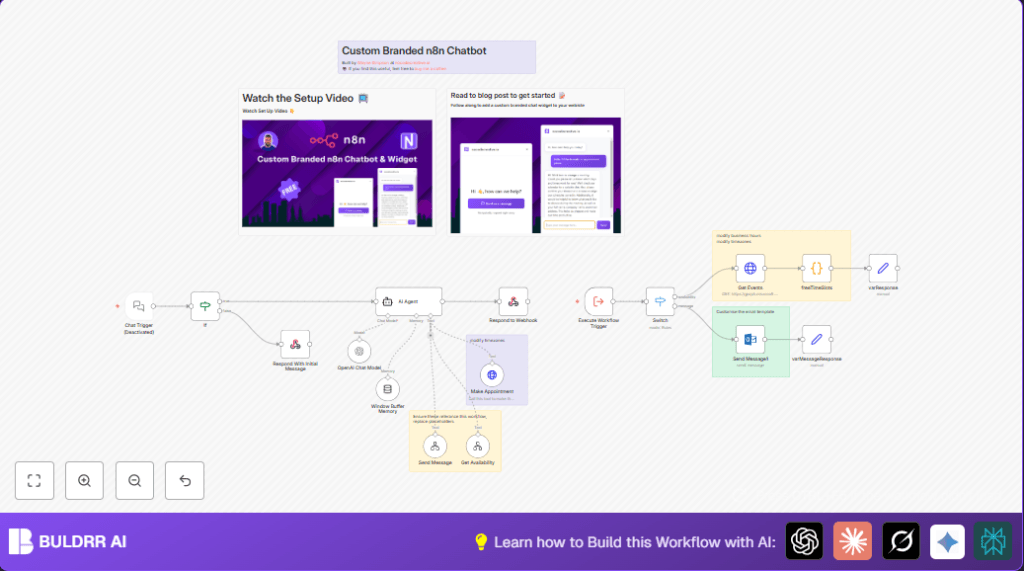

What This Workflow Does ⚙️
This workflow takes chat requests from a website and books appointments automatically in Microsoft Outlook.
It finds free times during business hours in the next 14 days and uses AI to talk to clients about booking.
It saves time by avoiding manual checking and double bookings.
You get an automatic calendar with precise 30-minute meetings set as Teams calls.
Clients get fast replies, and scheduling errors go down.
Who Should Use This Workflow
This is good for people who get many meeting requests online but don’t want to spend hours managing them.
Non-technical users who want to avoid email back-and-forth about scheduling will benefit a lot.
Tools and Services Used
- Microsoft Outlook Calendar API: To read and write calendar events.
- OpenAI GPT-4: To chat with clients and confirm booking details.
- n8n Automation Platform: To connect all steps and run the workflow.
- Website Webhook: To receive chat messages from website chatbot.
Beginner Step-by-Step: How to Use This Workflow in n8n
Download and Import Workflow
- Click the Download button on this page to get the workflow file.
- Open your n8n editor where you want to run this.
- Use “Import from File” option in n8n and load the downloaded workflow.
Configure Credentials and Settings
- Add Microsoft Outlook OAuth2 credentials with calendar permission.
- Enter your OpenAI API key into the AI Agent node.
- Update any email addresses or IDs if needed in the appointment creation or notification nodes.
- Check and update the webhook URL if your frontend needs a different endpoint.
- Copy-paste any code or prompt text exactly from the input sections if present.
Test and Activate
- Run the workflow manually with a test chat message to check if it works.
- Look at output messages and calendar events to confirm.
- Fix any errors you see, especially permissions or keys.
- When ready, activate the workflow for continuous use.
For better security and customization, consider self-host n8n.
Inputs, Processing, and Outputs
Inputs: Website chatbot messages arrive via the Webhook node.
Calendar events are fetched from Microsoft Outlook for the next 14 days.
Processing: The workflow checks if the chat message has text. If not, it sends a greeting reply. If yes, it uses AI (GPT-4) to understand client questions and intent.
It fetches all busy times, then runs JavaScript code to find free 30-minute slots in UK business hours (Mon-Fri, 8am-6pm).
Based on client intent, it either confirms available appointments or forwards inquiries for manual reply.
Outputs: New calendar events are created in Outlook with Teams meeting details.
Clients receive chat replies with booked times or further instructions.
Fallback emails are sent to notify about unresolved client inquiries.
Customization Ideas
- Change work hours in the freeTimeSlots code node by editing business start and end times.
- Switch timezones in the HTTP request and appointment nodes from ‘Europe/London’ to local time.
- Modify the HTML template in the Microsoft Outlook node for emails to reflect your branding.
- Expand calendar range beyond 14 days in the Get Events HTTP request node.
- Try newer or different OpenAI models by updating the AI Agent node’s settings.
Edge Cases and Failures
- 401 Unauthorized on calendar access: Fix by reauthorizing Outlook credentials in n8n.
- AI replies too generic or empty: Improve AI Agent system prompt with clearer instructions.
- Webhook no response: Check webhook URL is public, enabled, and CORS allows frontend.
Summary and Result
✓ Saves about 5 hours every week by fully automating appointment booking.
✓ Prevents double bookings and manual errors.
✓ Gives clients fast, smart replies confirming available meeting times.
✓ Automatically sets appointments in Outlook with Teams links.
✓ Sends fallback emails so no client message is lost.
