
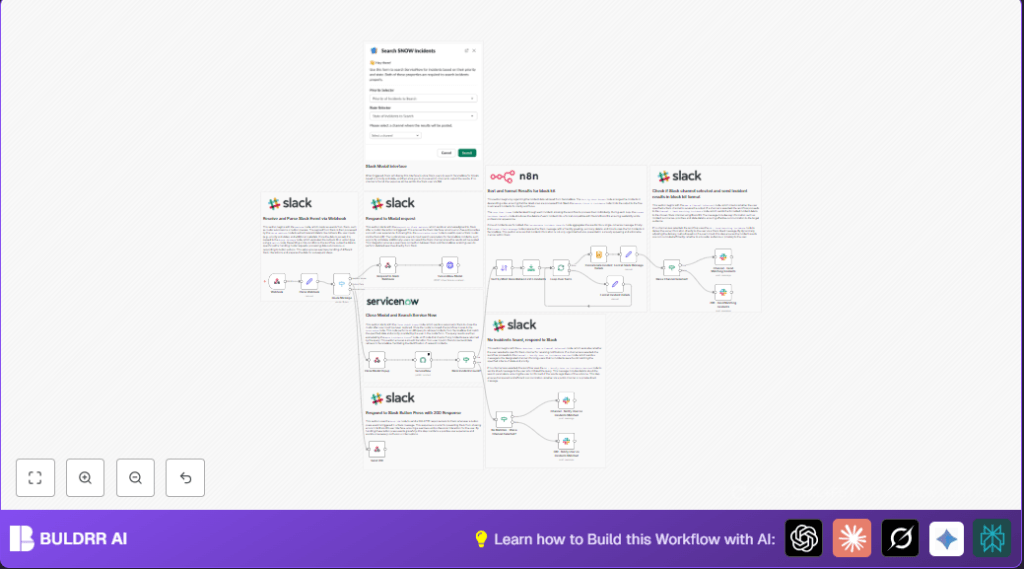

1. What This Workflow Does
This workflow lets users search ServiceNow incidents by priority and state directly inside Slack.
It opens a Slack modal for inputs, queries ServiceNow API for matching incidents, and sends results back to Slack.
The results show up either in a chosen channel or as a private message.
This saves time by letting you skip the manual portal search and get info fast where teams chat.
You can find the 5 most recent incidents that meet your criteria.
The incident summaries include clickable links for easy access.
If no incidents match, you get a clear notification.
The Slack modal closes automatically after submitting your search.
2. Who Should Use This Workflow
This workflow is for IT support or helpdesk teams who often check ServiceNow tickets.
It helps users who want to quickly see priority and state filtered incidents without switching apps.
Users managing many requests concurrently will find it especially useful.
If your team uses Slack heavily and ServiceNow for issue tracking, this tool boosts efficiency.
It reduces errors from manual searches and keeps incident info right inside your communication platform.
3. Tools and Services Used
- Slack API: Opens modals, sends messages, and receives user interactions.
- ServiceNow API with Basic Auth: Queries incident records based on search parameters.
- n8n Automation Platform: Runs the workflow, connects Slack and ServiceNow, processes data.
4. Beginner Step-by-Step: How to Use This Workflow in n8n
Step 1: Import Workflow
- Download the workflow file using the Download button on this page.
- Open n8n editor and select “Import from File” to load the workflow.
Step 2: Configure Credentials
- Add Slack API credentials for the Bot token.
- Set up ServiceNow Basic Authentication credentials for API access.
Step 3: Update IDs and Fields
- Check Slack channel IDs or user IDs if default values need changing.
- Adjust ServiceNow table names or query fields if using a custom setup.
- Update expressions in nodes if required for your workflow specifics.
Step 4: Test Workflow
- Trigger the workflow by sending a test request from Slack to open the incident search modal.
- Fill search form and submit to verify retrieval and messaging of incidents.
Step 5: Activate for Production
- Enable the workflow by switching it to active in the n8n dashboard.
- Make sure your webhook URL is publicly accessible and set in Slack event subscriptions.
- Monitor initial runs for any errors and fix them with credential or config checks.
For users running self-host n8n, check self-host n8n options to ensure smooth deployment.
5. Workflow Inputs, Processing Steps, and Outputs
Inputs
- User input from Slack modal fields: priority and state.
- Optional Slack channel selector for output destination.
Processing Steps
- Webhook node receives Slack interaction events.
- Extract payload with Set node to parse JSON from Slack.
- Switch node routes events by type: opening modal, submission, or button action.
- Acknowledge Slack quickly with Respond to Webhook node for good UX.
- HTTP Request node calls Slack API to open the modal for incident search.
- Once form is submitted, close modal and query ServiceNow’s incident endpoint using user inputs.
- If node checks if any incidents were found.
- Sort node orders results by newest.
- Limit node restricts output to first 5 incidents.
- SplitInBatches loops over each incident.
- Set node formats incident details for Slack-friendly display with clickable links.
- Summarize node concatenates formatted incident messages.
- Set node creates final Slack message blocks summarized with counts and search criteria.
- If node checks if user picked a channel to send results.
- Slack nodes send the messages either to the chosen channel or direct message to user.
- When no incidents found, send no-result notification similarly.
- Respond to Webhook node handles Slack button clicks with quick HTTP 200 to avoid UI errors.
Output
- Slack receives a clear list of up to 5 recent incidents matching priority and state.
- Clickable incident links and summaries help quick access.
- Notifications alert if no incidents matched, sent to user or channel.
- Slack modal opens and closes neatly during the search process.
6. Edge Cases and Failures
- If Slack modal does not open, check bot token permissions and event subscription URLs.
- If no incidents appear but expected, verify query string syntax and exact input values matching ServiceNow.
- If Slack messages fail to deliver, confirm channel or user IDs and bot membership in those channels.
- Handle empty search results gracefully to avoid confusion.
7. Customization Ideas
- Change the ServiceNow
sysparm_queryto include other filters like severity or category. - Edit Slack modal JSON to add more input fields or instructions.
- Adjust the Limit node to show more or fewer incidents.
- Modify no-match messages to include next steps or helpful links.
- Extend the workflow to create ServiceNow tickets from Slack.
- Integrate post-search automation that pushes incidents to Jira or other systems.
8. Summary and Results
✓ Search ServiceNow by priority and state straight from Slack.
✓ Get clear, linked incident summaries in chat.
✓ Send results to channels or direct messages.
✓ Save time and reduce errors from manual searches.
✓ Keep Slack interaction smooth with quick modal open/close.
✓ Easily customize filters and notifications for team needs.
{
  "sysparm_query": "incident_state={{state}}^priority={{priority}}"
}