
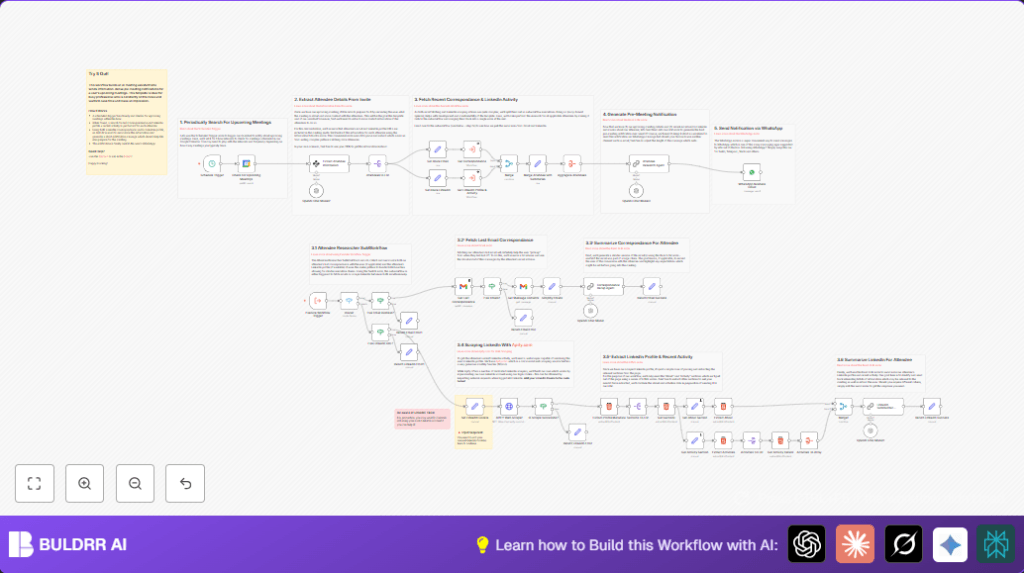

The briefing pulls from three data sources automatically:
→ Gmail — recent email history with each attendee so you know what was last discussed
→ LinkedIn — attendee’s current role, recent activity, and background
→ CRM data — past interaction context from your connected CRM if integrated
AI combines all of this into a short, clear summary and sends it straight to your phone via WhatsApp. By the time your call starts, you know who you’re talking to, what they care about, and what was last discussed.
Never walk into a call unprepared again.
1. What This Automation Does
This workflow delivers AI briefings before every call — automatically, 30 minutes in advance, to your WhatsApp.
Every hour, the workflow checks your Google Calendar for meetings coming up in the next 60 minutes. When it finds one, it immediately starts building your briefing:
From Gmail: It pulls recent email threads with each attendee — so you have full context on what was last discussed, any open questions, or previous decisions.
From LinkedIn: It scrapes each attendee’s LinkedIn profile and recent posts — giving you their current role, company focus, and what they’ve been talking about publicly.
From your CRM (optional): You can connect your CRM to add deal history, contact notes, or stage context to the briefing.
GPT-4o combines everything into a short, clear summary for each person on the call, then sends the complete briefing to your WhatsApp — so it’s waiting on your phone 30 minutes before the meeting starts.
You open WhatsApp, read the briefing in 2 minutes, and walk into the call fully prepared.
2. Tools And Services Used
- Google Calendar API: Provides upcoming meeting details.
- Gmail API: Retrieves recent emails with attendees.
- OpenAI GPT-4o Model: Extracts and summarizes data intelligently.
- Apify LinkedIn Scraper: Gets LinkedIn profiles and recent activity.
- WhatsApp Business Cloud API: Sends meeting briefings as messages.
- n8n Automation Platform: Orchestrates the workflow.
3. Beginner Step-by-step: How To Use This Workflow In n8n
Download And Import Workflow
- Click the Download button on this page to save the workflow file.
- Open your n8n editor where you want to run this automation.
- Use the “Import from File” option in n8n and select the downloaded workflow file.
Configure Credentials And Settings
- Add credentials for Google Calendar, Gmail, OpenAI, WhatsApp Business Cloud, and Apify in n8n.
- Update any email addresses, phone numbers, LinkedIn cookies (li_at), or folder names if needed.
- Check that API Keys and tokens are current and have required permissions.
Test And Activate
- Run the workflow once in manual mode to verify it collects meeting data and sends a sample message.
- If test passes, activate the workflow to start automatic hourly checks.
- Monitor runs and fix any errors using n8n’s execution interface.
- For self-host n8n environments, consider resources like self-host n8n for better stability.
4. Workflow Inputs, Processing Steps, And Outputs
Inputs
- Google Calendar event data within the next hour.
- Meeting invite details: attendee names, emails, LinkedIn URLs.
- Gmail messages between user and attendees.
- LinkedIn profile URLs and session cookie for scraping.
Processing Steps
- The schedule triggers hourly checks of calendar events.
- Google Calendar node fetches upcoming meeting details.
- Information Extractor AI node pulls attendee emails and LinkedIn links.
- Split Out node separates attendees for individual handling.
- Switch node routes based on attendee data presence: email or LinkedIn.
- Gmail node fetches recent emails; OpenAI summarizes these conversations.
- HTTP Request calls Apify LinkedIn scraper using profile URLs and cookies.
- HTML Extract nodes parse LinkedIn profiles and recent posts.
- Another OpenAI summarization combines profile info and activities.
- Set and Aggregate nodes merge summaries from email and LinkedIn per attendee.
- Final OpenAI node generates a clear, concise meeting briefing.
- WhatsApp node sends the briefing to the user’s phone number.
Outputs
- A personalized short briefing message about upcoming meetings.
- Sent instantly via WhatsApp to prepare the user.
5. Customizations
Connect your CRM for richer briefings (most impactful upgrade)
The workflow natively pulls from Gmail and LinkedIn. Adding your CRM as a third data source is the most powerful customization available:
– Add an HTTP Request node to call your CRM API (HubSpot, Salesforce, Pipedrive, etc.) using the attendee’s email as the lookup key
– Pull deal stage, last activity date, contact notes, and open tasks
– Pass this data into the final OpenAI prompt so the briefing includes CRM context alongside email and LinkedIn data
This turns the workflow from a “who is this person” briefing into a full pre-call intelligence summary — including where the relationship stands commercially.
Other customizations:
– Change the schedule trigger interval to deliver briefings earlier or later than 30 minutes before meetings
– Replace WhatsApp with Slack or Telegram by swapping the final messaging node
– Adjust the OpenAI system prompt to make briefings more formal (for enterprise calls) or more casual (for partner check-ins)
– Expand LinkedIn scraping to include skills, endorsements, and mutual connections by updating the HTML Extract nodes
– Add a Google Docs node to save every briefing as a permanent record alongside your calendar events
6. Troubleshooting Common Issues
Authentication Failed For Gmail Node
Make sure Gmail API credentials have correct scopes to read emails.
Re-authenticate if tokens expired.
No Upcoming Meetings Found
Check time filters in Google Calendar node, especially timezone settings.
Use correct start and end time for query.
LinkedIn Scraping Returns Empty Or Errors
Update LinkedIn session cookie (li_at) in the workflow.
Make sure Apify API key is valid and quota is available.
7. Pre-Production Checklist
- Verify Google Calendar credentials access correct calendar.
- Test Gmail node with emails from real attendees.
- Confirm LinkedIn cookie is current and Apify responds properly.
- Run workflow with test meetings for data extraction check.
- Send test WhatsApp messages to valid number.
- Backup workflow before starting production use.
8. Deployment Guide
After configuring all API credentials and testing parts, activate the Schedule Trigger node to start hourly runs.
Use n8n’s execution UI to watch for errors and performance.
Log errors, especially from LinkedIn scraping and API rate limits.
For self-host n8n, reliable hosting such as self-host n8n helps maintain uptime and speed.
9. Final Summary
✓ Sends AI briefings to WhatsApp 30 minutes before every call — fully automatic
✓ Pulls from Gmail (email history), LinkedIn (profile + activity), and optionally your CRM
✓ GPT-4o combines all data into a clear, concise per-attendee summary
✓ Works hands-free — no manual research, no prep time required
✓ Connects to HubSpot, Salesforce, or any CRM via HTTP Request for full deal context
✓ Customizable timing, messaging channel, and summary style
✓ Free workflow template — download and set up in under 20 minutes
