

What This Automation Does
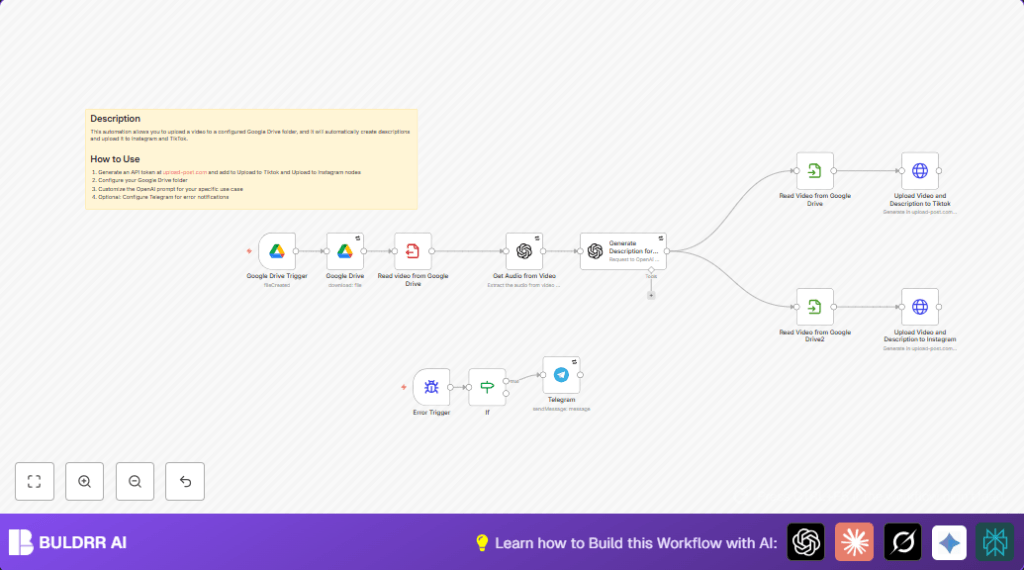
This workflow watches a Google Drive folder for new videos. It downloads the videos, listens to their audio, and writes captions using AI. Then it posts the videos and captions on TikTok and Instagram. If an error happens, it sends a message on Telegram.
This stops social media managers from doing long, repeated work by hand. It keeps posts steady and saves lots of time.
Tools and Services Used
- Google Drive: Stores and triggers new video uploads.
- OpenAI API: Transcribes video audio and writes video descriptions.
- Upload-post.com API: Sends videos and captions to TikTok and Instagram.
- Telegram Bot API: Sends error alerts to users.
- n8n Automation Platform: Runs the workflow.
Inputs, Processing Steps, and Output
Inputs
- New video file uploaded in a specific Google Drive folder.
Processing Steps
- Google Drive Trigger detects new video files.
- Google Drive node downloads the video.
- Write Binary File saves the video file locally.
- Langchain OpenAI node transcribes audio from the video.
- Another Langchain OpenAI node creates a social media description from transcription.
- Two Read Binary File nodes load the video twice for separate uploads.
- HTTP Request nodes upload the video and description to TikTok and Instagram.
- Error Trigger with Telegram node sends alerts if a problem happens.
Output
- Videos posted to TikTok and Instagram with AI-generated captions.
- Error messages sent on Telegram for issues during upload.
Beginner Step-by-Step: How to Use This Workflow in n8n
Step 1: Import Workflow
- Download the workflow file using the Download button on this page.
- Open n8n editor.
- Click on “Import from File” and choose the downloaded workflow.
Step 2: Configure Credentials
- Add Google Drive API Key in credential settings.
- Add OpenAI API Key for transcription and description generation.
- Add Upload-post.com API Key and username for video uploads.
- If using Telegram alerts, add your Bot Token and Chat ID.
Step 3: Update Workflow Settings
- In the Google Drive Trigger, change the folder ID if needed.
- Check folder permissions for access.
- Review the OpenAI prompt text in the “Generate Description for Videos in Tiktok and Instagram” node and adjust tone if desired.
- Update Upload-post.com username and API key in HTTP nodes.
Step 4: Run and Activate Workflow
- Run the workflow once with a test video in the Google Drive folder.
- Check execution logs for errors.
- Activate workflow for ongoing production use.
- If self hosting n8n, consider using self-host n8n for control.
Customizations
- Change the Google Drive folder ID to watch a different folder.
- Add new HTTP Request nodes to upload videos to other platforms supported by upload-post.com.
- Edit the OpenAI prompt text to fit your brand’s style or platform specifics.
- Set up Telegram bot to receive error messages live.
- Keep upload-post.com API Key updated in the HTTP nodes to avoid failed uploads.
Edge Cases and Troubleshooting
DNS Server Error During API Calls
This error shows if the workflow cannot connect to a needed external API because of DNS problems.
The workflow ignores this error to avoid breaking flow but users should check internet and DNS settings when it appears.
Video Upload Failure
This can happen if the upload-post.com API Key is invalid or expired. Wrong binary file data can also stop uploads.
Double-check API credentials and confirm binary video data passes correctly from the read nodes.
Pre-Production Checks
- Confirm Google Drive folder ID is correct and accessible.
- Test OpenAI API keys for quota and validity.
- Verify upload-post.com API credentials and username.
- Test Telegram bot setup if using alerts.
- Run test with a sample video and review workflow execution.
Summary
✓ Saves at least two hours every day by automating video post creation.
✓ Prevents mistakes caused by manual uploads and forgotten posts.
✓ Generates engaging video descriptions using OpenAI transcription and text generation.
✓ Publishes videos automatically on TikTok and Instagram.
✓ Sends alerts for errors via Telegram for fast response.
