
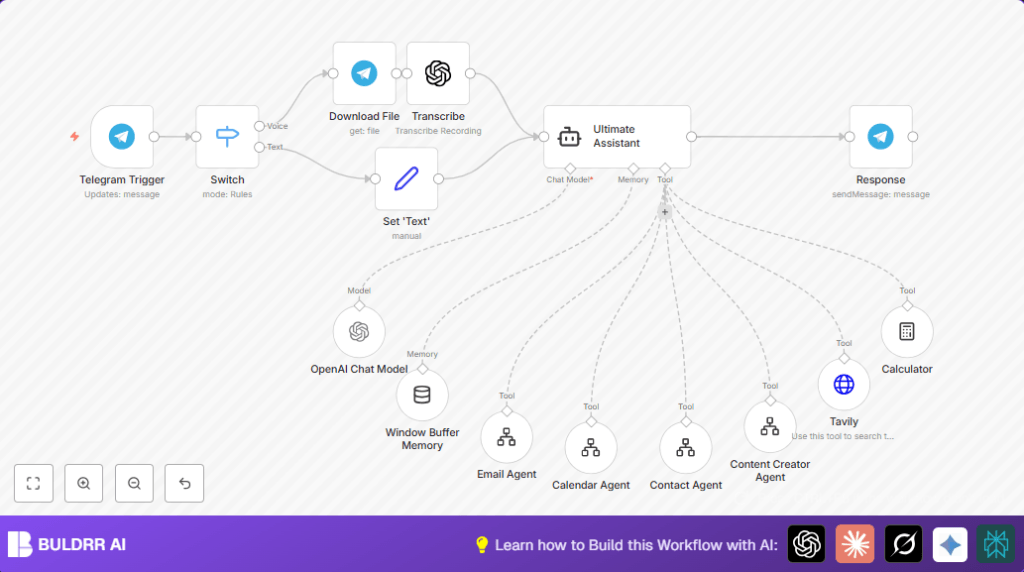

What this workflow does
This workflow turns Telegram into a smart personal assistant that understands messages and voice notes.
It solves the problem of wasting time managing many scattered tasks like emails, calendar, and contacts manually.
The workflow reads messages, decides what the user needs, and runs the right tool automatically.
The user gets quick replies on Telegram and saves hours every week handling tasks.
Who should use this workflow
Someone who uses Telegram daily for work and wants to automate common personal assistant tasks.
The user should have many small tasks like sending emails, managing calendar events, searching the web, or creating content.
This workflow fits well if managing these tasks manually is time-consuming or confusing.
Tools and services used
- Telegram Bot API: Receives messages and voice inputs.
- OpenAI API: Transcribes voice notes and processes text with GPT-4o.
- LangChain in n8n: Runs an intelligent agent that decides task routing based on message content.
- External n8n workflows: Separate automation flows for email, calendar, contacts, content creation, web search, and calculations.
- Tavily API (optional): Allows web searches from within the assistant.
Inputs, processing, and outputs
Inputs
- Text messages sent by the user on Telegram.
- Voice messages sent on Telegram, recorded by user.
Processing steps
- The Telegram Trigger node receives new inputs.
- A Switch node checks if message is text or voice.
- If voice, the Telegram node downloads audio file, and OpenAI transcription converts it to text.
- Text messages or transcribed voice are set to a consistent text format for AI.
- The LangChain Ultimate Assistant Agent uses AI to understand the user’s command and routes it to the correct toolWorkflow node.
- When contact info is needed for email or calendar tasks, the contact lookup agent fetches data automatically.
- Tools handle tasks like sending emails, creating calendar events, searching the web, writing content, or performing calculations.
- Context is saved per chat with memoryBufferWindow to keep conversations aware of recent history.
Outputs
- The AI answer is sent back to the user directly in Telegram as a message.
- The user sees task results or replies instantly in their chat window.
Beginner step-by-step: How to use this workflow in n8n
1. Import the workflow
- Download the workflow file using the Download button on this page.
- Open n8n editor and click “Import from File”. Select the downloaded workflow file.
2. Configure credentials
- Add Telegram Bot API credentials (bot token) to the Telegram Trigger and Telegram nodes.
- Add the OpenAI API Key for using GPT-4o and transcription models in the OpenAI nodes.
3. Update workflow references
- Check each toolWorkflow node and update IDs to match your external automation workflows for email, calendar, contact, content, web search, and calculator.
- Modify any email addresses, calendar folder IDs, or contact tables as needed.
4. Test the workflow
- Send a text message or voice note to your Telegram bot.
- Check if the workflow detects the input, transcribes voice if needed, routes correctly, and replies back.
5. Activate for production
- Turn the workflow “Active” in n8n to start listening for real messages.
- Monitor logs and execution history to check for any errors.
- For stable uptime, consider self-host n8n on a good server or VPS.
Possible issues and troubleshooting
- Webhook errors: Make sure Telegram bot token is correct and webhook URL is properly set in Telegram bot settings.
- Transcription fails: Verify OpenAI API key and transcription node settings are correct.
- Agent routing errors: Check the Ultimate Assistant prompt formatting and that all linked toolWorkflow nodes have correct workflow IDs.
Customizations ideas
- Add new toolWorkflow nodes to expand capabilities, then update Ultimate Assistant prompt with new tools.
- Change OpenAI transcription model to try different voice-to-text accuracy.
- Edit Ultimate Assistant system prompt to adjust routing rules or add instructions.
- Add triggers for other messaging platforms like WhatsApp or Slack by copying the Telegram trigger node.
- Adjust memoryBufferWindow node limits to keep more or less chat history.
Summary of results
✓ Users can send voice or text requests through Telegram to automate personal assistant tasks.
✓ AI decides the right tool to use and runs task workflows automatically.
✓ Task results come back instantly as Telegram messages.
✓ Reduces hours of manual task management each week.
✓ Keeps conversation context for better recall in follow-ups.
