
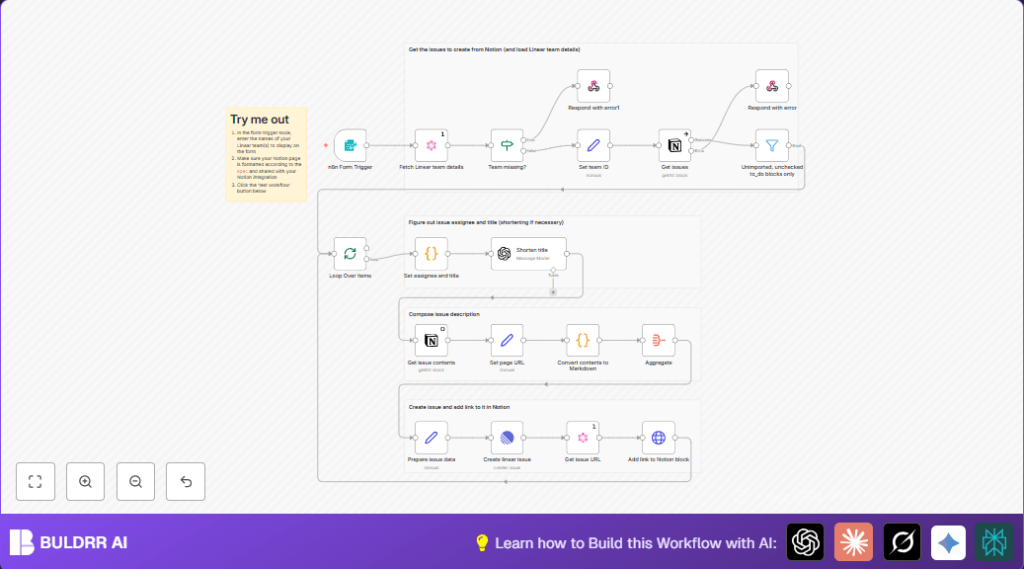

What This Workflow Does
This workflow takes tasks that are not done from a Notion page and makes matching issues in Linear for one team.
It stops the user from copying tasks by hand and making mistakes.
The result is Linear has new issues with titles, assignees, and links back to Notion.
Input: a Notion page URL and a Linear team name.
Process: the workflow finds new TODOs in Notion, reads their title and assigned person, shortens long titles with AI, creates issues in Linear with correct team and assignee IDs, and adds back links.
Output: new Linear issues with details and context from Notion.
Who Should Use This Workflow
Use this if you have a Notion page with tasks and want to quickly make Linear issues without typing.
It fits product managers, developers, or any team using Notion for notes and Linear for issue tracking.
It works best if TODO blocks include the assignee name in brackets at the start.
You need access to Notion and Linear APIs and an OpenAI key for title shortening.
Anyone wanting less manual entry and fewer mistakes will find this helpful.
Tools and Services Used
- n8n: Runs the automation workflow.
- Notion API: Reads TODO blocks from a shared Notion page.
- Linear GraphQL API: Fetches team info and creates new issues.
- OpenAI GPT-4 API: Shortens titles longer than 70 characters.
Beginner Step-by-Step: How to Use This Workflow in n8n
1. Import Workflow into n8n
- Download the provided workflow file using the Download button on this page.
- Open your n8n editor.
- Click “Import from File” and upload the downloaded workflow JSON.
2. Configure API Credentials
- Add your Notion API Key in n8n credentials.
- Add your Linear API Key similarly.
- Add your OpenAI API Key for the GPT-4 node.
3. Update Necessary Identifiers
- In the form trigger, select or add the Linear team names you want to use.
- Confirm the Notion page URL is correct and shared with your Notion integration.
- Adjust any member email or ID lookups in the Set assignee and title node if needed.
4. Test and Activate
- Run the workflow by submitting the form with a sample Notion page and team name.
- Check that issues appear in Linear with right titles and assignees.
- If tests pass, activate the workflow to run normally.
This setup lets the user run imports anytime by submitting the form.
For more control, see links below about self-host n8n.
Inputs, Processing Steps, and Outputs
Inputs:
- Notion page URL with TODO blocks.
- Linear team name chosen from a dropdown.
Processing Steps:
- Use GraphQL query to find Linear team ID, members, and projects.
- Check if the team exists; stop if not.
- Get all blocks from the Notion page; filter for unchecked TODOs without Linear tags.
- Split TODOs to handle in batches.
- Extract first line, parse assignee in brackets, find matching team member.
- If the title is too long, send to GPT-4 to shorten.
- Fetch full content of the TODO block and child blocks from Notion.
- Convert Notion content to markdown for the description.
- Build issue data with title, markdown description, assignee ID, and team ID.
- Create the Linear issue using the API.
- Get the Linear issue URL.
- Update the original Notion TODO block adding a link to the created Linear issue.
- Continue for all tasks.
Outputs:
- New Linear issues with titles and assignees matching Notion tasks.
- Linear link added in Notion task for easy navigation back.
- Error messages if a team is missing or API fails.
Edge Cases and Failures
- The workflow stops if the Linear team name from the form does not match any team found via API.
- Notion page must be shared with the Notion integration; otherwise, fetching content will fail.
- Long titles not shortened may cause messy issue names; the AI node shortens only above 70 characters.
- Assignee parsing requires the text to start with brackets, e.g. [Omar]; missing or incorrect format means no assignee assigned.
- API keys must be valid and have permission to read and write; expired keys cause request failures.
Customization Ideas
- Extend the form dropdown to add more Linear teams without coding.
- Change the GPT-4 prompt or character limits in the Shorten title node for title length control.
- Edit the description format in the Prepare issue data node to add more details or style.
- Modify the assignee detection code to use full exact matching or fallback rules.
- Add support for more Notion block types or attachments in the content converter code.
Summary
→ User inputs a Notion page URL and chooses a Linear team.
→ The workflow finds new unchecked TODO tasks in Notion.
→ Task titles get cleaned and shortened by AI when too long.
→ Correct assignees are matched from the Linear team members list.
→ New issues are created in Linear with detailed markdown descriptions.
→ Each original Notion task gets a link to its Linear issue for easy tracking.
✓ Saves time and stops errors from manual task copying.
✓ Keeps task context linked between Notion and Linear tools.
✓ Works with multiple tasks in batches for efficiency.
