

What This Automation Does
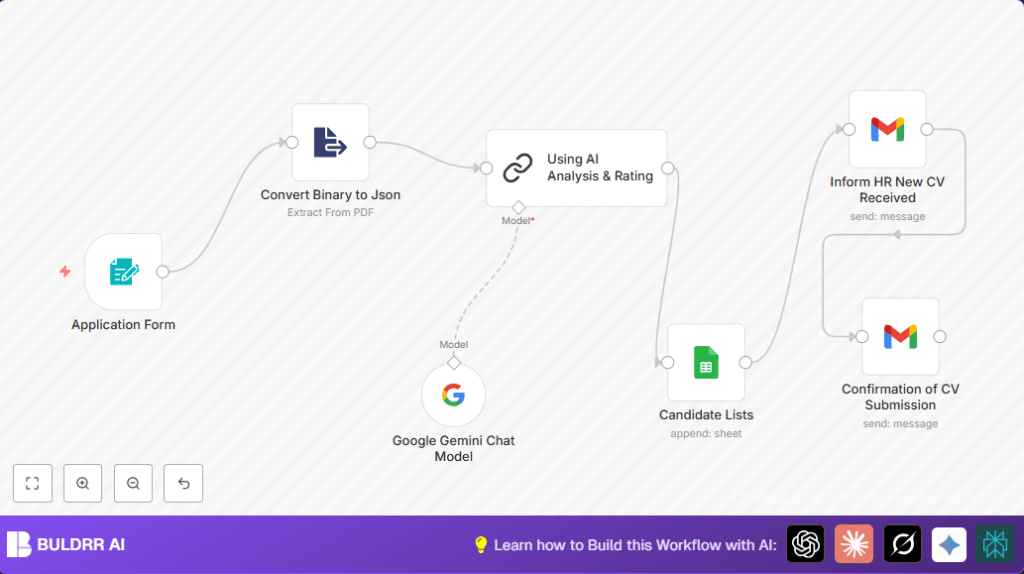
This workflow automatically gets Software Engineer CVs, reads and rates them using Google Gemini AI, then saves and shares results.
It solves time lost on manual resume reading and slow replies.
The workflow sends quick emails to candidates and notifies HR fast.
It takes PDF resumes, turns text to data, runs AI checks, and stores all info in Google Sheets.
This helps hiring teams move quicker and avoid missing good candidates.
Tools and Services Used
- n8n: Automates the entire workflow with various nodes.
- Google Gemini (PaLM) API: Runs AI analysis on resumes.
- Gmail: Sends confirmation emails and alerts.
- Google Sheets: Stores candidate info and AI ratings.
- Form Trigger node (n8n): Accepts candidate input and attachments.
How This Workflow Works (Input & Processing)
Inputs
- Candidate submits an application form with name, email, salary expectation, LinkedIn URL, and PDF resume.
Processing Steps
- Form Trigger receives the form submission.
- Extract From File reads the PDF resume’s text to JSON.
- Google Gemini Chat Model evaluates the extracted resume against the Software Engineer job prompt.
- Chain LLM cleans and organizes AI’s rating and recommendation.
- Google Sheets appends candidate data and AI scores into a sheet.
- Gmail node sends an alert email to HR with candidate details and analysis.
- Another Gmail node sends a polite confirmation email to the candidate.
Output
- Candidate’s details and AI rating logged inside Google Sheets.
- HR receives a detailed email with all info to decide fast.
- Candidate gets a confirmation email quickly.
Who Should Use This Workflow
This is for HR teams and hiring managers who see many resumes weekly.
It helps anyone with slow manual screening and wants quick AI help.
Users with basic n8n knowledge and access to Google Gemini API will benefit most.
Beginner step-by-step: How to Use This Workflow in n8n
Step 1: Import the Workflow File
- Download the workflow JSON file using the Download button on this page.
- In the n8n editor, click on “Import from File” and select the downloaded file.
Step 2: Configure Credentials and Settings
- Add Google Gemini (PaLM) API credentials in the Google Gemini Chat Model node.
- Connect a Gmail account in both Gmail nodes for sending emails.
- Set up Google Sheets credentials and make sure the correct Google Sheet and tab (পত্রক1) are selected.
- Update emails, folders or Google Sheet IDs inside nodes as needed.
Step 3: Review Prompt and Expressions
- Check the AI prompt in the Google Gemini Chat Model node. Copy or modify the job description prompt if needed.
- Make sure Gmail nodes use expressions like
{{ $('Application Form').item.json['E-mail'] }}to send dynamic emails.
Analyze this resume for the Software Engineer job role. Give a rating and interview recommendation in 75 words.Step 4: Test the Workflow
- Trigger the form with a test submission including a PDF resume.
- Watch each node’s output to confirm proper data flow and AI response.
Step 5: Activate for Production
- Turn on the workflow by toggling the active switch in n8n.
- Monitor early runs for errors and adjust if required.
For privacy or control, consider self-host n8n.
Common Issues and Fixes
- No binary data found: Check the form’s file upload field matches the expected name and only PDFs are allowed.
- Google API authentication failed: Re-add Google Gemini credentials and ensure billing is active.
- Emails missing dynamic info: Use correct expressions for candidate data inside Gmail nodes.
- Google Sheet append error: Confirm the sheet name and permissions are correct.
Customization Tips
- Change the AI job role prompt in the Chain LLM node for other positions.
- Add more form fields like phone or portfolio URL and map them downstream.
- Switch Google Gemini with other AI models inside n8n, updating prompts and credentials.
- Edit email messages inside Gmail nodes for your company’s tone.
- Automatically fetch LinkedIn public data using an HTTP Request node for richer profiles.
Summary
✓ Saves over 10 hours weekly on manual screening.
✓ Uses AI to rate candidate CVs fast and fairly.
✓ Sends quick emails to candidates and HR.
✓ Keeps all data organized in Google Sheets.
→ Helps teams hire faster with less errors.
→ Works with simple steps inside n8n.
