
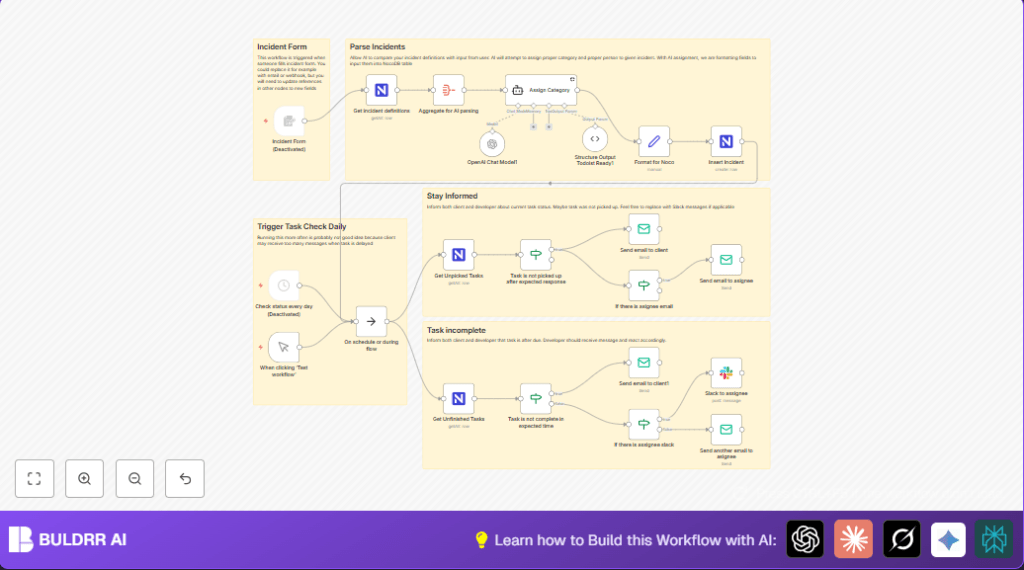

What this workflow does
This workflow gets incident reports from users and sorts them automatically. It reads each report’s details. Then it finds matching incident categories based on definitions from a NocoDB database. An AI model assigns a category, response time, resolution time, and who should handle the case. Finally, it adds the incident as a task to a database and sends reminders if tasks are late.
The goal is to stop manual work and make sure no incident gets missed. Teams can work faster and clients get quicker replies.
Who should use this workflow
This is best for anyone managing lots of support requests. It works well for customer support teams, help desks, or service managers. The workflow saves time and reduces mistakes in sorting and assigning incidents.
Users with basic n8n knowledge can run it. It helps teams stay organized and meet deadlines better.
Tools and services used
- n8n: Runs the workflow automation.
- NocoDB: Stores incident categories and task records.
- OpenAI GPT-4o-mini model: Analyzes text and assigns categories.
- LangChain: Organizes AI chat and agent calls.
- SMTP Email: Sends notification emails.
- Slack (optional): Delivers reminders via chat messages.
Inputs, Processing Steps, and Output
Inputs
- User submitted incident through a form including email, description, and desired category.
- Incident definitions pulled from NocoDB with categories, deadlines, and assignees.
Processing Steps
- Aggregate incident definitions to prepare data for AI.
- Call GPT-4o-mini via LangChain agent to match the user’s incident description to a category and deadlines.
- Format AI results alongside user data into a database-ready format.
- Insert the new incident as a task record into NocoDB.
- Periodically check if tasks are overdue and send email or Slack reminders.
Output
- New incident task with category assigned appears in NocoDB.
- Email alerts sent to clients and assignees for missed deadlines.
- Slack notifications sent to assignees if enabled.
Beginner step-by-step: How to use this workflow in n8n
Import the workflow
- Download the workflow file using the Download button on this page.
- If inside the n8n editor, click the menu and choose Import from File.
- Select the downloaded workflow JSON file to load it into n8n.
Configure credentials and settings
- Open the Get incident definitions node and add the NocoDB API Key in credentials.
- Enter your NocoDB project ID and table ID where incidents and definitions are stored.
- Update the Send email nodes with the working SMTP email account details.
- Add your OpenAI API Key to the OpenAI Chat Model1 node credentials.
- If Slack notifications are needed, add Slack OAuth credentials and update assignee Slack IDs if necessary.
- Check the Format for Noco node to confirm field mappings for emails and dates.
Test and activate
- Use the manual trigger node When clicking ‘Test workflow’ to run and check for errors.
- Look if new incident records go into NocoDB and emails appear in inbox.
- Fix any errors found using n8n debug.
- After success, enable the main trigger node such as the Incident Form or a Schedule Trigger.
- This activation will run the workflow automatically on new submissions or scheduled checks.
For users hosting the workflow themselves, consider using self-host n8n to deploy it on a server.
Common issues and edge cases
- Empty AI output: Check if the AI prompt includes the full JSON data from the aggregate node.
- NocoDB auth fails: Refresh API Key or verify project and table IDs.
- Emails not sent: Confirm assignee email exists and SMTP credentials are correct.
- Missing Slack alerts: Ensure Slack credentials and IDs are set; Slack node connected.
Scheduled checks depend on a job scheduler or Schedule Trigger node enabled to run queries for overdue tasks.
Customization ideas
- Use an email trigger instead of a form trigger to accept incident reports via email.
- Switch to different AI models like GPT-4 or GPT-3.5 for varied speed and cost.
- Edit or add new categories and rules directly in NocoDB to change how tasks are sorted.
- Add extra Slack notifications for all updates, including task completions or status changes.
Summary of benefits
✓ Saves over 8 hours weekly by cutting the manual work of sorting incidents.
✓ Assigns correct category and deadlines using AI understanding.
✓ Sends timely reminders to avoid missed responses.
✓ Keeps incident records organized in a no-code database.
→ Supports better customer service and team efficiency.
→ Simple to set up with mostly configuration in n8n and NocoDB.
