
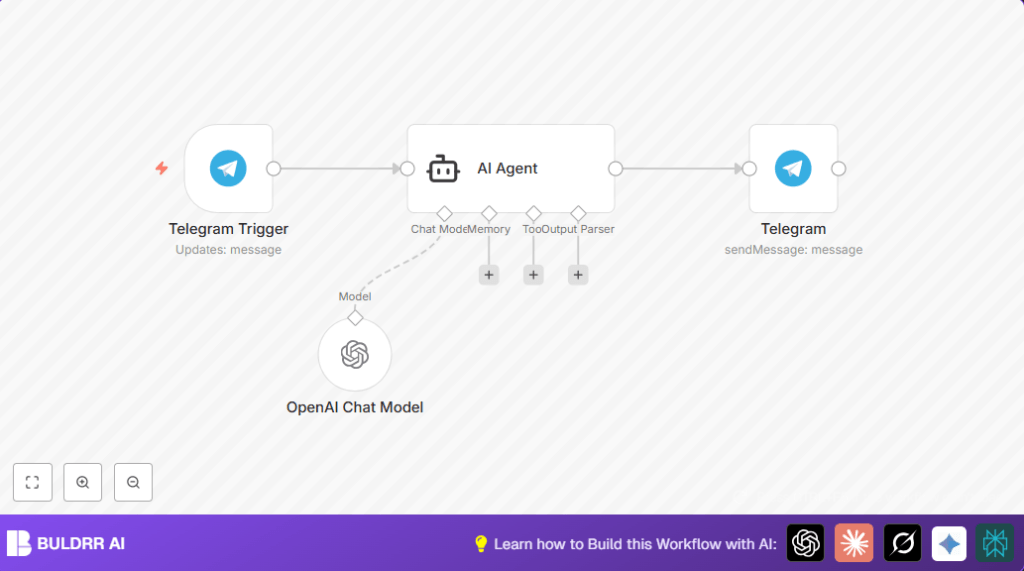

What This Automation Does
This workflow connects Telegram messages with OpenAI AI to reply automatically.
When someone sends a message in a Telegram group, the system reads it, sends it to OpenAI, and gets a friendly answer with emojis.
Then, the answer goes right back to the same Telegram chat. This helps reply faster without people typing all the time.
Tools and Services Used
- Telegram Bot API: Receives user messages and sends replies.
- n8n Automation Platform: Ties nodes together to run the workflow.
- OpenAI Chat Model (LangChain package): Creates AI chat replies from message text.
Inputs, Processing, and Outputs
Inputs
- User text messages sent to the Telegram bot in a chat or group.
Processing Steps
- Telegram Trigger listens for new messages from Telegram.
- AI Agent sends the message text to the OpenAI Chat Model to get a reply.
- The AI Agent forms a helpful, emoji-rich response.
Outputs
- The Telegram node sends the AI response back to the chat as a message.
Who Should Use This Automation
Anyone who manages a Telegram chat where many questions repeat often can use this to save time.
This helps small teams or individuals reply faster without typing every answer manually.
No deep tech skills are needed once the workflow is imported and running.
Beginner Step-by-Step: How to Use This Workflow in n8n
Step 1: Import the Workflow
- Download the workflow file using the Download button on this page.
- In the n8n editor, use the menu “Import from File” to load the workflow.
Step 2: Add API Credentials and Settings
- Open each node that requires credentials.
- Enter your Telegram Bot API Key in the Telegram Trigger and Telegram nodes.
- Add your OpenAI API Key in the OpenAI Chat Model node.
- If needed, update any chat IDs or channel details to match your target Telegram chat.
Step 3: Test the Workflow
- Send a message to your Telegram bot in the specified chat.
- Watch the workflow run inside n8n to check for errors.
- Confirm the bot replies with an AI generated message including emojis.
Step 4: Activate for Production Use
- Turn on the workflow inside n8n to run automatically.
- Make sure the Telegram bot webhook is set and valid so messages reach n8n.
- Monitor response times and logs to ensure smooth operation.
Customization Ideas
- Change the AI Agent prompt to adjust the chatbot’s style.
- In the AI Agent text parameter, edit the prompt for different tone like “professional and short”.
- Add support for other Telegram updates such as edited messages or callback queries in the Telegram Trigger node.
- Connect nodes to log conversation data for analysis, like Google Sheets or Airtable.
Troubleshooting Common Problems
No Messages Received in Telegram Trigger
Check the Telegram bot webhook setup.
Make sure the Telegram Bot API Key is correct and active.
AI Agent Returns No Output
Verify the AI Agent node prompt syntax uses {{ $json.message.text }} exactly.
Confirm the OpenAI Chat Model node is linked via the ai_languageModel connection.
Pre-Production Checklist
- Verify Telegram Bot API Key validity and permissions.
- Test Telegram webhook by sending test messages.
- Ensure OpenAI API key has enough quota and no restrictions.
- Confirm AI replies appear as expected in the test runs.
- Activate the workflow only after the above checks pass.
Deployment Guide
Activate the workflow in n8n to make the chatbot live.
Check n8n execution logs during live message flows.
This workflow handles multiple Telegram chats well due to n8n’s event driven design.
For those who control their own servers, consider self-host n8n to keep full data privacy and control.
Key Prompt Example Used in AI Agent Node
The prompt tells AI to be helpful and use emojis.
=Respond to this as a helpful assistant with emojis: {{ $json.message.text }}Summary of What You Get
✓ Automatic replies to Telegram messages that sound natural and friendly.
✓ Saves time so no more typing repeated answers.
✓ Near real-time responses to customer questions.
✓ Easy to configure for your Telegram bot and OpenAI account.
✓ Scales nicely without needing extra staff for chatting.
