

What This Workflow Does
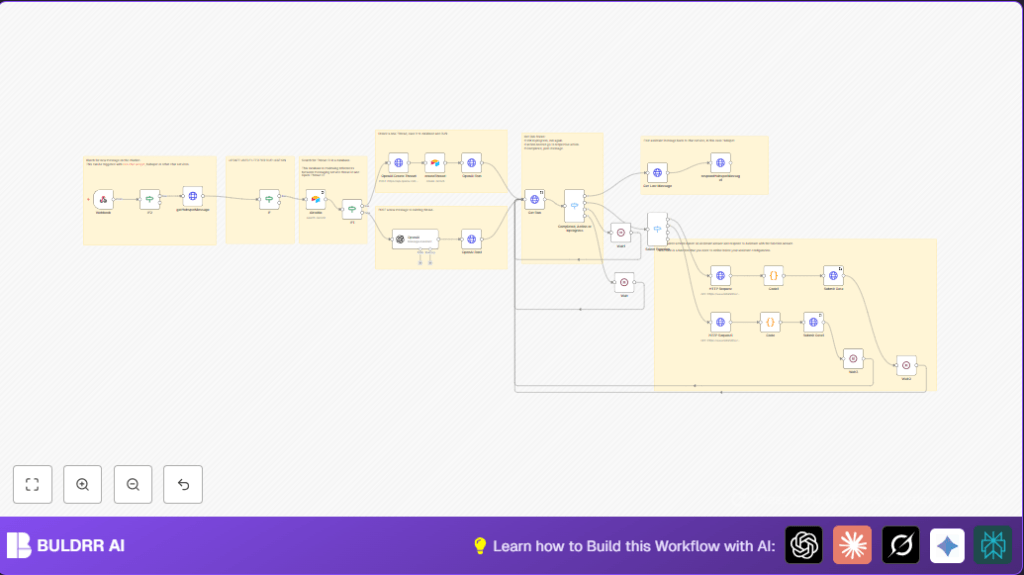
This workflow connects HubSpot Conversations with an OpenAI Assistant to answer chat messages automatically. It helps fix slow replies, repeated questions, and mistakes that annoy customers. The workflow reads new HubSpot messages, talks to OpenAI to get replies, and sends those back to HubSpot fast.
The system looks if there is already an AI conversation linked to the chat using Airtable. If not, it starts a new AI thread. It keeps track so the chat history is saved. It also waits for the AI to finish before replying. This way, the support team saves time and customers get quick answers.
Tools and Services Used
- HubSpot Conversations API: Sends new chat messages to the workflow.
- OpenAI API: Runs the AI assistant to create answers.
- Airtable: Stores the link between HubSpot threads and OpenAI threads.
- n8n Automation Platform: Runs all nodes and logic to connect everything.
Inputs, Processing, and Outputs
Inputs
The trigger is a new HubSpot chat message, sent to a Webhook node. It must have a message ID to continue. The workflow fetches full message details from HubSpot.
Processing Steps
- Check if the message sender is the bot itself; if yes, stop to avoid reply loops.
- Search Airtable for a matching conversation thread with the current HubSpot thread ID.
- If no matching thread is found, create a new OpenAI assistant thread and save the mapping in Airtable.
- Run OpenAI assistant either on the new or existing thread, sending the user message.
- Poll the assistant run status with wait cycles until it is complete.
- Handle any required external functions by calling APIs and submitting results back.
- Once done, get the AI response message.
- Send the AI reply back to HubSpot Conversations as a chat message.
Output
The final output is an AI-generated message posted automatically into the HubSpot chat thread. This allows quick, human-like replies without agent delays.
Beginner Step-by-Step: How to Use This Workflow in n8n
Importing the Workflow
- Download the workflow file using the Download button on this page.
- Open the n8n editor where you want to use the workflow.
- Use the “Import from File” option to load the downloaded workflow.
Configuring Credentials and IDs
- Add your HubSpot App Token credential inside n8n.
- Add your OpenAI API Key credential.
- Provide your Airtable API Key and configure the base and table names.
- Update any hardcoded IDs such as bot actor ID, workspace IDs, channel IDs, or table fields if needed.
Testing and Activating
- Trigger the Webhook node manually or with a test HubSpot message.
- Watch each node execute correctly in the n8n execution log.
- If all nodes succeed, toggle the workflow to “Active” for production use.
- Make sure the webhook URL is publicly accessible and configured in HubSpot webhook subscriptions.
- Check logs regularly to monitor performance and failures.
For users running self-host n8n, ensure the server is reachable from HubSpot for webhook calls.
Customization Ideas
- Change the IF node filter for your bot’s specific actor ID to stop reply loops.
- Add new API calls by extending the Select Function switch node with new HTTP Request nodes.
- Adjust Wait nodes times to match expected OpenAI response delays.
- Modify the message format in respondHubspotMessage1 for richer text or markdown.
- Expand the Airtable schema to keep more context about customer chats.
Troubleshooting Common Issues
- 401 Unauthorized from HubSpot API
Cause: Invalid HubSpot App Token
Solution: Refresh or re-authenticate the App Token credential in n8n. - OpenAI assistant never completes
Cause: Wrong thread ID or missing assistant ID
Solution: Check Airtable stored thread IDs and assistant IDs match those in OpenAI requests. - Infinite chat reply loops
Cause: Not filtering out bot’s own messages by actor ID
Solution: Update the IF node condition to block processing messages sent by the bot. - JSON parse errors submitting function outputs
Cause: Improper escape of JSON strings
Solution: Use the provided JavaScript code in the Code nodes to escape JSON before submitting back.
Pre-Production Checklist
- Check webhook URL configuration in HubSpot webhook subscriptions.
- Manually test HubSpot message retrieval with the HTTP Request node.
- Verify Airtable credentials, base, and table schema.
- Test OpenAI assistant thread creation and run calls.
- Confirm capable posting back to HubSpot Conversations with correct IDs.
- Enable error handling and system logging inside n8n.
- Backup Airtable data before going live.
Summary
✓ The workflow automatically replies to HubSpot chat messages using OpenAI.
✓ It keeps conversation history with Airtable linking HubSpot and OpenAI threads.
✓ The user saves time by reducing manual responses and avoids repeated questions.
→ Users get fast, AI-driven support replies that improve customer experience.
→ The system detects bot messages to prevent reply loops.
→ The workflow handles multi-step conversations by polling OpenAI runs and invoking functions.
