

What this workflow does
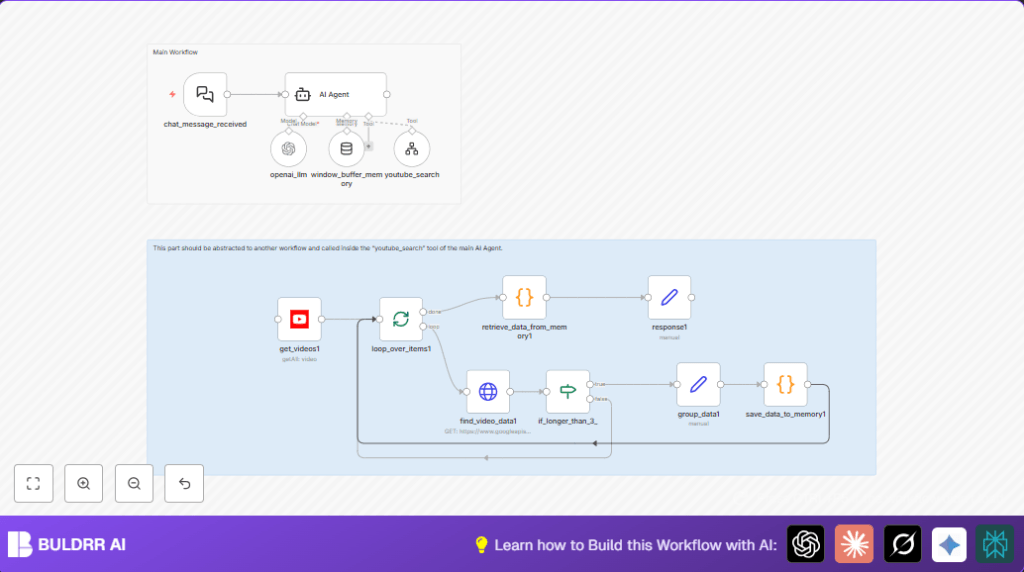
This workflow collects trending YouTube videos in a chosen niche from the last 2 days. It filters out short videos under 3 minutes 30 seconds to focus on detailed content. Then, it cleans data by removing emojis and URLs and analyzes patterns to report trending themes, not just individual videos.
The main problem solved is saving content creators hours spent on manual YouTube trend research. The output is a clear summary of recent trends tailored to the niche.
Who should use this workflow
Creators who want fast insights from YouTube trend data in specific topics without wasting time searching manually.
Users with some access to Google APIs and basic n8n knowledge gain the most.
Tools and services used
- n8n: to run and connect automation nodes.
- Langchain AI Agent and Chat Trigger nodes: understand user input and decide search queries.
- YouTube Data API with OAuth2: to search videos and retrieve detailed video data.
- HTTP Request node: to fetch extended video info from the YouTube API.
Beginner step-by-step: How to build this in n8n
Import the workflow
- Download the workflow file using the Download button on this page.
- Inside the n8n editor, click “Import from File” and select the downloaded workflow.
Configure credentials and settings
- Add Google OAuth2 credentials for YouTube Data API in n8n.
- Insert your Google API key where required, especially inside the HTTP Request node.
- Make sure workflow IDs for any sub-workflows, like the YouTube search tool workflow, are updated if needed.
- Verify any hardcoded IDs, emails, or channel names are correct for your use.
Test and activate
- Run the workflow manually to test if it gets YouTube videos and processes them correctly.
- If successful, activate the workflow to listen for incoming chat messages and start trend detection in real time.
For better control and privacy, consider running self-host n8n.
Workflow input, processing steps, and output
Inputs
- User sends a chat message with a niche or topic.
- YouTube search queries from the niche terms.
Processing steps
- Langchain Chat Trigger listens for incoming user messages with niche input.
- Langchain AI Agent checks if the niche is given, and decides up to three search terms.
- Langchain Tool Workflow calls a helper sub-workflow to run YouTube searches.
- YouTube node retrieves up to 3 videos published in the last 48 hours per search term, filtered for region and duration.
- If node filters out videos shorter than 3 minutes 30 seconds using ISO 8601 duration parsing.
- HTTP Request node fetches detailed metadata including view count, likes, tags, and descriptions.
- Set node formats and groups relevant video data.
- Code node cleans text by removing emojis and URLs, then saves all video data into static workflow memory.
- SplitInBatches node loops over each video for processing.
- Set node compiles final responses for the AI Agent to return.
Outputs
The AI Agent returns a clear summary of trending themes and insights about recent videos fitting the niche.
Handling errors and edge cases
- If Google API keys run out of quota or credentials are invalid, the workflow will error out during video search or data fetching.
- If no niche is provided, the AI Agent asks the user to clarify before proceeding.
- Overly narrow search terms or wrong region codes may return no videos.
- Error in ISO duration parsing can cause all videos to be filtered incorrectly.
- If the code node script for cleaning or data saving has syntax errors, collected data may be lost.
Customization ideas
- Change the max number of YouTube search queries in the AI Agent prompt.
- Adjust YouTube node regionCode to target different countries.
- Modify the minimum video duration filter in the If node to include shorter videos.
- Expand AI prompt to analyze video tags or channel reputation.
- Add calls to other platforms such as TikTok or Instagram for wider trend data.
Summary of benefits and results
✓ Saves hours weekly by automating YouTube trend research.
✓ Filters and cleans video data for quality and clarity.
✓ Produces concise trend summaries tailored to chosen niches.
✓ Reduces manual work and risk of missing hot topics.
