
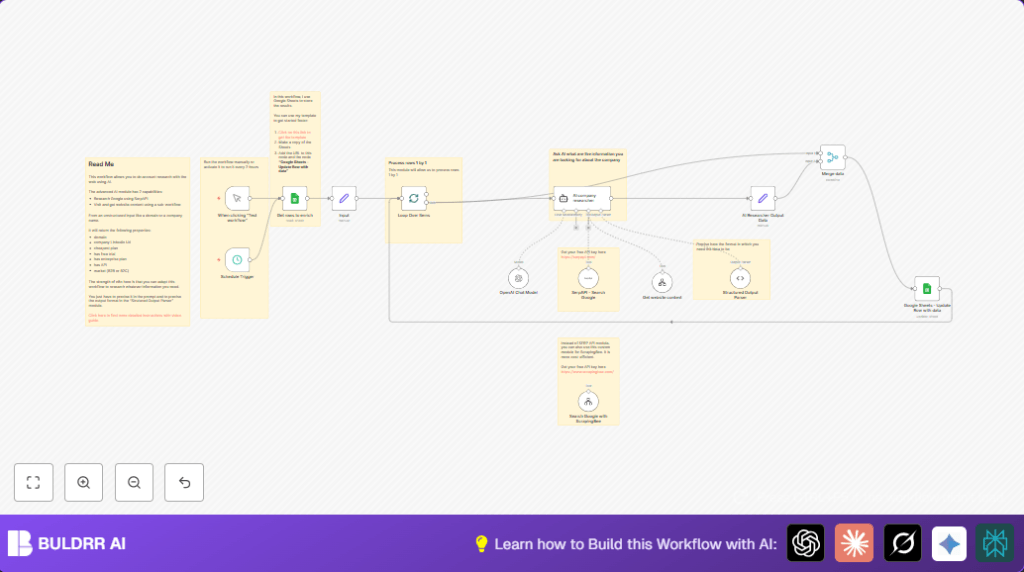

What this workflow does ✅
This workflow reads company names and domains from Google Sheets that need data.
It asks AI via OpenAI GPT-4 to find details like LinkedIn URL, market type, pricing, and integrations.
It also uses SerpAPI searches and website calls to get fresh pricing and case study links.
Each company is handled in small batches to keep things safe and clean.
Finally, it updates Google Sheets with the new company info and marks rows as done.
Who should use this workflow
This is for market researchers or sales teams who need to find detailed company info fast.
It helps those tired of copying data manually and making mistakes.
Anyone using Google Sheets for tracking companies can use it.
Tools and Services Used
- Google Sheets: Stores company data and records results.
- OpenAI API (GPT-4): Provides AI responses for company details.
- SerpAPI: Runs Google searches to find fresh public info.
- n8n Automation Platform: Orchestrates the workflow process.
Workflow Input, Processing, and Output
Inputs
- Rows from Google Sheets marked as “pending” or empty for enrichment.
- Company names and domains from these rows.
Processing Steps
- Split rows into batches to deliver one company at a time for safety and focus.
- Send company info as prompts to the AI agent requesting structured company data.
- Use SerpAPI and HTTP to find fresh pricing plans and case study URLs.
- Parse AI replies into neat JSON with structured output parsing.
- Merge new data back into the original row info.
- Update Google Sheets with enhanced company details and mark “enrichment_status” as done.
Output
- Google Sheets rows updated with LinkedIn links, price plans, market type, integrations, APIs, and case studies.
- Accurate, fresh company profiles ready for research and sales use.
Beginner step-by-step: How to use this workflow in n8n
Import Workflow into n8n
- Download the workflow JSON file by clicking the Download button on this page.
- Inside the n8n editor, use the Import from File option to load the workflow.
Configure Credentials and Settings
- Add your OpenAI API Key under Credentials in n8n.
- Add your SerpAPI Key in the proper node’s credentials.
- Connect your Google Sheets account with OAuth2.
- Check the Google Sheets node for correct document ID and sheet name.
- Update any IDs, emails, or table names if required.
Run and Test
- Run the workflow using the Manual Trigger node.
- Check the Google Sheets that new company info updates appear.
- Fix any errors by reviewing credentials or mappings.
Activate for Production
- Switch on the Schedule Trigger node to run every 2 hours.
- Monitor executions via the n8n dashboard for errors or issues.
- Consider using self-host n8n to run and control workflow on own server.
Customization Ideas
- Change AI model temperature or pick a different GPT version for creativity adjustments.
- Swap SerpAPI with ScrapingBee for a cheaper search alternative.
- Add more company data fields by editing the AI prompt inside the Agent node.
- Change batch size in the SplitInBatches node to process more companies if API limits allow.
- Modify the expected JSON schema in the Structured Output Parser node for tailored outputs.
Common Issues and Fixes
- Problem: API calls fail with authentication errors.
Cause: Wrong or expired API keys.
Fix: Update OpenAI, SerpAPI, and Google Sheets credentials inside n8n. - Problem: Google Sheets rows do not update.
Cause: Incorrect row number or sheet ID mapping.
Fix: Make surerow_numbermatches the sheet and correct document is selected. - Problem: Structured Output Parser returns errors.
Cause: AI response format doesn’t match schema.
Fix: Improve AI prompt clarity and adjust parser schema. - Problem: Workflow times out or freezes.
Cause: Batch size too big or API limits hit.
Fix: Lower batch size in SplitInBatches node and respect API rate limits.
Summary and Results
✓ Saves over 5 hours of manual work on company research weekly.
✓ Ensures accurate and up-to-date company info inside Google Sheets.
✓ Reduces errors and missed details during data collection.
→ Provides structured business insights fast for market research and sales.
→ Automates tedious tasks to free time for analysis and strategy.
