

What This Automation Does
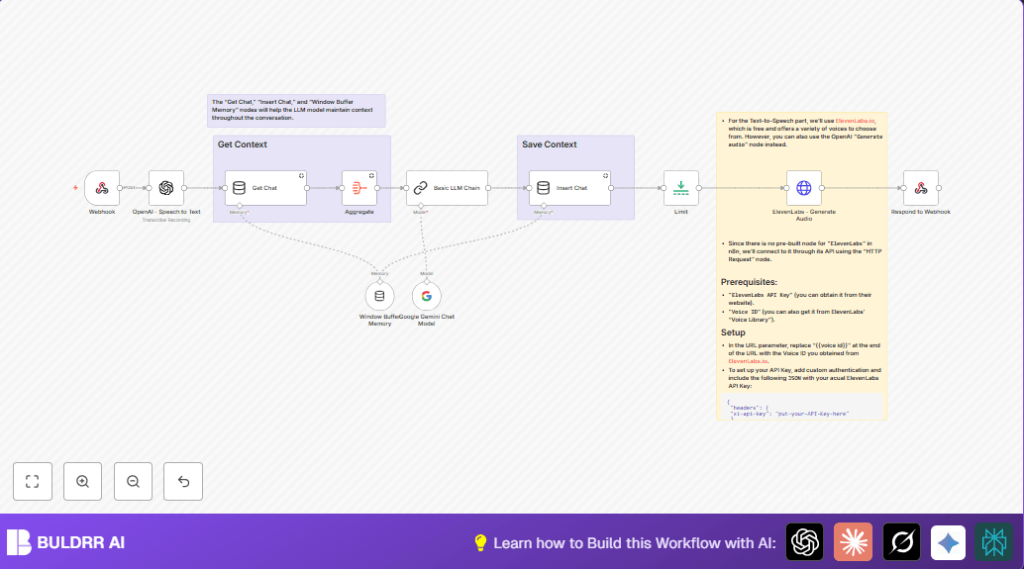
This workflow takes voice messages sent to a webhook, turns the speech into text, remembers the past chat to keep the conversation going, writes back a reply using an AI chat model, then changes that reply into spoken audio and sends it back.
It helps users save time on typing and answering messages by hand and makes the replies sound like a real person.
Inputs: voice audio message through HTTP POST webhook.
Processing Steps: transcript with OpenAI Speech to Text, get memory with Get Chat node, combine context with Aggregate node, generate reply using Google Gemini Basic LLM Chain, save conversation in memory, convert reply text to speech with ElevenLabs HTTP Request node.
Output: spoken audio response sent back to the original sender automatically.
Tools and Services Used
- n8n: For workflow automation and connecting nodes.
- Webhook node: Receives voice audio files via HTTP POST.
- OpenAI Speech to Text: Turns voice audio into typed text.
- Memory Manager nodes (Get Chat, Insert Chat): Stores and retrieves conversation history.
- Aggregate node: Joins previous conversation messages into one context field.
- Basic LLM Chain node with Google Gemini: Creates AI chat replies based on conversation text.
- HTTP Request node to ElevenLabs TTS API: Converts AI reply text to natural voice audio.
- Respond to Webhook node: Sends the final audio response back to the user.
Beginner Step-by-Step: How to Use This Workflow in n8n
Importing Workflow
- Download the workflow file using the Download button on this page.
- Inside the n8n editor, choose “Import from File” and upload the downloaded workflow.
Configuring Credentials
- Open each node that needs API keys, like OpenAI Speech to Text, Basic LLM Chain for Google Gemini, and HTTP Request for ElevenLabs voice.
- Enter your API Key and other credentials exactly as provided by the platform.
- Update any IDs like ElevenLabs Voice ID or paths if needed.
Testing the Workflow
- Send a test voice message (like an audio file) as an HTTP POST to the webhook URL.
- Check that the workflow runs, creates transcription, generates a reply, converts to audio, and responds with voice.
Activating for Production
- Switch the workflow toggle to active in n8n.
- Monitor webhook hits and workflow executions for errors or failures.
- For privacy or faster processing, consider self-host n8n.
Inputs → Processing → Outputs Explained
Inputs
- Voice message audio sent by user via POST request to Webhook node.
Processing Steps
- Transcribe audio to text using OpenAI Speech to Text on the binary audio data.
- Retrieve past conversation history with Get Chat to keep context.
- Aggregate previous messages into one field with Aggregate node.
- Generate a new AI reply using Google Gemini Basic LLM Chain, giving it transcription and context.
- Store user input and AI output back into memory with Insert Chat for future reference.
- Optionally control the flow with a Limit node.
- Send the AI reply text to ElevenLabs via HTTP Request to get a natural voice audio.
Outputs
- Audio reply sent back automatically as the HTTP response from Respond to Webhook.
Customization Ideas
- Change the voice by editing the ElevenLabs Voice ID in the HTTP Request node URL.
- Set how long conversation memory lasts by changing session or window size in Window Buffer Memory node.
- Swap out Google Gemini AI for OpenAI ChatGPT by replacing the Basic LLM Chain node and its credentials.
- Add a moderation step to check content between transcription and AI chat if needed.
Troubleshooting Common Issues
- Webhook audio not received? Check the webhook URL and confirm HTTP method is POST.
- Speech to Text fails or empty text? Make sure the binary property name matches the payload exactly and audio files are valid.
- ElevenLabs returns 401 Unauthorized? Verify that the API key is correctly set in the HTTP Request headers.
- Conversation context keeps resetting? Ensure consistent session keys and proper memory node connections.
Pre-Production Checklist
- Test webhook reception with sample audio POST and confirm transcription output.
- Verify conversation memory stores and returns chat snippets properly.
- Check AI chat generates answers related to previous messages.
- Confirm ElevenLabs TTS returns working audio replies.
- Validate all API credentials and ensure rate limits fit your needs.
Deployment Guide
Turn the workflow status to active in your n8n editor.
Watch webhook activity and fix any errors in the n8n logs.
For privacy or speed, you might want to consider self-host n8n on your own server.
Conclusion
Now the workflow can receive voice messages, understand them with AI using context, reply in chat, and send back a natural sounding spoken answer—all fully automatic.
Users save hours typing and replying every day.
Next improvements might include adding sentiment check, tying replies to user info in CRM, or using multiple languages.
You can apply this to your voice workflows and improve user replies without typing.
Summary of Benefits and Outcomes
✓ Saves time by automating voice message handling.
✓ Keeps conversation context for smarter responses.
✓ Creates replies that sound like natural speech.
✓ Improves response speed and accuracy.
→ You get smooth voice chat with AI making it easy to talk and reply without typing.
