
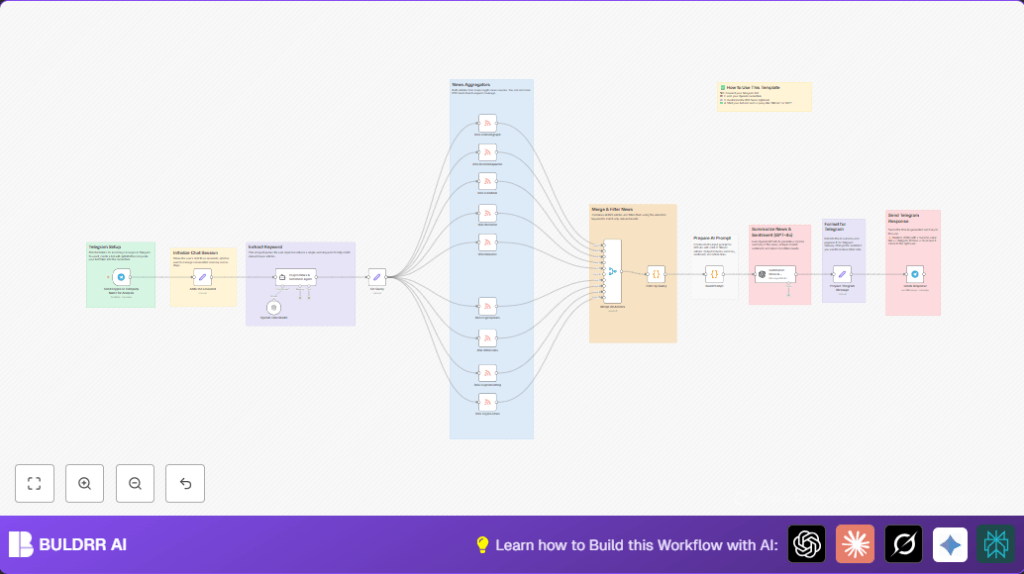

What This Automation Does
This workflow gets crypto news from many RSS feeds when you send a coin name to a Telegram bot.
It picks only news about your coin by using an AI keyword extractor.
Then it asks an AI model to make a short summary and market mood report.
The summary is sent back through Telegram as a message.
This helps a user save time and get clear info quickly.
Who Should Use This Workflow
Crypto traders or fans who want fast news updates on specific coins or companies.
People who get lost in many articles or want to avoid missing important info.
Tools and Services Used
- Telegram Bot API: Receives user messages.
- OpenAI GPT-4o: Creates summaries and analyzes market sentiment.
- RSS Feeds: Provides news articles from 10 major crypto news websites.
- n8n Workflow Automation Platform: Runs the process including keyword extraction and message sending.
- LangChain Agent: Extracts a single keyword from the user message for filtering.
Inputs, Processing Steps, and Output
Inputs
- User sends a cryptocurrency or company name via Telegram to the bot.
- RSS feeds provide fresh crypto news articles.
Processing Steps
- Telegram Trigger catches the message and stores chat ID.
- LangChain Agent extracts one main keyword from user’s text.
- Several RSS Feed Read nodes pull articles from different crypto news sources in parallel.
- All articles are merged into one list.
- A Code node filters articles by checking if the extracted keyword appears in title or content.
- Another Code node builds a formatted prompt listing these filtered articles.
- OpenAI GPT-4o node summarizes the news and analyzes market sentiment.
- A Set node prepares the Telegram message text from the AI response.
- Telegram node sends the summary message back to the user.
Output
The user receives a concise Telegram message with current news summary, market mood, and links.
Beginner Step-by-Step: How to Use This Workflow in Production
Download and Import Workflow
- Click the Download button on this page to save the workflow JSON file.
- Open your n8n editor where you want to use this workflow.
- Choose Import from File and select the downloaded file.
Configure Credentials
- Go to Credentials and add your Telegram Bot API Key (get it from @BotFather in Telegram).
- Add your OpenAI API Key to the OpenAI Credential section.
Update IDs or URLs if Needed
- Check if you need to update the Telegram chat IDs or session fields. Usually, you do not need to change them.
- Verify that the RSS feed URLs in the RSS Feed Read nodes are current.
Test the Workflow
- Send a cryptocurrency name (like “Bitcoin” or “Ethereum”) in Telegram to your bot.
- Watch the execution inside n8n and see if it retrieves news and sends a summary back.
Activate for Production
- Once verified, set the workflow status from inactive to active inside n8n.
- Make sure the Telegram Trigger webhook URL is accessible externally, which might need firewall or proxy setup.
- Optionally, check self-host n8n options to run n8n on your server.
Important Code and Prompt Snippets
Code to Filter Articles by Keyword
This Code node checks if the article mentions the extracted keyword in the title, snippet, or content. It uses lowercase to avoid case mismatches.
const term = $node["Set Query"].json.query.toLowerCase();
return items.filter(item => {
  const j            = item.json;
  const title        = (j.title || "").toLowerCase();
  const snippet      = (j.contentSnippet || j.description || "").toLowerCase();
  const fullContent  = (j.content || "").toLowerCase();
  return title.includes(term)
      || snippet.includes(term)
      || fullContent.includes(term);
});
Prompt for AI Summarization and Market Sentiment Analysis
This prompt instructs the AI to summarize news and describe the market mood for the keyword, listing article titles and links.
const q   = $node["Set Query"].json.query;
const list = items
  .map(i => `- ${i.json.title} (${i.json.link})`)
  .join("\n");
const prompt = `
You are a crypto-industry news analyst.
Summarize current news and market sentiment for **${q}** based on these articles:
${list}

Answer in 3 parts:
1. Summary of News
2. Market Sentiment
3. Links to reference news articles
`;
return [{ json: { prompt } }];
Customization Ideas
- Add extra RSS Feed Read nodes with other crypto news sources to get broader news coverage.
- Change the OpenAI model in the summarization node to try newer AI versions or a different style.
- Modify the prompt text to request shorter summaries, more or less detail, or different tone.
- Edit the Telegram message format to include emojis, timestamps, or price alerts.
- Adjust the keyword extraction node’s prompt to fine-tune how it picks filtering keywords.
- Make sure the Telegram send node uses dynamic chat IDs from sessionId for multi-user support.
Common Issues and Fixes
Telegram messages don’t send. Check that chatId is set dynamically using the stored sessionId field. Also, disable privacy mode in @BotFather.
No news after filtering. The keyword might not match articles. Check the keyword extractor output and make filter code case-insensitive.
OpenAI API errors. Validate your API Key and check usage limits on your OpenAI dashboard.
Summary of Benefits
✓ Save hours by automating crypto news filtering and summarization.
✓ Get quick, clear market sentiment reports on specific cryptocurrencies.
✓ Use Telegram bot to receive instant updates without opening many news tabs.
✓ Support multiple users with personalized chats and dynamic keyword filtering.
✓ Easy to customize by adding feeds or changing AI prompt and model.
