
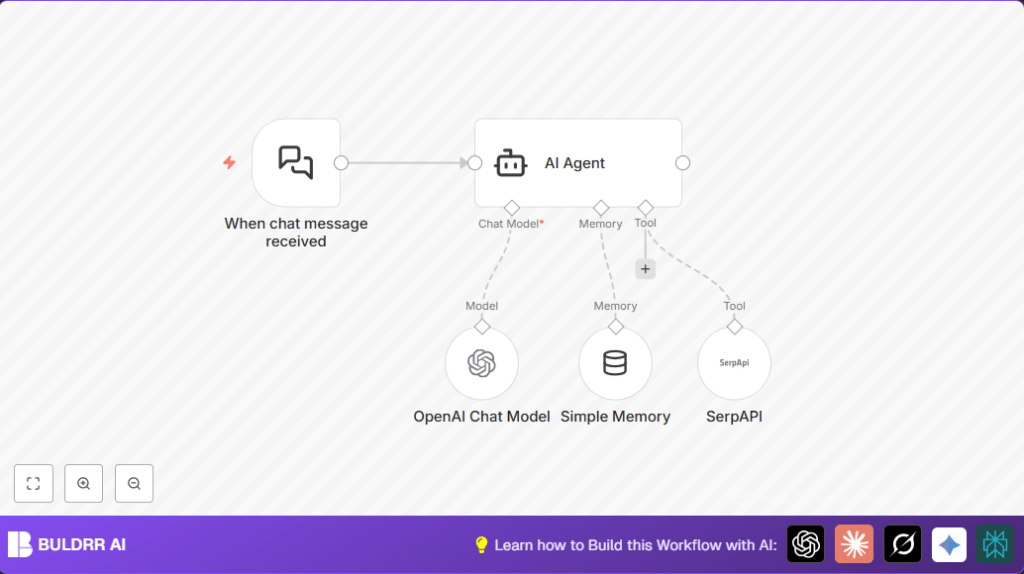

What This Workflow Does
This workflow helps you reply to chat messages fast and right. It solves the problem of agents spending lots of time searching info and writing answers. The result is quick, clear answers using AI that remembers the talk and looks up new info live.
It works by catching chat messages, using AI to understand and remember past chats, and adding live web search results when needed to give smarter answers.
Who Should Use This Workflow
If you handle customer chats and feel slow or make mistakes because you search for info manually, this is for you.
This helps teams save time, reply quicker, and avoid wrong answers by using AI with memory and live search.
Tools and Services Used
- n8n: Automates the workflow.
- Langchain Nodes: Handle chat triggers, memory, AI agent, AI chat model, and search API tool.
- OpenAI API (GPT-4o-mini): Creates natural chat responses.
- SerpAPI: Provides live search results to keep answers fresh.
Beginner Step-by-Step: How to Use This Workflow in n8n
Step 1: Import Workflow
- Download the workflow file using the Download button on this page.
- Open the n8n editor you already use.
- Use the option “Import from File” to upload the downloaded workflow.
Step 2: Configure Credentials and Details
- Add your OpenAI API Key in the OpenAI Chat Model node credentials.
- Add your SerpAPI API Key in the SerpAPI node credentials.
- Check if any IDs, emails, chat channels, or folders need updating to your setup.
- If the workflow has prompt text or code in inputs, confirm they are ready to use or edit as needed.
Step 3: Test the Workflow
- Send a test message to the webhook URL shown in the When chat message received node.
- Look for an AI response that remembers context and may include live search info.
Step 4: Activate for Production
- Turn on the workflow so it runs when real messages come in.
- Make sure the webhook URL is reachable by your chat platform or service.
- Monitor the workflow to ensure answers stay quick and correct.
If running your own server, consider self-host n8n for control and privacy.
How the Workflow Works: Inputs, Processing, and Output
Inputs
- Chat Message: The user sends a message to the webhook URL.
- Conversation History: Stored in Simple Memory node to keep context.
- External Search Query: Generated when AI needs live data.
Processing Steps
- The Langchain Chat Trigger node catches incoming chat messages.
- The AI Agent node uses stored conversation from the Simple Memory node to understand the chat history.
- The AI Agent calls the OpenAI Chat Model node (GPT-4o-mini) to create smart replies.
- If the message needs fresh info, AI Agent uses the SerpAPI node to get live search results.
- The AI Agent combines memory, chat model, and live search to make an answer.
- Memory updates with the new AI response for future context.
Output
- The workflow returns a relevant, clear response to the chat automatically.
Customization Ideas
- Change the AI Model in OpenAI Chat Model to another like
gpt-3.5-turbofor different costs or response style. - Increase the memory size in Simple Memory node to keep longer chat history.
- Add more Langchain tools to the AI Agent for better answers, like Wikipedia or WolframAlpha nodes.
- Filter or pre-process messages in Langchain Chat Trigger to handle specific chats only.
Common Problems and Fixes
- AI Agent not answering or timing out: Check all input connections to the AI Agent node; memory, language model, and tools must connect properly.
- OpenAI API errors: Verify the OpenAI API Key in OpenAI Chat Model node is correct and active.
- SerpAPI search fails or is empty: Confirm the SerpAPI key is valid and usage limits not exceeded.
- No workflow trigger: Make sure the Langchain Chat Trigger node is active and the webhook URL is correct.
Pre-Production Checklist
- Confirm OpenAI and SerpAPI API keys are working and saved in nodes.
- Check that the workflow is active with the webhook URL accessible.
- Send test messages covering different chats to see if responses make sense.
- Backup workflow settings in case rollback is needed.
Deployment Guide
Keep the workflow running either in the n8n cloud or your own server.
Watch workflow logs to spot any errors or delays early.
Set up alerts to know when something stops working so you can fix fast.
Summary
✓ This workflow uses AI with chat memory and live search to speed up answers.
✓ Users save time and avoid mistakes by automating chat replies.
✓ The AI Agent blends past conversation and fresh data for better responses.
→ The result is faster, smarter customer chat support that feels human.
