
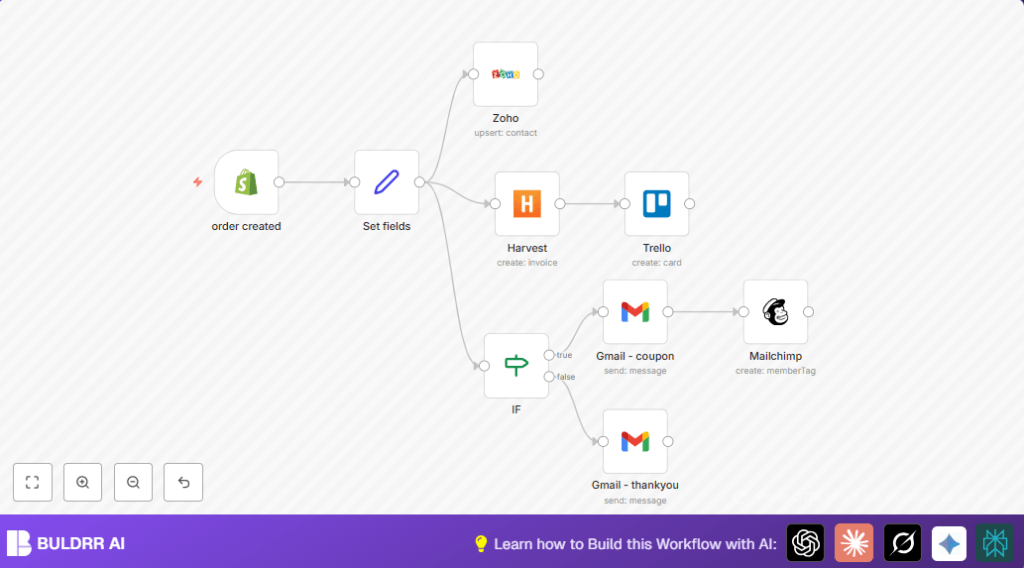

What this workflow does
This n8n workflow automatically manages new Shopify orders.
It updates customer data in Zoho CRM, creates Trello cards, sends emails via Gmail, tags customers in Mailchimp, and makes Harvest invoices.
This stops manual work, fixes errors, and helps teams work faster.
The workflow starts when Shopify sends an order event.
It gathers the order and customer info.
Then it adds or updates the customer in Zoho CRM.
Next, it creates an invoice for accounting.
It checks order amount and sends a coupon email if the order is big.
Everyone gets a thank-you email.
It makes a Trello card to track the order visually.
And tags customers in Mailchimp for future marketing.
Who should use this workflow
This workflow fits store managers using Shopify with multiple tools for CRM, email, task boards, and accounting.
It is good for small to medium shops who spend time doing order follow-ups.
Users wanting to avoid manual mistakes and speed up order processing will like it.
It also helps marketing teams by tagging special customers for campaigns.
Tools and services used
- Shopify API: Sends new order data via webhooks.
- Zoho CRM API: Updates and manages customer contact info.
- Trello API: Creates task cards for orders tracking.
- Gmail API: Sends personalized thank-you and coupon emails.
- Mailchimp API: Tags customers for targeted marketing.
- Harvest API: Creates invoices related to each order.
Beginner step-by-step: How to use this workflow in n8n
Import the workflow
- Inside the n8n editor, click the Import button.
- Select the workflow file by clicking “Import from File”.
Configure credentials and settings
- Add your Shopify, Zoho CRM, Trello, Gmail, Mailchimp, and Harvest API credentials using the n8n Credentials Manager.
- Update IDs like Trello list ID, Mailchimp list ID, and email addresses as needed in the relevant nodes.
- If there is code or expressions in the workflow (like
{{$json["customer_firstname"]}}), leave them as they help pull dynamic data.
Test the workflow
- Trigger the workflow manually or place a test order in Shopify to make sure data moves correctly through each node.
- Verify that contacts update, cards create, emails send, and invoices are made.
Activate for production use
- Turn the workflow ON in the n8n editor to start running automatically.
- Make sure your webhook URL is accessible to Shopify.
- Optionally, consider self-host n8n for stable uptime and reliable webhook reception.
Inputs, processing steps, and outputs
Inputs
- Shopify sends order creation events with all customer and order details.
Processing Steps
- Sort important fields like customer name, email, address in Set Fields node.
- Upsert customer info in Zoho CRM to keep contacts fresh and avoid duplicates.
- Create a Harvest invoice linked to purchase details.
- Check order amount and branch to send either coupon or thank you email via Gmail.
- Create Trello card named after order number for visual team tracking.
- Tag customers in Mailchimp with coupon eligibility status for marketing segmentation.
Outputs
- Updated customer records in Zoho CRM.
- New invoices in Harvest.
- Trello cards for team tracking.
- Sent personalized emails to customers.
- Tagged customer segments in Mailchimp.
Common problems and fixes
Shopify webhook trigger not working
If new Shopify orders don’t start the workflow, the webhook URL is probably not set right.
Check Shopify admin for the exact webhook endpoint matching n8n’s webhook URL in Webhook node.
Zoho CRM upsert fails
Invalid token means tokens expired or not authorized.
In n8n, re-connect Zoho API credentials. Test the connection before run.
Emails don’t send from Gmail node
OAuth permissions missing for Gmail API can block email sending.
Reconnect Gmail credentials with mail send scopes enabled and re-test sending.
Customization ideas
- Change coupon minimum value by editing the condition in the IF node.
- Add custom fields like birthday or preferred contact in Zoho CRM node.
- Move Trello cards to different boards or lists by changing the list ID.
- Edit Gmail node email text to add more info like shipping date or offers.
- Add taxes or discounts in Harvest invoice fields if needed for accounting.
Summary
✓ Automates Shopify orders from webhook to CRM, Trello, email, Mailchimp, and invoicing.
✓ Eliminates manual data entry and reduces errors.
✓ Saves time and speeds up order handling.
✓ Keeps customers engaged with personalized emails and campaigns.
✓ Gives teams clear visual task tracking with Trello cards.
