
A Practical Guide to Learning n8n

These 15 nodes are enough to build 80% of real-world automations

if you understand how and when to use them.


Part 1: The 15 Core n8n Nodes You Must Master

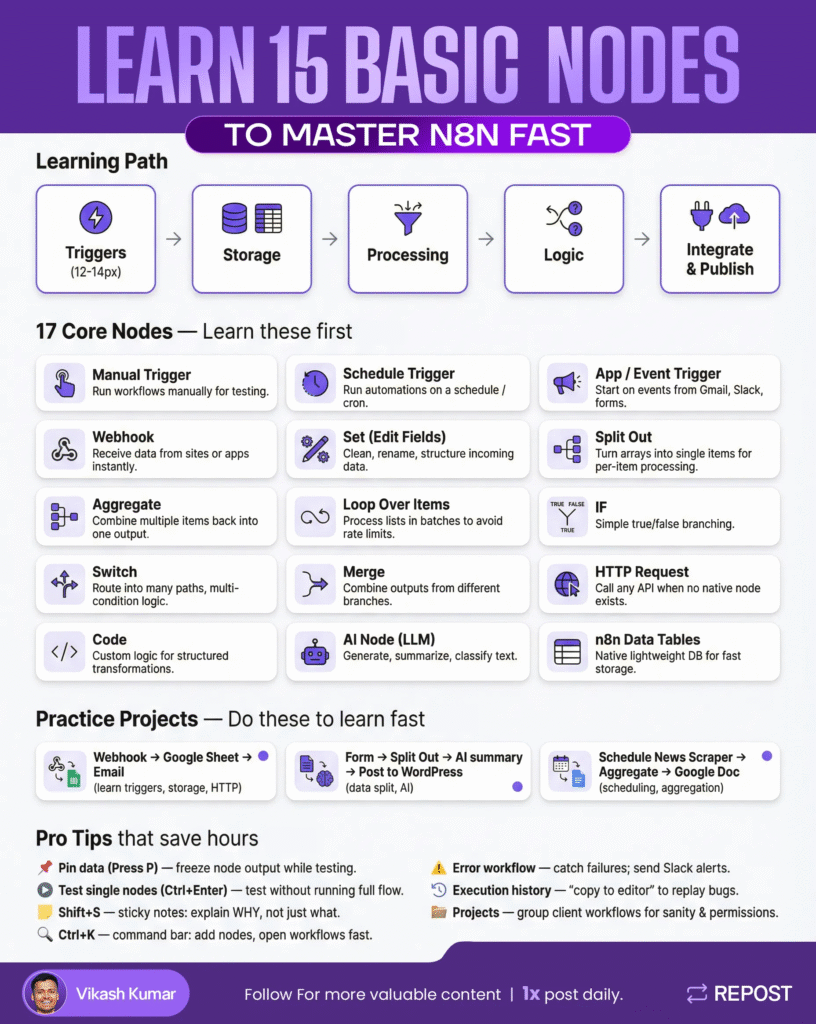
1. Manual Trigger

Use this to test workflows safely before going live.

Every serious workflow starts here during development.

Why it matters:

You debug logic without firing real webhooks or APIs.


2. Schedule Trigger

Runs workflows automatically on a time-based schedule (cron).

Used for:

Daily reports, data syncs, scrapers, backups.


3. App / Event Trigger

Starts workflows when something happens inside an app.

Examples:

New email, form submission, Slack message, CRM update.


4. Webhook

Receives data from websites, apps, or external services instantly.

This is critical:

Webhooks turn n8n into a backend for real products.


5. Set (Edit Fields)

Clean, rename, format, or create new fields.

Most beginners skip this — and break everything later.

Good workflows = clean data early.


6. Split Out

Turns lists (arrays) into single items.

Used when:

You need to process each record individually (emails, rows, users).


7. Aggregate

Brings many items back into one structured output.

Think:

“Collect everything, then summarize or save it.”


8. Loop Over Items

Processes large lists in controlled batches.

Why it matters:

Prevents API rate limits and workflow crashes.


9. IF

Basic decision-making.

Example:

If amount > $100 → continue

Else → stop or log


10. Switch

Advanced routing based on multiple conditions.

Use when:

You have categories, statuses, or multiple paths.


11. Merge

Combine data from different branches.

Real-world use:

Join AI output + user data + API response.


12. HTTP Request

Connect to any API, even when n8n has no native node.

This unlocks 90% of integrations.


13. Code

Custom logic when no node fits.

Best practice:

Use code only for predictable logic, not AI-style tasks.


14. AI Node (LLM)

Generate, summarize, classify, rewrite content.

Never use AI for:

IDs, conditions, core logic, or data structure.


15. n8n Data Tables

Lightweight internal database.

Perfect for:

Caching, logs, intermediate storage, state tracking.


Part 2: Practice Projects (This Is Where Learning Actually Happens)

Knowing nodes ≠ knowing automation.

These projects force you to combine concepts properly.


Practice Project 1

Webhook → Google Sheet → Email

What you build:

A system that receives data, stores it, and notifies someone.

What you learn:

  • Webhooks (real inputs)
  • Data cleanup with Set
  • External storage
  • Email delivery
  • Basic HTTP/API thinking

Why it matters:

This mirrors real client workflows.


Practice Project 2

Form → Split Out → AI Summary → Post to WordPress

What you build:

A content pipeline from raw input to published output.

What you learn:

  • Handling multiple inputs
  • Splitting and looping data
  • Safe AI usage
  • Publishing to platforms

Key lesson:

AI is a tool — not the brain of your workflow.


Practice Project 3

Schedule News Scraper → Aggregate → Google Doc

What you build:

A daily automated research or content report.

What you learn:

  • Scheduling automations
  • Scraping with HTTP
  • Aggregating data
  • Structured document creation

This is where automation starts feeling powerful.


How to Use This Guide Properly

  1. Don’t memorize nodes
  2. Build one practice project at a time
  3. Debug using execution history
  4. Clean data early
  5. Add error handling once it works

If you master these 15 nodes + these 3 projects,

you’ll be ahead of most people calling themselves “n8n experts”.

No shortcuts.

Just solid foundations.

These 15 nodes are enough to build 80% of real-world automations

if you understand how and when to use them.


Part 1: The 15 Core n8n Nodes You Must Master

1. Manual Trigger

Use this to test workflows safely before going live.

Every serious workflow starts here during development.

Why it matters:

You debug logic without firing real webhooks or APIs.


2. Schedule Trigger

Runs workflows automatically on a time-based schedule (cron).

Used for:

Daily reports, data syncs, scrapers, backups.


3. App / Event Trigger

Starts workflows when something happens inside an app.

Examples:

New email, form submission, Slack message, CRM update.


4. Webhook

Receives data from websites, apps, or external services instantly.

This is critical:

Webhooks turn n8n into a backend for real products.


5. Set (Edit Fields)

Clean, rename, format, or create new fields.

Most beginners skip this — and break everything later.

Good workflows = clean data early.


6. Split Out

Turns lists (arrays) into single items.

Used when:

You need to process each record individually (emails, rows, users).


7. Aggregate

Brings many items back into one structured output.

Think:

“Collect everything, then summarize or save it.”


8. Loop Over Items

Processes large lists in controlled batches.

Why it matters:

Prevents API rate limits and workflow crashes.


9. IF

Basic decision-making.

Example:

If amount > $100 → continue

Else → stop or log


10. Switch

Advanced routing based on multiple conditions.

Use when:

You have categories, statuses, or multiple paths.


11. Merge

Combine data from different branches.

Real-world use:

Join AI output + user data + API response.


12. HTTP Request

Connect to any API, even when n8n has no native node.

This unlocks 90% of integrations.


13. Code

Custom logic when no node fits.

Best practice:

Use code only for predictable logic, not AI-style tasks.


14. AI Node (LLM)

Generate, summarize, classify, rewrite content.

Never use AI for:

IDs, conditions, core logic, or data structure.


15. n8n Data Tables

Lightweight internal database.

Perfect for:

Caching, logs, intermediate storage, state tracking.


Part 2: Practice Projects (This Is Where Learning Actually Happens)

Knowing nodes ≠ knowing automation.

These projects force you to combine concepts properly.


Practice Project 1

Webhook → Google Sheet → Email

What you build:

A system that receives data, stores it, and notifies someone.

What you learn:

  • Webhooks (real inputs)
  • Data cleanup with Set
  • External storage
  • Email delivery
  • Basic HTTP/API thinking

Why it matters:

This mirrors real client workflows.


Practice Project 2

Form → Split Out → AI Summary → Post to WordPress

What you build:

A content pipeline from raw input to published output.

What you learn:

  • Handling multiple inputs
  • Splitting and looping data
  • Safe AI usage
  • Publishing to platforms

Key lesson:

AI is a tool — not the brain of your workflow.


Practice Project 3

Schedule News Scraper → Aggregate → Google Doc

What you build:

A daily automated research or content report.

What you learn:

  • Scheduling automations
  • Scraping with HTTP
  • Aggregating data
  • Structured document creation

This is where automation starts feeling powerful.


How to Use This Guide Properly

  1. Don’t memorize nodes
  2. Build one practice project at a time
  3. Debug using execution history
  4. Clean data early
  5. Add error handling once it works

If you master these 15 nodes + these 3 projects,

you’ll be ahead of most people calling themselves “n8n experts”.

No shortcuts.

Just solid foundations.

Author

Written By

Vikash Kumar

Building AI agents, n8n workflows and end-to-end automation for 30+ Brands across India, the US, Europe, Dubai & Australia. 7+ years of Experience saving founders real hours every week - no code required.

Ask more Questions about this Blog with AI:

Our AI Articles

Learn from our AI Articles to excel in your profession ;)

The Complete Claude Mastery Guide

This roadmap breaks Claude mastery into 10 stages. Follow them in order....

Complete Guide To Claude Code Agent Teams

Agent Teams are one of the most advanced features inside Claude Code. Instead of using one AI agent to complete...

How To Build Realistic AI Voice Agents With 11Labs + Make.com

How Agent Teams turn Claude Code into a collaborative AI workforce for building complex systems....

100 SECRET CLAUDE PROMPT CODES

Practical Claude prompt systems that improve writing, research, strategy, automation, and workflows....

The Real Claude AI Business Guide for 2026

5 Claude AI business models solving expensive problems businesses already pay for in 2026....

Complete Guide: How To Build A Claude Skill For SEO Content Writing

Reusable Claude workflows that turn generic AI writing into personalized, scalable SEO systems....

Complete Breakdown: How To Build AI Backlink Systems Using Claude Skills + Automation

Complete Breakdown: How To Build AI Backlink Systems Using Claude Skills + Automation...

Claude AI SEO Automation Guide

This AI SEO workflow automates content creation, optimization, publishing, and indexing at scale....

Complete AI Lead Generation Workflow Using Claude AI + ChatGPT

AI workflow to automate lead generation, outreach emails, and scalable client acquisition....

Use Amazon Bedrock To Try Claude, OpenAI, DeepSeek, And More

Beginner guide to using Amazon Bedrock with Claude, OpenAI, DeepSeek, APIs, and AI workflows....
1:1 Free Strategy Session
Your competitors are already automating. Are you still paying for it manually?

Do you want to adopt AI Automation?

Every hour your team does repetitive work, you're burning real money.
While you wait, faster businesses are cutting costs and moving quicker.
AI and automations aren't the future anymore — they're the present.

Book a live 1-on-1 session where we show you exactly which of your daily tasks can be automated — and what it’s costing you not to.