
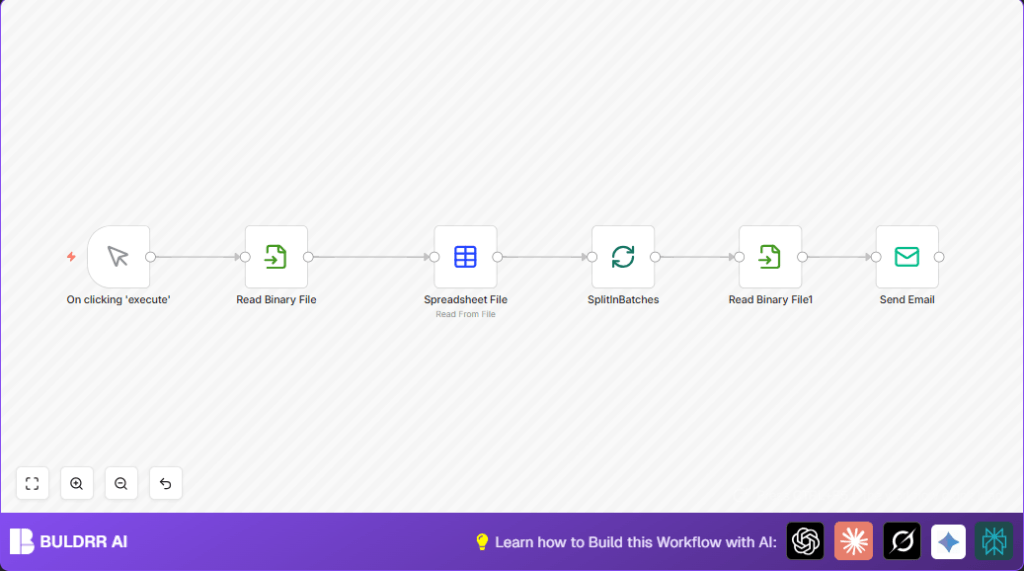

What this workflow does
This workflow reads student data from a CSV file and sends each student their own certificate image by email automatically.
It solves the problem of manually matching emails and certificates, saving hours of work and reducing mistakes.
When run, it sends batches of emails with personalized certificate attachments using SMTP, ensuring each recipient gets the correct file.
Who should use this workflow
Anyone who needs to send many personalized certificates or files via email and has a CSV list of recipients.
This is good for course instructors, trainers, or teachers who want to skip manual emailing.
You should have your certificates named after student names and be comfortable setting up n8n credentials.
Tools and Services Used
- n8n Automation Platform: For building the email sending workflow.
- SMTP Server with credentials: For sending mail (Gmail, Riseup, or others).
- Local file system: To store the CSV file and certificate images.
- CSV file: Contains student names and emails.
- PNG certificate files: Named with students’ names.
How the workflow works (Inputs → Process → Output)
Inputs
- CSV file with student details (including name and email).
- Certificate image files named after each student (e.g., John.png).
Processing Steps
- Starts manually when triggered by the user.
- Reads the CSV file as binary data.
- Converts CSV to JSON objects for each student.
- Splits student list into batches of 5 to send emails gradually.
- For each student in batch, loads their specific PNG certificate using their name from the JSON data.
- Sends an email via SMTP with the student’s certificate attached.
Output
- Students receive timely emails with their own certificate attached.
- The instructor saves several hours by avoiding manual email sending.
- Reduced errors like missing attachments or wrong recipients.
Beginner step-by-step: How to use this workflow in n8n
Importing the workflow
- Download the workflow file using the Download button on this page.
- Open n8n editor where you want to run the automation.
- Use the menu option “Import from File” to upload the downloaded workflow.
Configuring after import
- Go to Credentials section and add your SMTP credentials (e.g., Gmail or Riseup SMTP).
- Update the CSV file path in the Read Binary File node labeled “Read CSV Data” to match where your CSV is saved.
- If needed, update certificate file folder path or file extension in the Read Binary File node named “Read Certificate File”.
- Check that the Email Send node uses the correct sender email address and refers to the student email dynamically.
Testing and activation
- Run the workflow manually by clicking the execute button on the Manual Trigger node.
- Verify emails are sent with correct certificate attachments.
- If successful, toggle the workflow to active mode for regular use.
- Optionally add a Cron node to schedule this workflow automatically.
For users hosting their own instance, see self-host n8n options for deployment.
Common issues and solutions
File not found errors for certificate images
This happens if the file path or name does not exactly match the student name from CSV.
Make sure the certificates have exact name matching including letter case and file extension.
Check file permissions if reading is blocked.
SMTP sending failures or unauthorized errors
This happens when SMTP credentials are missing or wrong.
Recheck your SMTP username and password in n8n credentials.
Test connection with outside tools if needed.
Customization ideas
- Change batch size in the SplitInBatches node to send more or fewer emails per run.
- Add a Set node before Email Send to customize email subjects or message body using student data.
- Support PDF certificates by updating the file extension in the certificate reading node path expression.
Summary of results
✓ Saves several hours by automating personalized certificate emails.
✓ Ensures accurate matching of certificates to students.
✓ Allows controlled email sending via batch processing.
→ Users reduce manual errors and improve communication speed.
→ Simple modifications allow customization for different needs.