

1. Opening Problem Statement
Meet Sarah, a content manager for a popular Discord community dedicated to daily comic strips. Every morning, Sarah spends nearly 30 minutes finding the latest Calvin and Hobbes comic, translating the dialogues from English to Korean, and posting it on the community server. This tedious manual process not only wastes valuable time but is also prone to errors like incorrect translations or missing comic posts. Over a month, Sarah loses about 15 hours which she could have used for engaging with her community or planning new content.
This is exactly where the n8n automation workflow comes in to save the day by completely automating this process.
2. What This Automation Does
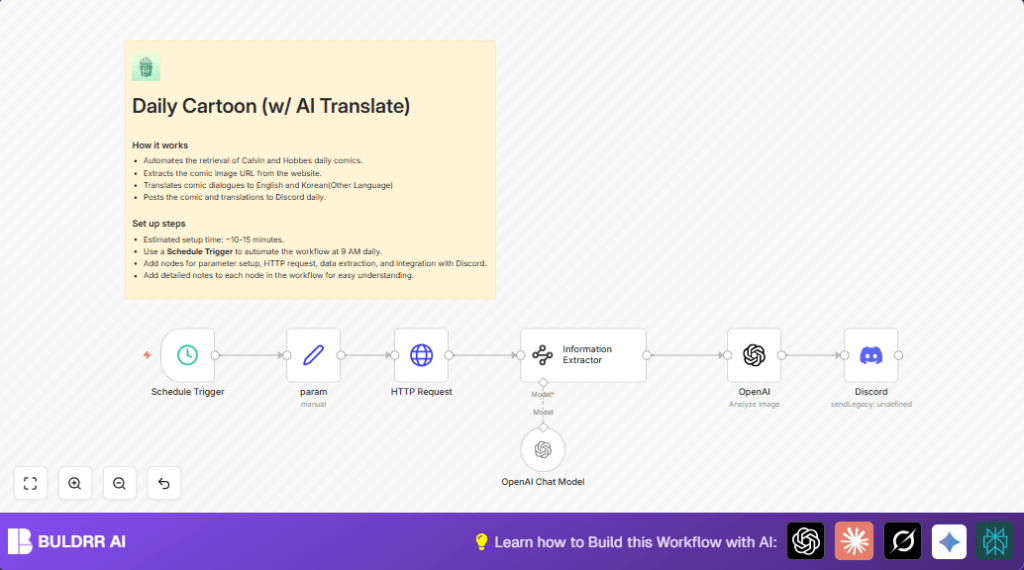
This n8n workflow is carefully designed to automate the retrieval and sharing of daily Calvin and Hobbes comics with translations. When the workflow runs at 9 AM each day, it:
- Automatically fetches the daily Calvin and Hobbes comic image from the official website using an HTTP Request node.
- Extracts the direct URL of the comic image from the webpage HTML using an AI-powered Information Extractor node.
- Translates the comic dialogues into English and Korean (or any other language you configure) via the OpenAI Chat Model node.
- Compiles the translated dialogues side-by-side with the original text for context.
- Posts the final comic image and translations directly into a designated Discord channel using the Discord node configured with a webhook authentication.
- Saves Sarah from spending 30 minutes daily, effectively freeing up 15+ hours monthly for more productive tasks.
3. Prerequisites ⚙️
- n8n account for creating and running workflows. Self-hosting options are available for more control and privacy.
- Discord account with webhook URL to post messages to a chosen server/channel.
- OpenAI account and API key with access to GPT-4o-mini or similar model for language translation and text analysis.
- Basic understanding of HTTP requests and URL structures helpful but not required.
4. Step-by-Step Guide
Step 1: Set Up the Schedule Trigger Node
In the n8n editor, click + Add Node → search for Schedule Trigger → add it to your canvas.
Configure it for daily automation by setting the triggerAtHour parameter to 9, meaning the workflow will start automatically at 9 AM every day.
After adding, you should see a box indicating the trigger time on the canvas. This is the workflow’s starting point.
Common mistake: Forgetting to set the trigger time or setting it to a past time won’t run the workflow as expected.
Step 2: Add the Set Node for Date Parameters
Add a Set node, rename it to param.
Use the expression editor to assign three string parameters: year, month, and day based on the current date using {{$now.format('yyyy')}}, {{$now.format('MM')}}, and {{$now.format('dd')}} respectively.
This node formats today’s date which is used in the subsequent HTTP Request to fetch the correct comic for the day.
Expected outcome: Today’s date fields correctly populate for the entire workflow’s current run.
Step 3: Configure the HTTP Request Node
Add the HTTP Request node.
Set its URL parameter to use the date variables to fetch the comic: https://www.gocomics.com/calvinandhobbes/{{$json.year}}/{{$json.month}}/{{$json.day}}.
Leave other options default.
This node retrieves the HTML page containing the day’s comic for extraction.
Common mistake: Using a static date will cause the workflow to fetch outdated comics only.
Step 4: Extract Comic Image URL with Information Extractor
Add the Information Extractor node (which uses Langchain AI capabilities).
Set its text parameter with a prompt to extract the src attribute of the comic image tag () from the HTML retrieved in the previous step. The prompt explicitly requests only the URL string.
Example prompt snippet for clarity:
Please just extract the src value in the
tag from HTML below. I don't need anything other than the value.Feed the HTML data from the HTTP Request node into this node’s input.
Expected result: The node outputs the direct URL of the cartoon image.
Common mistake: Modifying HTML structure without updating the extraction prompt can cause failures.
Step 5: Translate Dialogues with OpenAI Chat Model
Add the OpenAI Chat Model node.
This node will handle language translation and reformatting of the comic dialogues.
Use the prompt:
Please write the original language and Korean together.
EXAMPLE)
Calvin: "YOU'VE NEVER HAD AN OBLIGATION, AN ASSIGNMENT, OR A DEADLINE IN ALL YOUR LIFE! YOU HAVE NO RESPONSIBILITIES AT ALL! IT MUST BE NICE!" (너는 평생 한 번도 의무, 과제, 혹은 마감일 없었잖아! 전혀 책임이 없다니! 정말 좋겠다!)
Hobbes: "WIPE THAT INSOLENT SMIRK OFF YOUR FACE!" (그 뻔뻔한 미소를 그만 지어!)
Paste this prompt into the text field and connect the output from the Information Extractor to provide the comic’s image URL for reference.
Outcome: Translated dialogues combining original and Korean texts, formatted for posting.
Step 6: Send Translated Comic to Discord
Add the Discord node and set its authentication to use a webhook.
Configure the content to post using expressions that pull today’s date, the cartoon image URL, and the translated dialogue content from the previous OpenAI node.
Example content field:
Daily Cartoon ({{$json.year}}/{{$json.month}}/{{$json.day}})
{{$json.output.cartoon_image}}
{{$json.content}}
Expected outcome: Daily posting of comic image and translated dialogues in your Discord channel automatically.
Common mistake: Not setting proper webhook permissions or incorrect URL leading to failed posts.
5. Customizations ✏️
- Change Comic Source URL: In the HTTP Request node, modify the URL to another comic archive if desired, for example, switching from Calvin and Hobbes to another syndicated comic.
- Add More Languages: In the OpenAI Chat Model node, update the prompt to translate to additional languages such as Spanish or French by adding appropriate instructions.
- Schedule Time: Modify the Schedule Trigger node’s
triggerAtHourto post comics at a different time suited to your audience’s timezone. - Customize Discord Message Format: Change the message template in the Discord node to include extra text or embed metadata like comic titles or author credits.
- Add Error Handling: Insert additional nodes to notify you via email or Slack if the HTTP Request fails or if no comic image is found.
6. Troubleshooting 🔧
Problem: “No output from Information Extractor node”
Cause: The HTML structure of the comic site has changed making the extraction prompt obsolete.
Solution: Review the website’s HTML source again. Update the prompt in the Information Extractor node ensuring that the tag classnames and structure match the site. Test with raw HTML snippets.
Problem: “Discord message not posted”
Cause: Incorrect Discord webhook URL or permission issues.
Solution: Double-check the webhook URL in the Discord node. Verify that the webhook has permission to send messages to the channel. Test webhook manually to ensure functionality.
7. Pre-Production Checklist ✅
- Verify the Schedule Trigger is set to your preferred post time.
- Check the date formatting in the Set (param) node to ensure current date parameters are correct.
- Test the HTTP Request URL in a browser to confirm the comic page loads for the expected date.
- Validate Information Extractor prompt against actual HTML from the comic site for accurate image URL extraction.
- Confirm OpenAI API keys and model settings are valid and working.
- Test Discord webhook by sending a manual message.
- Run the entire workflow manually in n8n to verify that each step passes and the comic posts successfully.
8. Deployment Guide
Once tested, activate your workflow by toggling it live in n8n’s UI.
Monitor the workflow in the n8n execution panel to ensure daily runs succeed.
Keep your OpenAI API keys secure and review any usage limits to avoid interruptions.
Check Discord webhook logs or notifications to confirm messages are posted daily without failure.
9. FAQs
Can I use a different comic besides Calvin and Hobbes?
Yes, modify the HTTP Request URL in the param node to fetch a different comic’s archive page.
Will this consume a lot of OpenAI API credits?
Translation requests do use OpenAI API credits; optimizing prompt length and frequency can reduce consumption.
Is this workflow secure?
Yes, all API keys and webhooks are stored securely within your n8n instance. Use self-hosting if preferred for additional data control.
Can I schedule posts for multiple timezones?
Yes, duplicate the Schedule Trigger node and adjust trigger times accordingly to accommodate different timezones.
10. Conclusion
By setting up this n8n workflow, you have automated the daily fetching, translation, and posting of Calvin and Hobbes comics directly to your Discord community. This saves you significant time daily and delivers consistent, accurate content to your audience without fail.
Next steps include expanding language options, adding error notifications, or integrating other comic feeds. You’re now equipped to bring engaging daily content to your subscribers with minimal effort.